
Features · Construction
Construction features: order, track, document
The site side of Nereva. Your sites’ transport goes to your usual carriers; you follow its execution and keep the record.
The Back-office Construction holds all your sites, their requests, their history and your carriers’ statements. Nereva Commandes lets the site order a skip, a waste removal or materials, follow the truck’s arrival and find its skips. This page describes each feature as it exists in the product.
15-day trial with 2 licences. No payment method required.

Overview
From the site’s request to the history, without re-entry
Every site transport follows the same path in Nereva. The six steps link to the detail of each feature.
Request
From Nereva Commandes or the back office: request type, skip or material, site, preferred time slot, note for the driver.
RequestsTransmission
The request goes to the partner carrier you chose and lands in their schedule, without a call or re-entry.
Your carriersTracking
Received, scheduled, in progress, completed: the site sees the status, the truck assigned to its request and the estimated arrival time.
TrackingDocumented execution
The driver confirms each step; photos, times, waste type and weight stay attached to the request.
HistorySkips and materials
The skips present on each site and their status; material deliveries, traced the same way.
SkipsManagement view
Skips on site, skips sent to the sorting centre, costs per site, carrier statements, roles and permissions.
Management view
Creating a request: seven types, the same fields
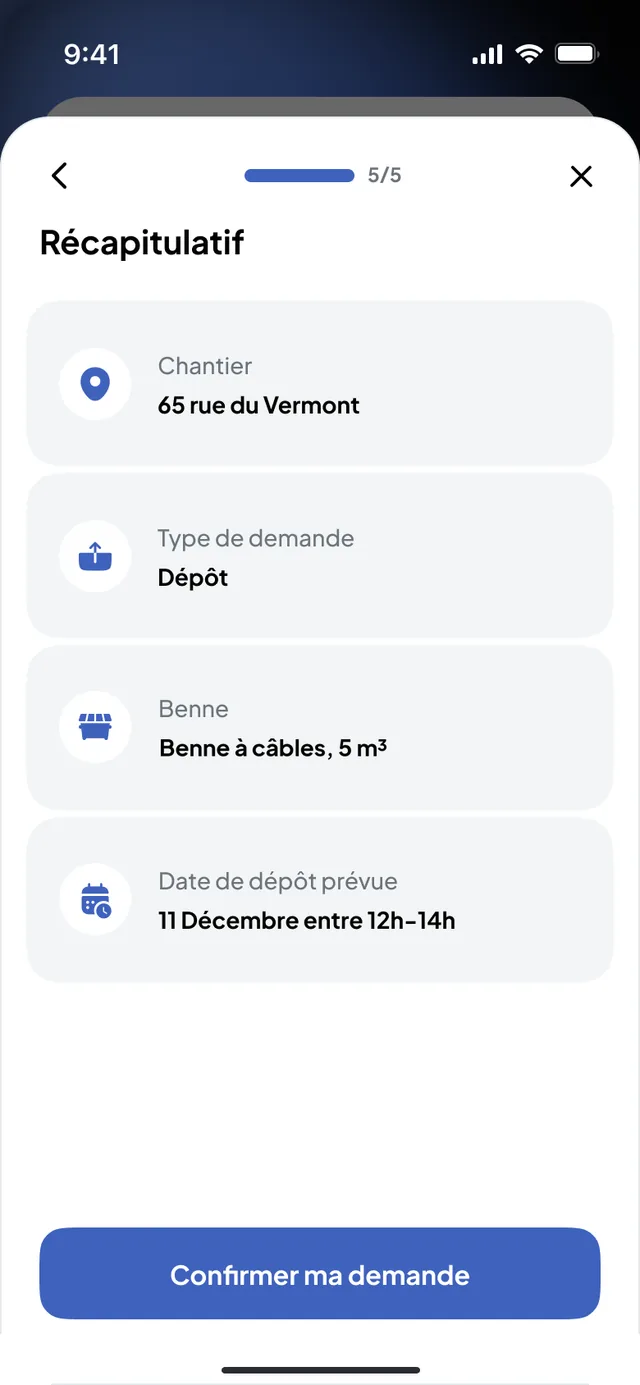
A request is created from Nereva Commandes or from the back office. It carries the site, the request type, the skip (type and volume) or the material, the preferred time slot and a note for the logistics officer or the driver. A summary repeats these fields before sending; the request then goes to the chosen carrier.
- Skip drop-offan empty skip is placed on the site.
- Skip exchangean empty skip replaces the full one, which goes to the sorting centre.
- Collectionthe full skip is picked up and taken to the sorting centre.
- Empty and returnthe full skip is emptied at the sorting centre and brought back to the site.
- Removal with waitingthe truck brings a skip, waits while it is loaded on site and leaves to dispose of it.
- Materials deliverymaterials are collected where they are and delivered to the site.
- Custom requestanything outside the catalogue, moving a machine for instance, described in plain words for the carrier; the service is billed by the hour.
The site’s access constraints (width, height, length, gross truck weight, photo of the spot) can be described when ordering. A past request can be redone from the site’s history.
Discover Nereva Commandes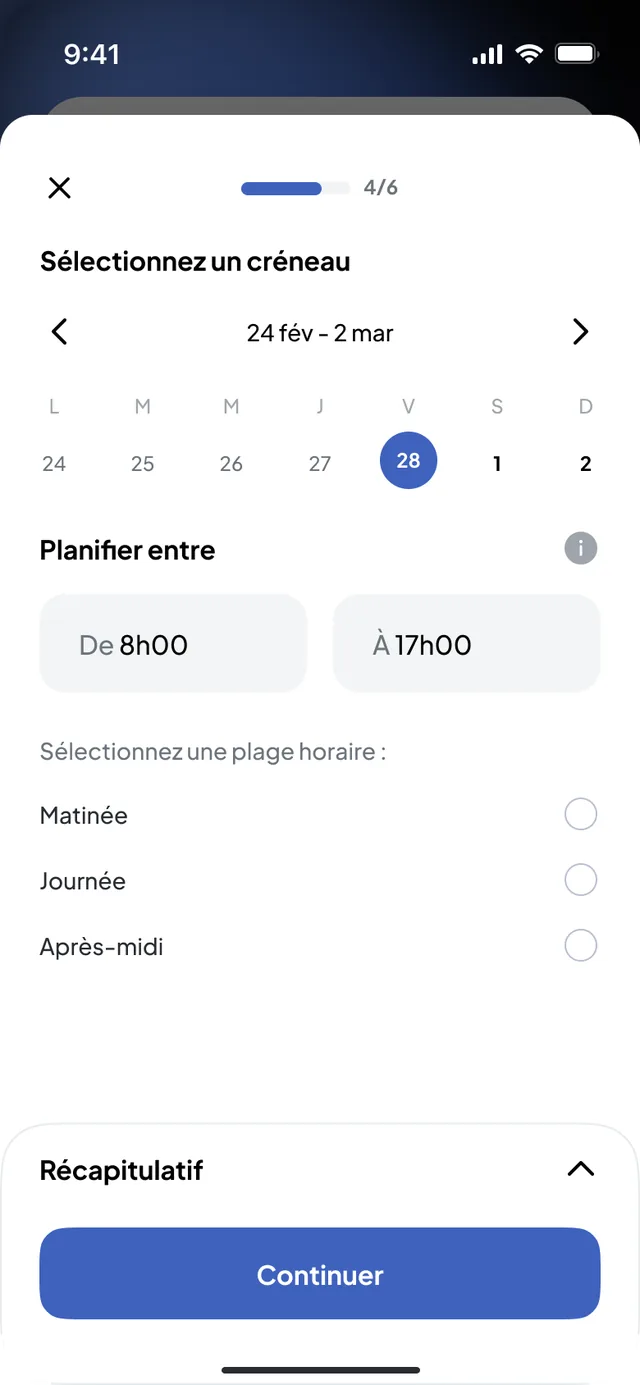
The site’s skips: which ones, how many, in what state
For each site, Nereva Commandes and the back office show the skips present by type and volume, and the state of each one: waiting for a carrier, being loaded, collection or empty-and-return scheduled. The next rotation is ordered from the same record, and a pending order can be cancelled.
The GPS is the truck’s, never the skip’s. What you see of a skip is its management: where it was placed, since when, what is planned for it.
See skip management on the transport side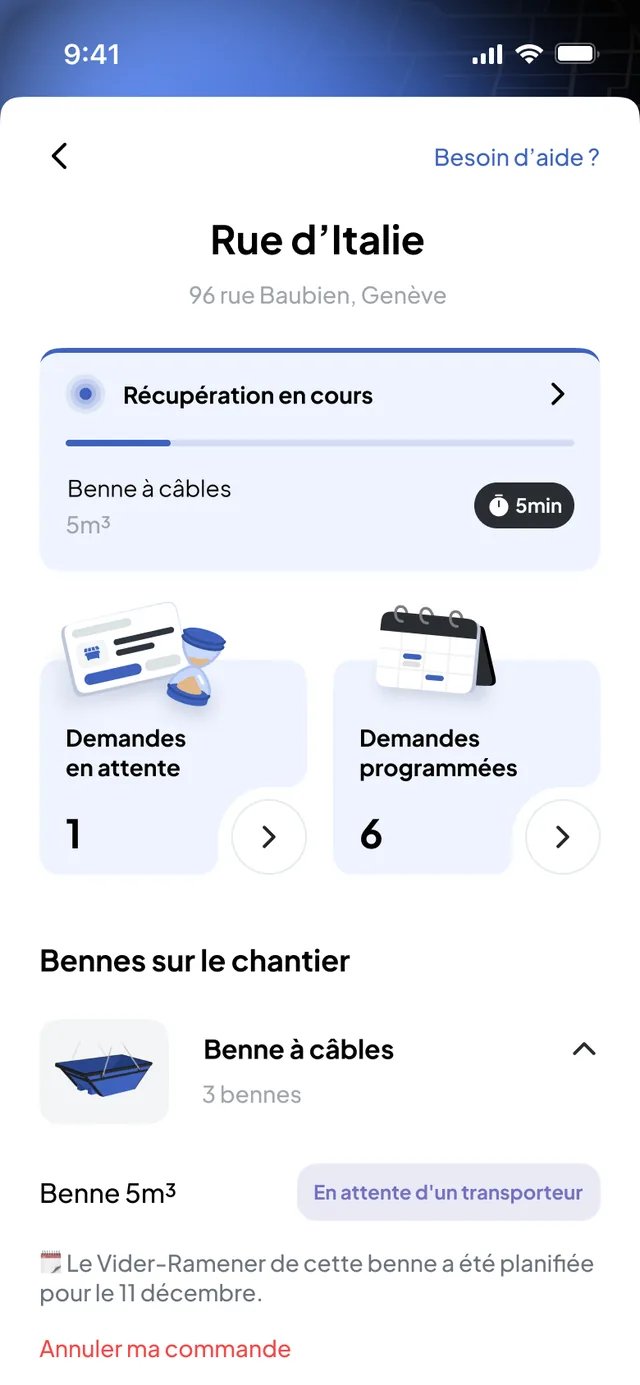
Materials delivery: ordered like a skip, traced the same way
A materials delivery is requested with the nature, the quantity, the site and the time slot. The carrier collects the materials where they are and delivers them to the site; each step is timestamped, with the photos of loading and unloading.
Nereva does not sell materials and compares no prices. Your suppliers and your agreements remain yours; the back office records them so that the request goes to the right place.
Nereva and material suppliers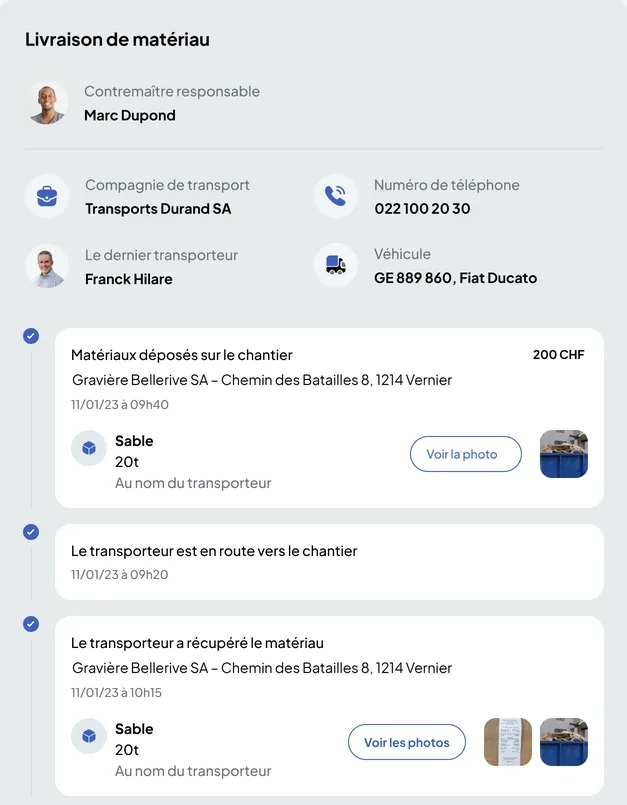
Following an active request, changing it or cancelling it
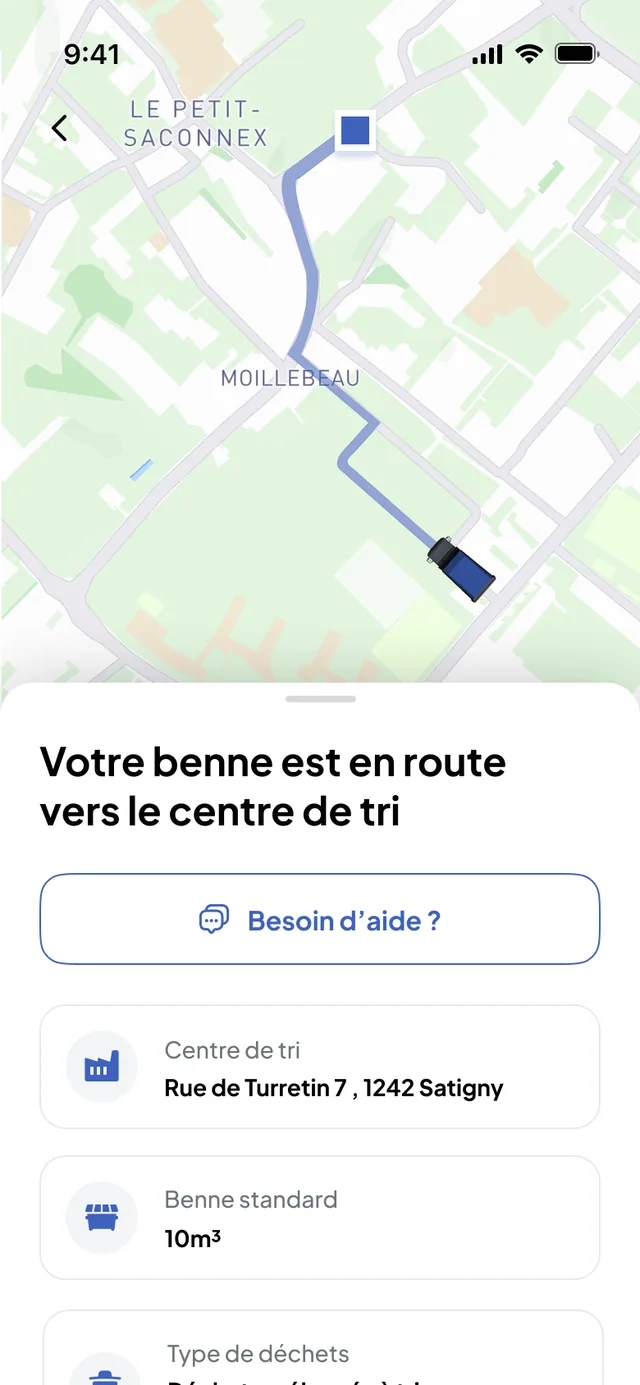
In the back office as in the app, every request has a status: received, scheduled, in progress, completed. While it waits for its slot, the app shows that it is being scheduled. As soon as the carrier is on the way, the map shows the truck assigned to your request and its estimated arrival time; for a removal, you see the skip leave for the sorting centre.
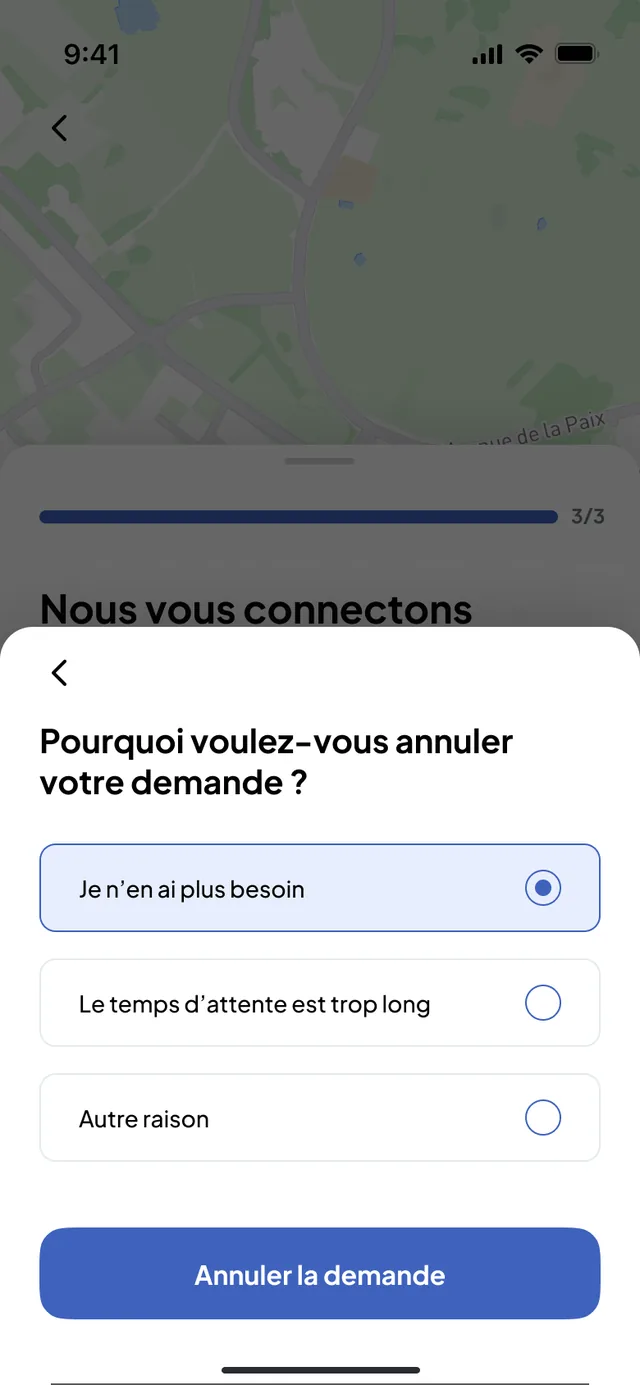
- A scheduled request can be changed (new time slot) or cancelled from the app; the carrier sees the change in their schedule.
- Cancelling asks for a reason; if the carrier has already started the service, the app says so before confirmation.
- At the end, the photos and the timestamped delivery note stay attached to the request, visible from the site and from the office.
Your requests go to your usual carriers
You invite your carriers from the back office. Each one receives your requests in their schedule, accepts them and carries them out with their trucks and drivers. Several carriers can serve the same site. If you also transport with your own fleet, that is the hybrid use case.
- The site is notified at every step: request accepted, carrier on the way, arriving in a few minutes, skip dropped at the sorting centre, time slot changed.
- A carrier not yet on Nereva receives an e-mail invitation from your back office and starts with a free 15-day trial; they remain free to accept the partnership or not.
- Until they join Nereva, you keep working with them as you do today.
Your partners and your business relationships remain yours. Nereva synchronises operations without stepping into the business relationship.
What the carrier receives on their side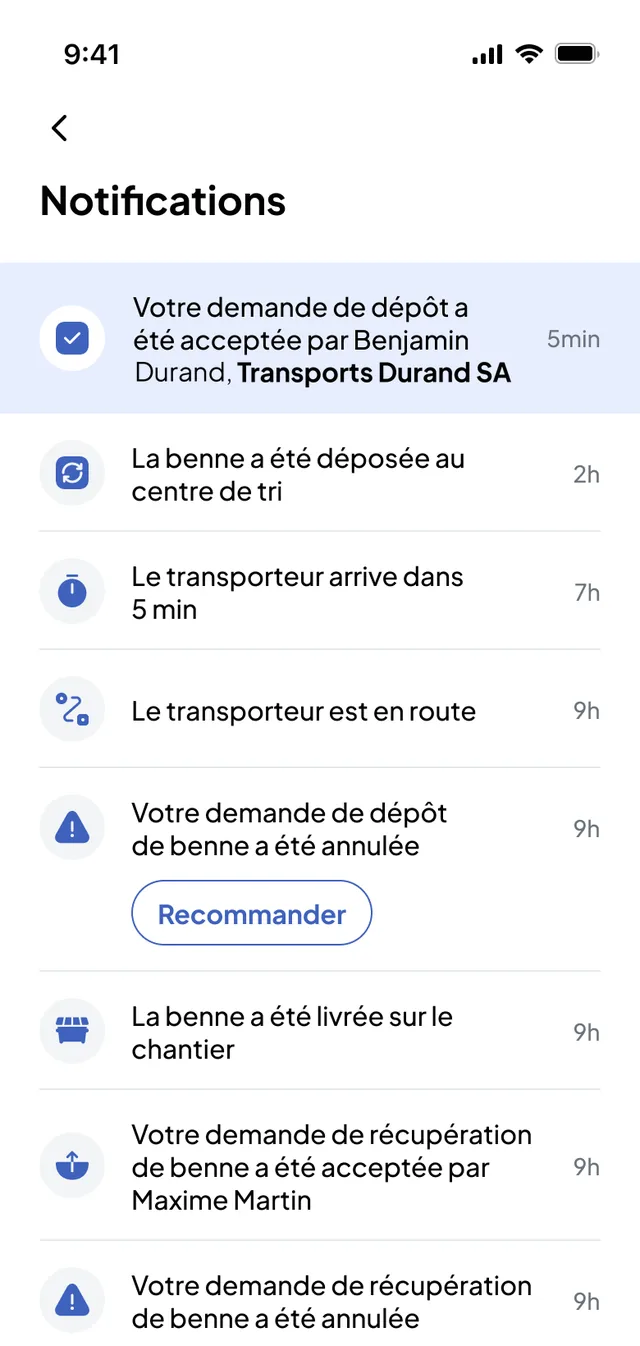
Two interfaces
Nereva Commandes on site, the Back-office Construction in the office
The same information, seen from the field and from the office. What the site orders appears in the office without re-entry.
Nereva Commandes
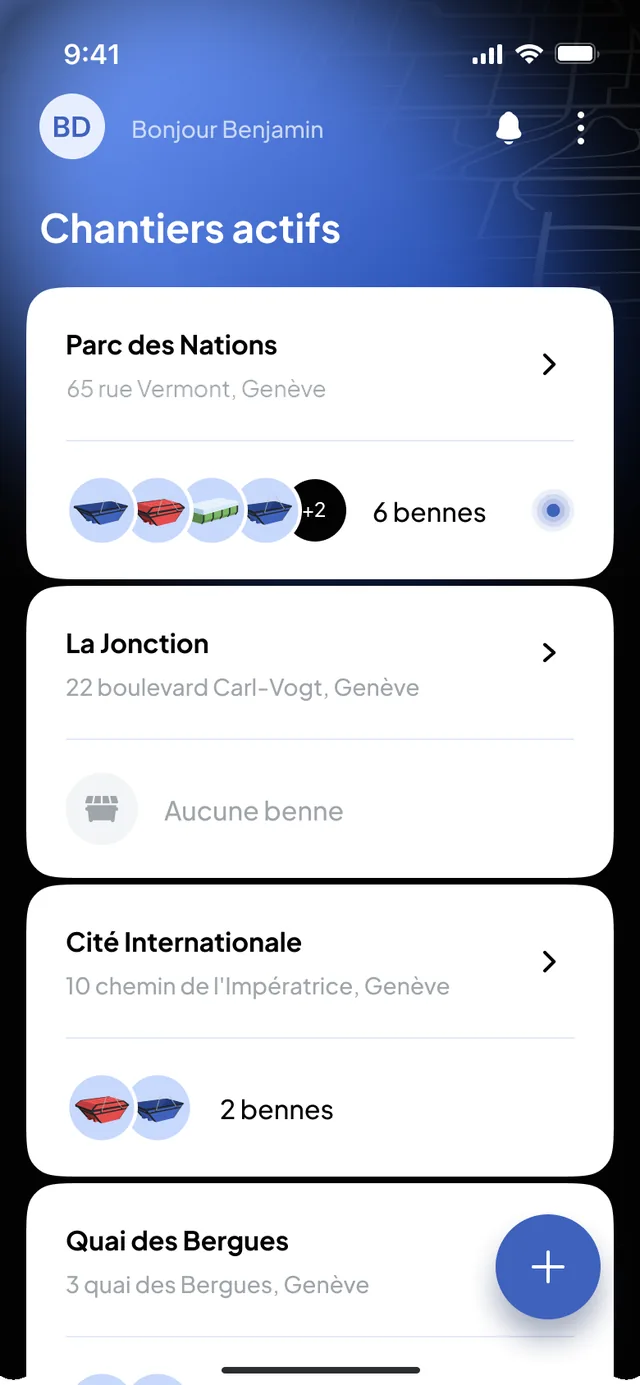
The app for field teams: site manager, foreman, works manager, logistics manager. Each one signs in with their own credentials and finds their active sites.
- Order and schedule a request from the site
- Follow the current request, the pending and scheduled requests
- See the skips present by type and their state
- Receive the carrier’s notifications
- Keep working without a network, within the supported scope (offline mode), with synchronisation when the connection returns
Free on the App Store (iPhone, iOS 15.6 or later) and Google Play; mobile access is included in each user’s licence.
Back-office Construction
The office view: management, works managers, administration, accounting.
- All the sites, with their current and upcoming requests
- The request history per site, with photos and delivery notes
- Partner carriers, suppliers and their terms
- Carrier statements and invoices, built from the executed requests
- Users and their roles
A coordination and consultation tool, not an ERP: accounting and payroll stay in your own software.
Who requested what, when, for which site
Every request keeps its responsible foreman, its site, its carrier and its timestamped steps: the driver has started, on the way, skip drop-off, skip ready for collection, collection, drop at the sorting centre. The photos, the waste type and the weight, when they are entered, stay attached to the request.
The history is consulted per site in the back office, and from the site record in the app. It is an operating record, useful to check an invoice, answer a client or prepare an audit.
What the QHSE manager finds there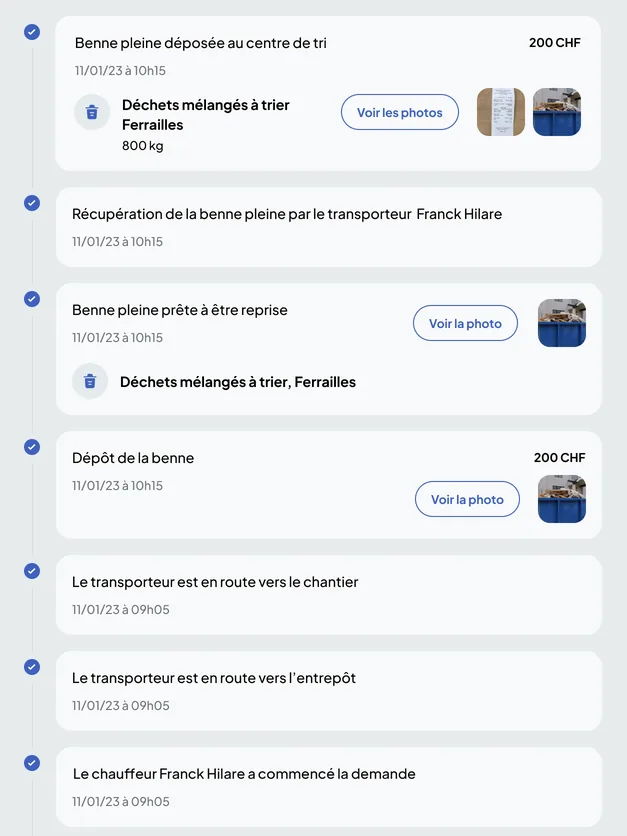
Management view
Roles, figures and QHSE: what the back office shows
Roles and permissions
Access depends on the roles and permissions configured: who orders, who validates, who consults. Every request keeps the name of its responsible foreman, and every user finds their own sites.
Statistics
Per site: skips on site, skips sent to the sorting centre, total costs, executed requests. Reports and exports are described on the Analytics and reports page.
QHSE
Operations produce the data. QHSE can then use it. Waste types, weights, drop-off times at the sorting centre, photos: everything is already in the request history.
What Nereva does on the construction side, and what it does not
Nereva is neither a carrier, nor a skip rental company, nor a supplier, nor a marketplace: it transports nothing, sells nothing and takes no commission. On the construction side, Nereva is there to order, track and coordinate, with the connected partner carriers who carry out your requests. All Construction features are included in the licence; adapt your licences to your teams and your sites, with no fixed term.
Frequently asked questions
The Construction features, in plain words
Does my carrier have to be on Nereva?
Yes, for a request to be carried out in Nereva: it goes to a connected partner carrier, who schedules and carries it out; that is where live tracking, photos and statements make full sense. A carrier not yet on Nereva receives an invitation from your back office and starts with a free 15-day trial, with no payment method required. In the meantime, you keep working with them as you do today.
What types of requests can I place?
Skip drop-off, exchange, collection or empty-and-return, removal with waiting, materials delivery and custom request, for anything outside the catalogue. Every request carries the site, the skip type or the material, the time slot and your notes.
What does the site see during the mission?
The status of the request (received, scheduled, in progress, completed), the carrier on the way on the map with the estimated arrival time, then the photos and the timestamped delivery note. The site sees the truck assigned to its request, not the carrier’s fleet.
Can a request be changed or cancelled?
Yes, from the app, as long as the request is scheduled: new time slot or cancellation, with a reason. The carrier sees the change in their schedule. If their service has already started, the app says so before confirmation.
Does the Back-office Construction replace my ERP?
No. It is there to order, track, consult and document the transport of your sites, and to find your carriers’ statements. Accounting, payroll and company management stay in your own software.
Where do I find my carriers’ invoices?
For each period, your carrier’s invoice is built from the executed requests: in your back office if they are on Nereva, by e-mail as a PDF otherwise. It stays attached to the traced services: nature of the transport, dates, rotations and proof of completion.
Who can place an order on site?
Those you authorise: foreman, site manager, works manager, logistics manager. Access depends on the roles and permissions configured, and every request keeps the name of its responsible foreman.
Other questions about construction, skips or carriers are in the general FAQ.
Going furtherOrders, providers, tracking: stay in control of your site operations.
15-day free trial with 2 licences. No payment method required. Then a monthly subscription, with no fixed term.