
Features · Transport
Transport features: the Nereva TMS for your construction operations
A TMS built for construction transport. Usable on its own, synchronised with your sites when they are on Nereva.
The Transport back office receives the requests, runs the schedule and dispatch, tracks the fleet and the skip stock, produces the delivery notes and the statements. Nereva Transports gives each driver their day, truck guidance and the proof to capture. This page describes each feature as it exists in the product.
15-day trial with 2 licences. No payment method required.

Overview
From the request to the history, in a single back office
Every transport follows the same path in Nereva. The six steps link to the detail of each feature.
Request
The request is created by your client on Nereva, or entered by you when it arrives by phone or e-mail: site, type of movement, skip or material, time slot, instructions.
RequestsScheduling
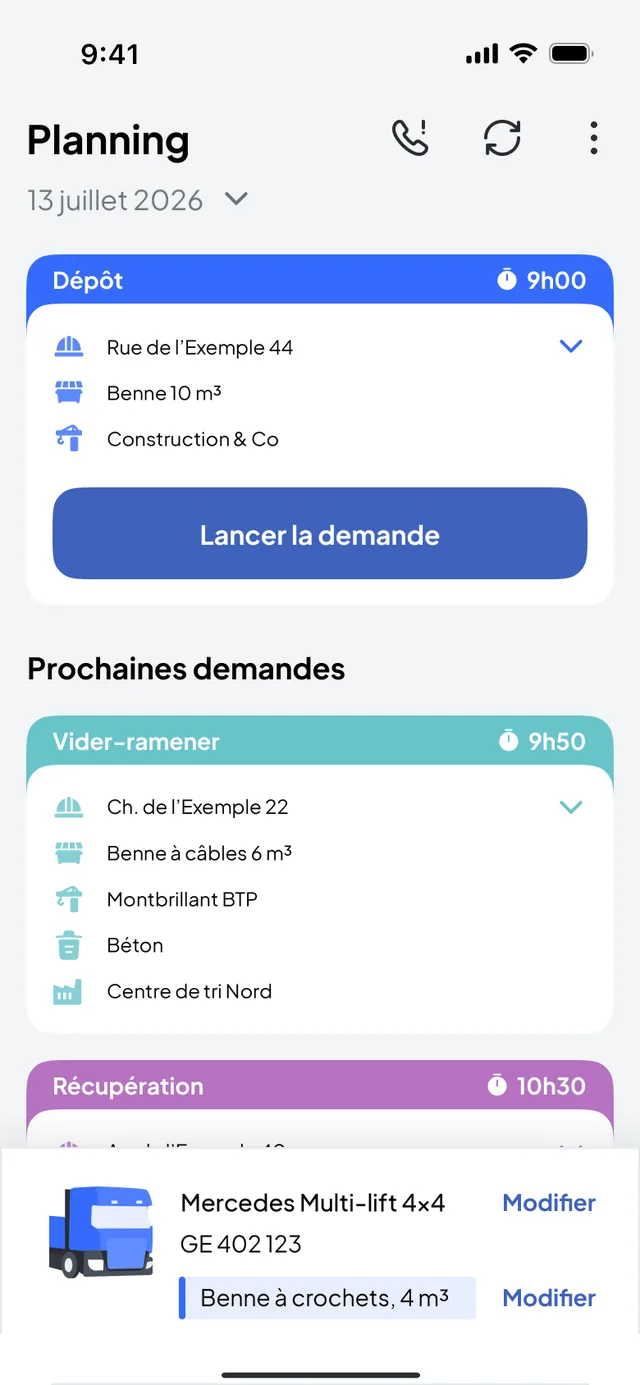
Requests to schedule wait in a queue. The schedule shows them by day and by hour, with immediate requests at the top.
The scheduleDispatch
Each request is placed on a truck, a driver and a time slot. The schedule updates for everyone, in the office and in the cab.
DispatchExecution
The driver receives the mission in Nereva Transports, starts truck navigation, reports the steps and takes the photos.
DriversDocumentation
Timestamped steps, photos, receipts and tonnages form the digital delivery note of the mission, attached to statements and invoices.
ProofHistory and reporting
Each request stays attached to the site, the client and the truck. Statements and the dashboard give the overall view.
History
Requests: seven types of movement, one format
A request always carries the same information: the site and its address, the requester, the carrier, the type of operation, the container or the material, the time slot and the instructions, then the assigned truck and driver, and the request’s status.
- Skip drop-offan empty skip is dropped on the site.
- Skip exchangean empty skip replaces the full one, which is taken to the sorting centre.
- Collectionthe skip is collected and dropped at the sorting centre.
- Empty and returnthe full skip is emptied at the sorting centre and brought back to the site.
- Removal with waitingthe truck brings a skip, waits while it is loaded and leaves with it.
- Materials deliverythe materials are picked up at their location and delivered to the site.
- Custom requestany other service, invoiced by the hour.
Each request has a status visible to everyone: it moves from scheduling to acceptance by the driver, then to execution and closure, and it can also be cancelled. Urgent requests appear among the immediate requests of the schedule; those the driver could not carry out return to the postponed requests, to be rescheduled.
How your clients create their requests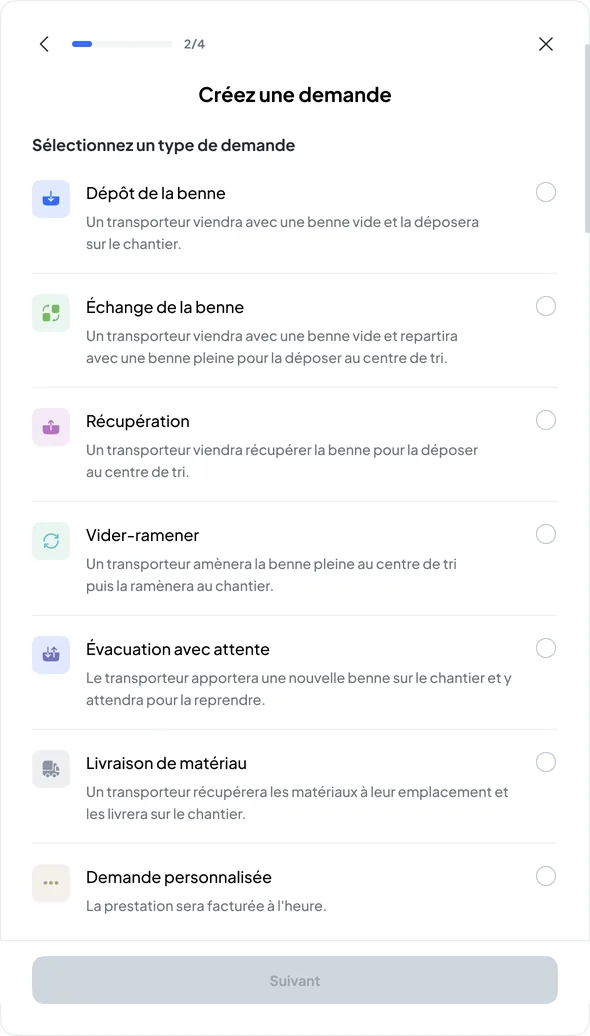
Scheduling
The schedule: per truck, per driver, hour by hour
The schedule shows your missions per truck and per driver. Requests to schedule appear in a queue; you place them on a truck and a time slot, and the change is transmitted to the driver concerned in their app.
Daily view and weekly view
The day shows the time slots hour by hour; the week shows the load of each truck day by day. Filters and search find a request, a site or a client.
The queue of requests to schedule
Requests not yet placed wait in a queue, with a counter. You place them on a truck and a time slot; what changes is visible at once in the office and in the driver’s app.
Immediate, postponed, blocked
Immediate requests sit at the top of the schedule. Requests postponed by the driver come back to be scheduled. A time slot can be blocked on a truck, with a comment.
No automatic schedule optimisation. The dispatcher decides; Nereva makes the decision visible to everyone, in the office and in the cab, and flags what changes. See the transport TMS
Dispatch
Dispatch: one truck, one driver, one time slot
Each request is assigned from the schedule to a truck and a driver. The driver receives it in their app with the address, the time slot, the type of skip or load and the instructions. If something changes, you reassign and they are notified.
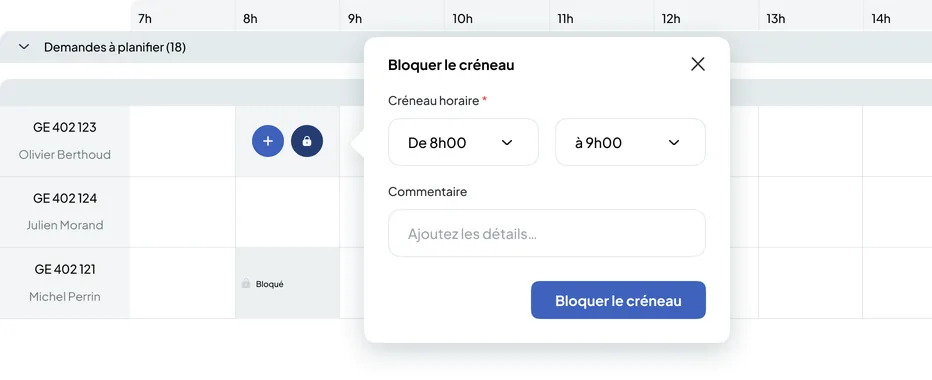
- One move, everyone up to dateThe request placed on a truck goes to the driver; the client sees it scheduled if they are on Nereva. The schedule also shows whether each driver is online or offline.
- The time slot can be blockedA truck unavailable over a period: the slot is blocked with a comment, and nothing can be placed on it.
- The schedule stays yoursNereva does not reassign your trucks for you. It shows the real situation and makes each decision visible.
The driver has their day in the app
Nereva Transports shows the driver their day in order: the next mission, the site, the skip type, the time slot, the instructions, then truck guidance to the mission location. They start the mission, report the steps and take the requested photos.
- Missions in order, with the truck and the skip they have on board.
- Every change live: new address, new time slot, cancellation, without a call to the depot.
- Steps timestamped by the app: departure, arrival, drop-off, collection, closure.
- Photos and receipts taken on the spot, attached to the mission.
- Offline mode: work in progress continues without a network, within the supported scope, and synchronises when the connection returns.
The driver can also postpone a request they cannot carry out: it returns to the schedule, among the postponed requests, and the dispatcher reschedules it.
Discover Nereva Transports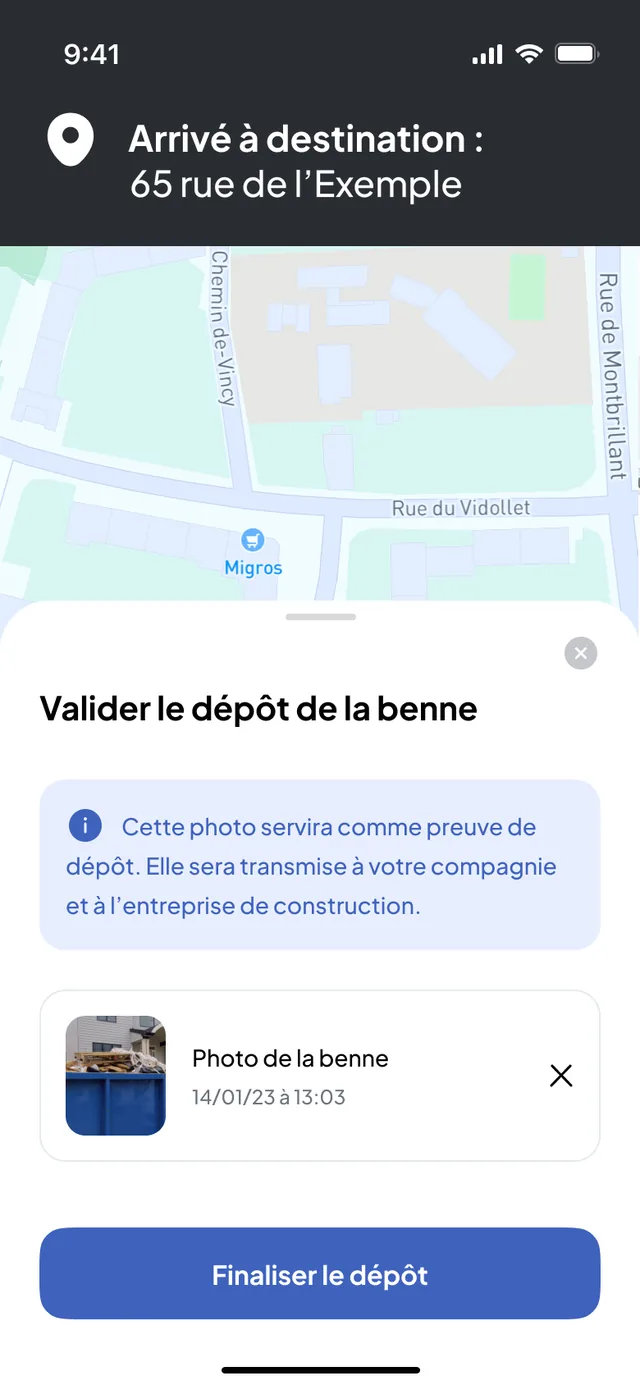
Truck GPS
Truck navigation is part of the mission
The route, calculated for the truck
Nereva relies on HERE technology for mapping and heavy-vehicle routing. Guidance starts from the mission, without typing an address. The route takes traffic and congestion into account; the mileage is calculated before departure and the distance travelled is recorded for the mission. Navigation keeps working even without a network connection.
Navigating is not monitoring
The truck’s position is shared during the mission only, from its acceptance to its closure, never during breaks or personal time. It serves the dispatcher and the site; it is never used to monitor, rank or sanction a driver.
Fleet
Each truck has its record, the schedule is organised per vehicle
The truck record
Plate, make and model, number of axles, type and lifting system (skip loader, hook-lift, tipper, crane, flatbed), gross vehicle weight rating, volume, operational or out-of-service status, own or chartered truck. The mission history stays attached to the truck.
The fleet on the map
During missions, the trucks appear on the Transport back office map, with the sites and the depots, through the driver app: no tracking box to install. Nereva does not manage maintenance or technical inspections.
Skips
The skip stock, by type and by status
The stock
Each skip has a type, a volume and dimensions: chain-lift skip, hook-lift skip, trailer. The stock is tracked by status: at the depot, on site, on a truck or in maintenance, and each site shows the skips present.
Truck = GPS, skip = management
GPS tracks the truck during the mission. The skip, for its part, is managed: its status and its movement history say where it is. Individual identification of each skip is under development.
The digital delivery note: timestamped steps, photos, receipts
Each step of the mission is timestamped by the driver’s app, and the requested photos are taken on the spot: the skip dropped off, the full skip, the skip at the sorting centre, the sorting centre receipt, the materials receipt. The tonnage is entered or weighed, the waste type recorded.
The note is archived with the mission and attached to the statements and the invoice. Your client sees it in their back office if they are on Nereva; otherwise, they receive it as a PDF. It is operational proof of what was done, when and by whom.
See invoicing from missions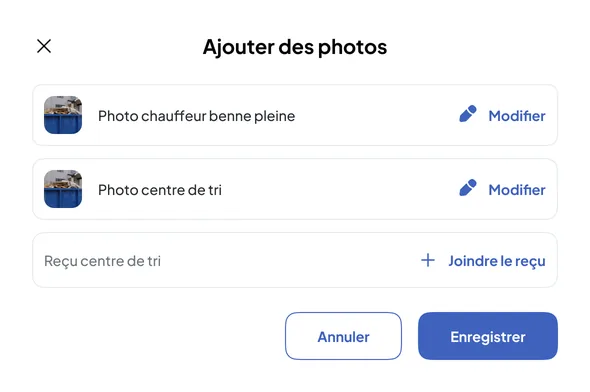
The history stays attached to the site, the client and the truck
Each site keeps the list of its requests, with the type, the skip and the date, and for each one the thread of events: request created, mission started by the driver, carrier on the way, skip dropped off, with the time of each step, the driver’s note and the request’s remark.
It is an operational history, not a regulatory register: it serves to find out what happened on an operation, to answer a client and to prepare a statement, without reconstructing the exchanges.
Nereva for QHSE managers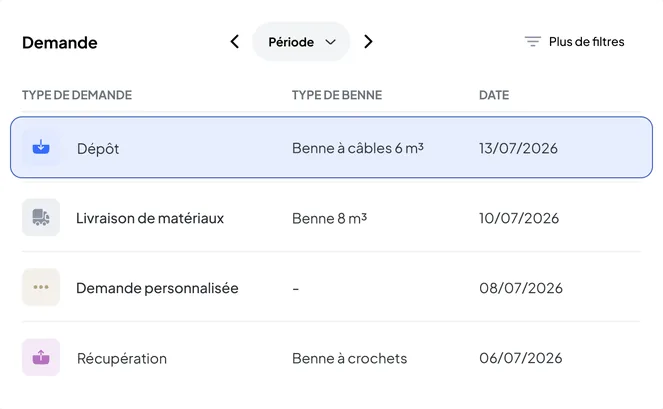
Statistics and statements
What operations produce, with no re-entry
The dashboard
The Transport back office shows closed requests by period, kilometres travelled, skips on sites and skips dropped at the sorting centre. The indicators come from the executed missions, not from a report to assemble.
Statements and exports
Daily and monthly statements per client and per site, generated from the executed missions, PDF and XLSX export. Your data remains exportable.
Autonomy
Usable on its own: your TMS, for all your clients
Without waiting for your clients
You enter the requests received by phone or e-mail yourself, then everything else happens in Nereva: schedule, dispatch, missions, drivers, delivery notes, statements and invoicing. Your clients have nothing to install for your operations to run.
The day a client joins you
Their requests land directly in your schedule and they follow their missions from their end, without a call. Nothing changes in the way you work: the same request, the same schedule, the same mission.
Synchronisation
When the site is on Nereva, the same information on both sides
The site creates its request in Nereva Commandes or in its Construction back office; it lands in your schedule. The site then sees its request scheduled, the truck linked to its request approaching, the mission closed and the delivery note.
What the site sees
Its request and its status, the truck linked to its request and its estimated arrival time, then the note and the photos. Not your fleet, not your other clients.
What does not change
Your partners and your business relationships remain yours. Nereva synchronises operations without stepping into the business relationship.
0% commission
Nereva takes no commission on your transport operations and does not touch your prices. The subscription is paid per licence and per month, with no fixed term. All Transport features are included; add or remove licences according to your drivers and your teams.
Your questions
Transport features, in plain words
Can a transport company use Nereva on its own?
Yes. You enter the requests received by phone or e-mail yourself, then everything else happens in Nereva: schedule, dispatch, missions, drivers, delivery notes, statements and invoicing. When a client joins you on the platform, their requests land directly in your schedule.
Does Nereva replace a general-purpose TMS?
For construction transport, yes: requests, schedule, dispatch, drivers, vehicles, missions, delivery notes, statements and invoicing are covered, and your data remains exportable. What Nereva does not do: vehicle maintenance, driving times, payroll. The switch is made without importing history: you start with today’s missions.
What do drivers see?
Their day in order, in the Nereva Transports app: the next mission, the site, the skip type, the time slot, the instructions and truck guidance. They start the mission, report the steps and take the photos. No paper route sheet, no call to the depot to know what comes next.
Does Nereva optimise the schedule automatically?
No. The dispatcher places each request on a truck and a time slot; Nereva makes the decision visible to everyone and flags what changes. An anticipation engine based on operational data, EVA, is under development.
Does each skip have a GPS?
No. GPS tracks the truck during the mission, through the driver’s app. Skips are managed by type and by status, at the depot, on site, on a truck or in maintenance, with their movement history. Individual identification of each skip is under development.
How does synchronisation with a site work?
When the site uses Nereva, its request lands directly in your schedule. It then sees its request scheduled, the truck linked to its request approaching, the mission closed and the delivery note. It sees neither your fleet nor your other clients, and your business relationships remain yours.
Which types of request does Nereva handle?
Seven types: skip drop-off, skip exchange, collection, empty and return, removal with waiting, materials delivery and custom request. The custom request covers any other service, for example transporting a machine, and is invoiced by the hour.
Are the delivery notes and photos shared with the client?
Yes. The digital delivery note, the photos and the receipts are archived with the mission and attached to the statements and the invoice. Your client sees them in their back office if they are on Nereva; otherwise, they receive them as a PDF by e-mail.
All carriers’ questions are in the FAQ.
Go furtherSchedule, drivers, fleet and skips: run your operations with Nereva.
15-day free trial with 2 licences. No payment method required. Then a monthly subscription, with no fixed term.