
SaaS platform · construction transport flows
The transport software built for construction.
The site and the truck, synchronised.
Nereva is a SaaS platform specialised in construction transport flows. For hauliers, a site-transport TMS: planning, dispatch, drivers, delivery notes and proof. For construction companies, the requests, tracking and proof of every transport. When both use Nereva, everyone works on the same information.
15-day trial with 2 licences. No payment method required.

Two specialised software products
Two software products, two trades: Construction & Transport.
Nereva is not one generic tool. It brings together two products, each with its own back office and mobile app: Nereva Construction for site requests and follow-up, Nereva Transport for hauliers’ operations. Connected, both work on the same information.
Nereva Construction
Order, follow, find again: site by site.
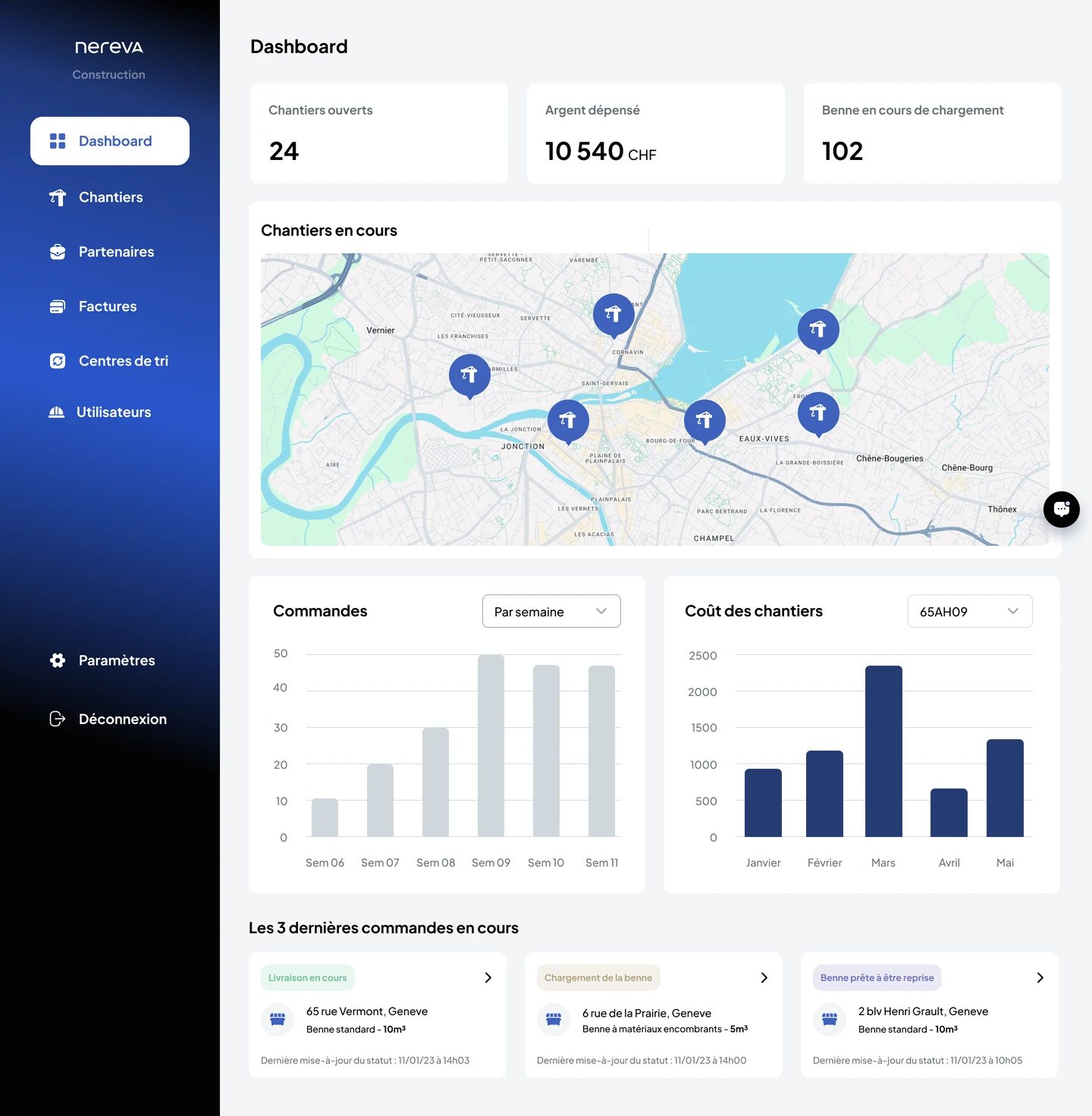
Requests for skips, materials and services, transport follow-up, documents and spending per site. The services are carried out by your connected partner hauliers.
Discover Nereva ConstructionNereva Transport
Requests, planning, dispatch, drivers, fleet, skips.
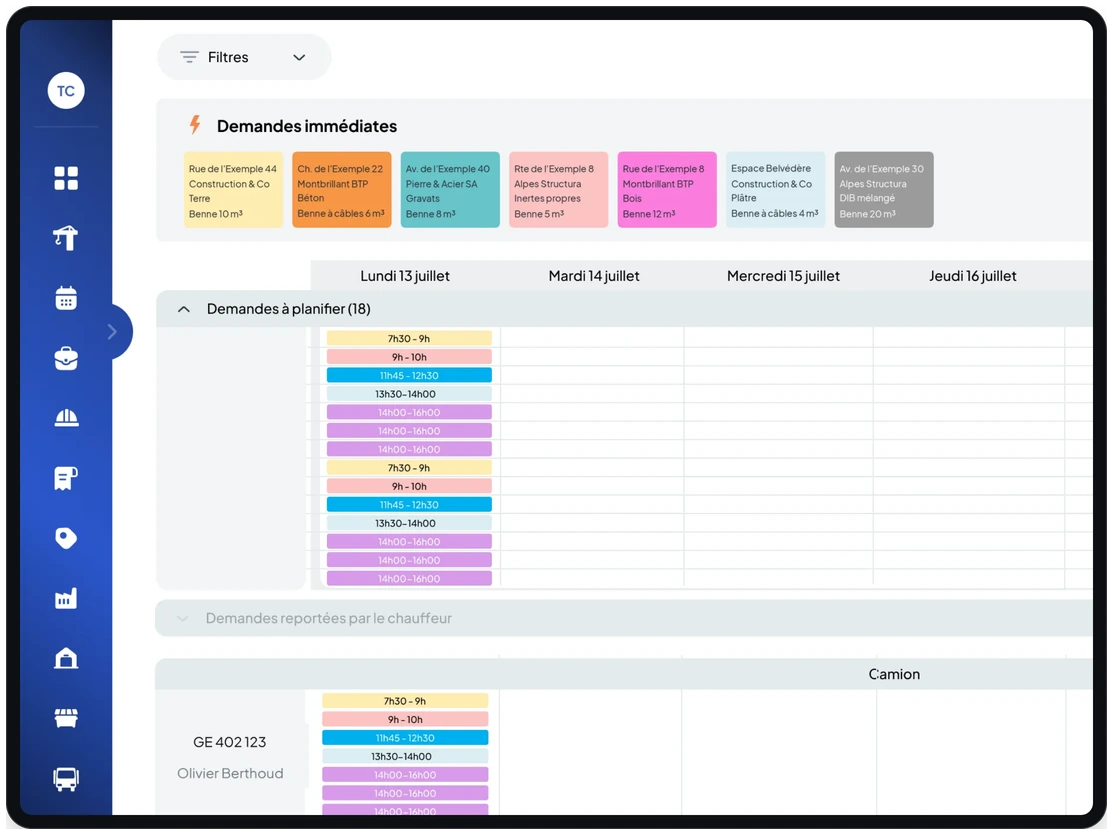
The TMS of the site-transport company: requests from all your customers, the planning by truck and by driver, delivery notes and records. It works on its own.
Discover Nereva TransportNereva Construction · ordering
Order from the site, organise with the haulier.
The foreman picks the request in Nereva Commandes: order a skip, collect it, exchange it, empty and return, removal with waiting. The request leaves structured for your connected partner haulier, who finds it in the Transport planning and carries it out.
- Every request arrives with the site, the skip type or material and the time slot: nothing to re-enter.
- The partner haulier places it in the planning, by truck and by driver: immediate, to-be-scheduled, postponed requests.
- The site and the office follow its handling, without a call to find out where it stands.
Nereva Construction · follow-up
The site orders, then sees the haulier arrive.
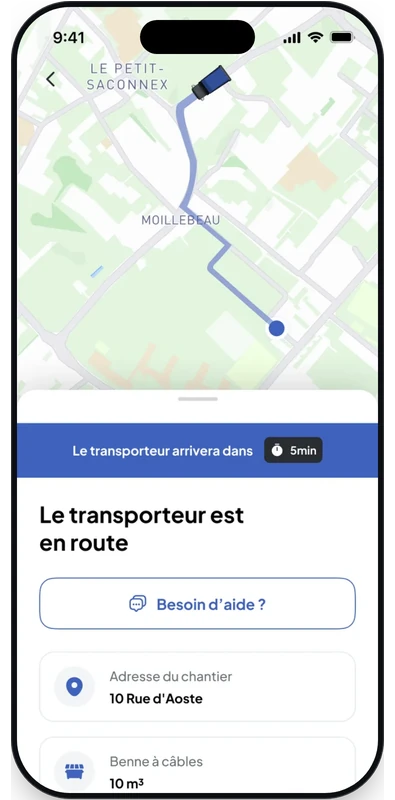
Two screens for the field team: the order in a few taps, then the follow-up of the request, with the haulier on its way and its estimated arrival time. The works manager and the office see the same thing from the Construction back office.
- Request status: received, scheduled, in progress, completed.
- Truck linked to the request on the map, with the estimated arrival time, when the haulier is on its way.
- Photos and time-stamped delivery note attached to the request, available to the site and the office.

Nereva Construction · statistics
Transport spending, site by site.
The Construction back office consolidates what the requests have cost: per site, per request type, per item (transport, materials, waste, standby and standby-waiting), with the trend over time. The data comes from the requests carried out, not from a report to assemble.
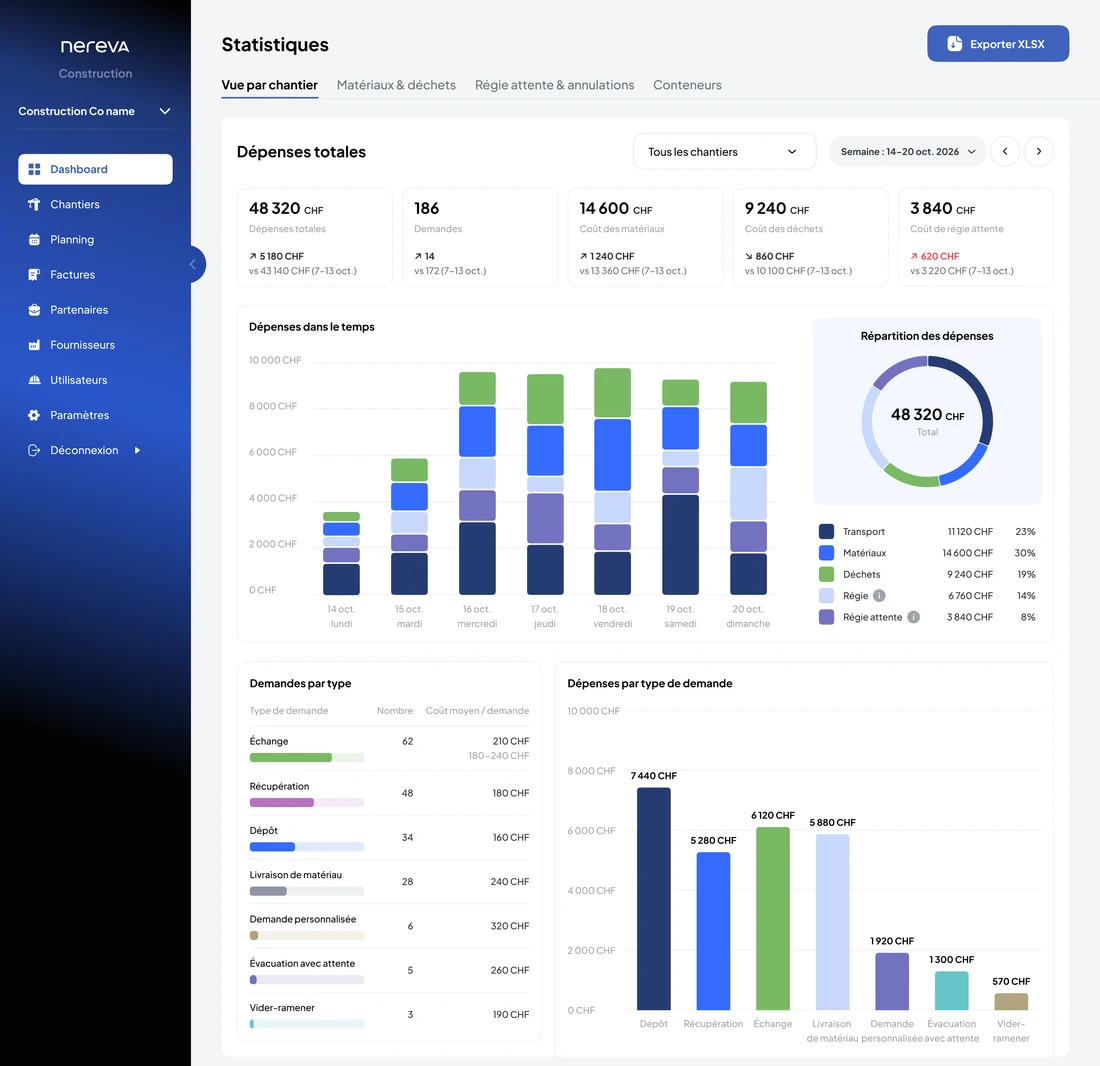
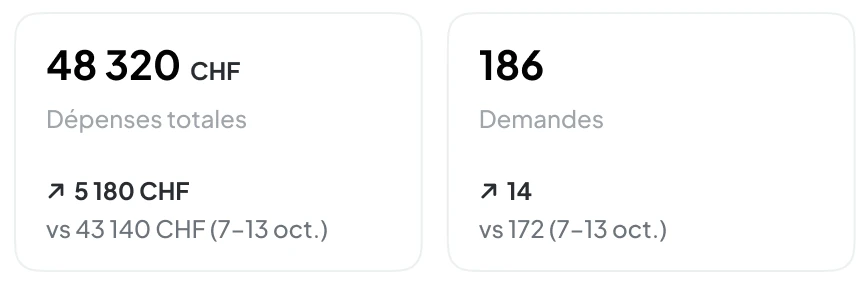
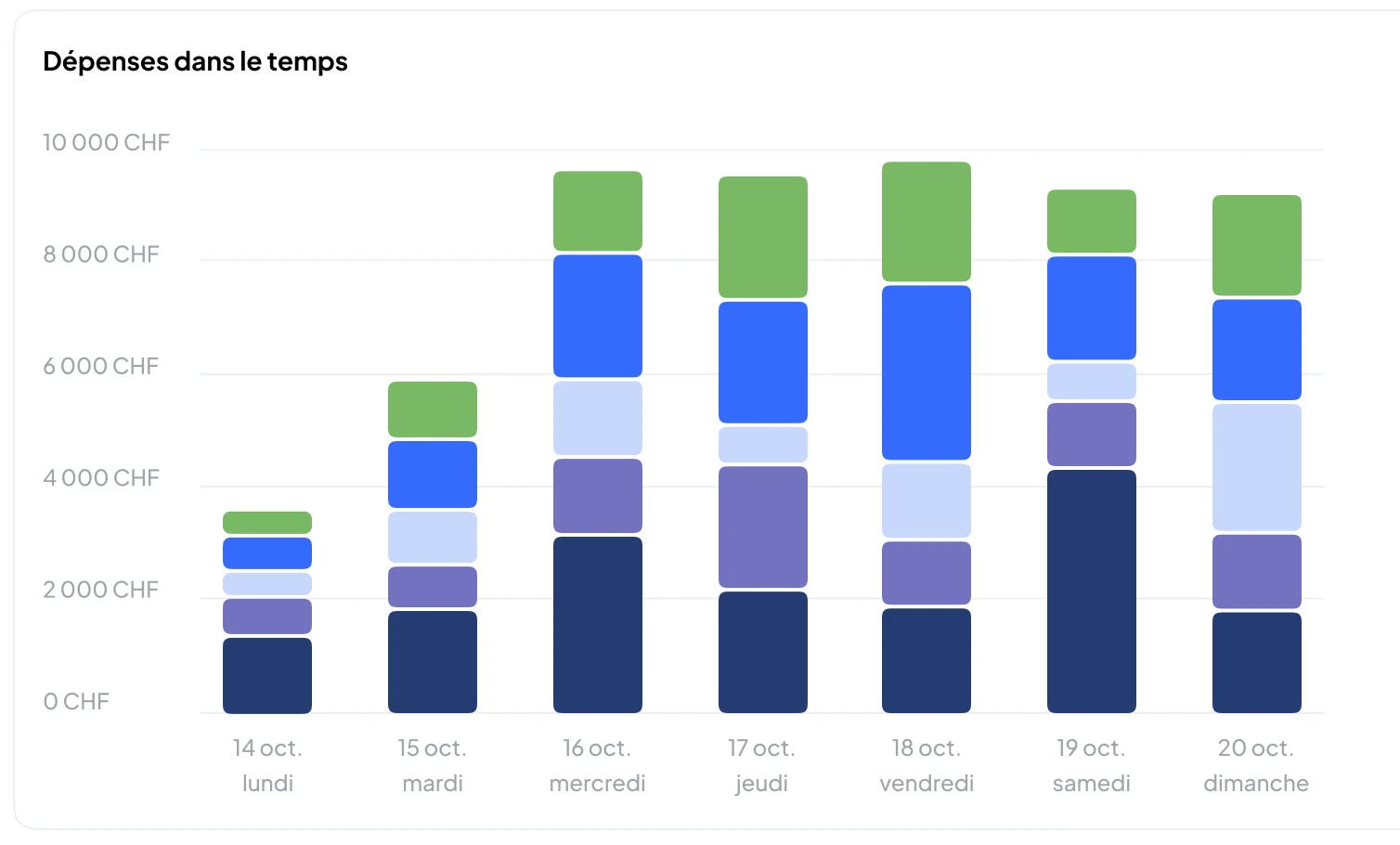
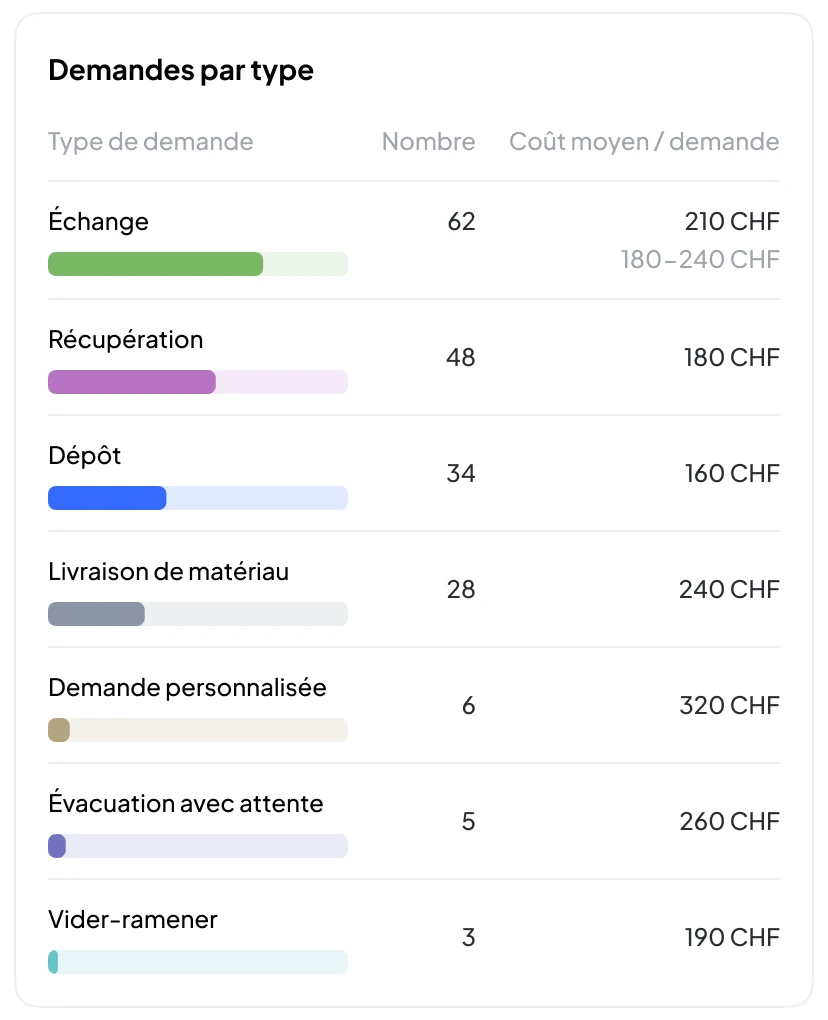
- For one site or for all: total spending, cost of materials, of waste and of standby-waiting, each compared with the previous period.
- Number and average cost per request type: exchange, collection, drop-off, materials delivery, removal with waiting.
- XLSX export of the statistics.
Illustrative screen: the amounts shown are not customer results.
See the Construction featuresNereva Transport · operations
Your trucks, your sites, your missions: one view.
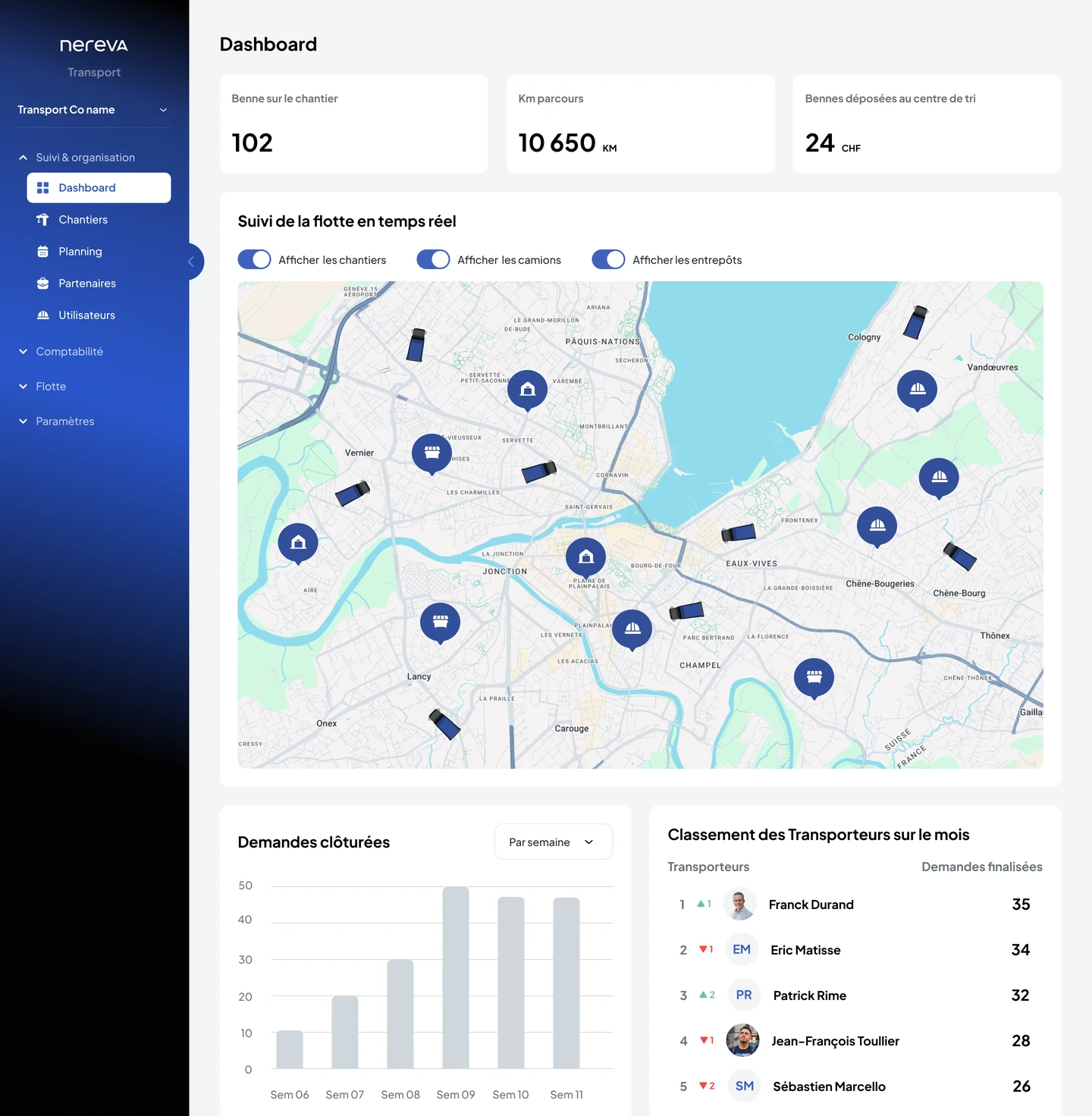
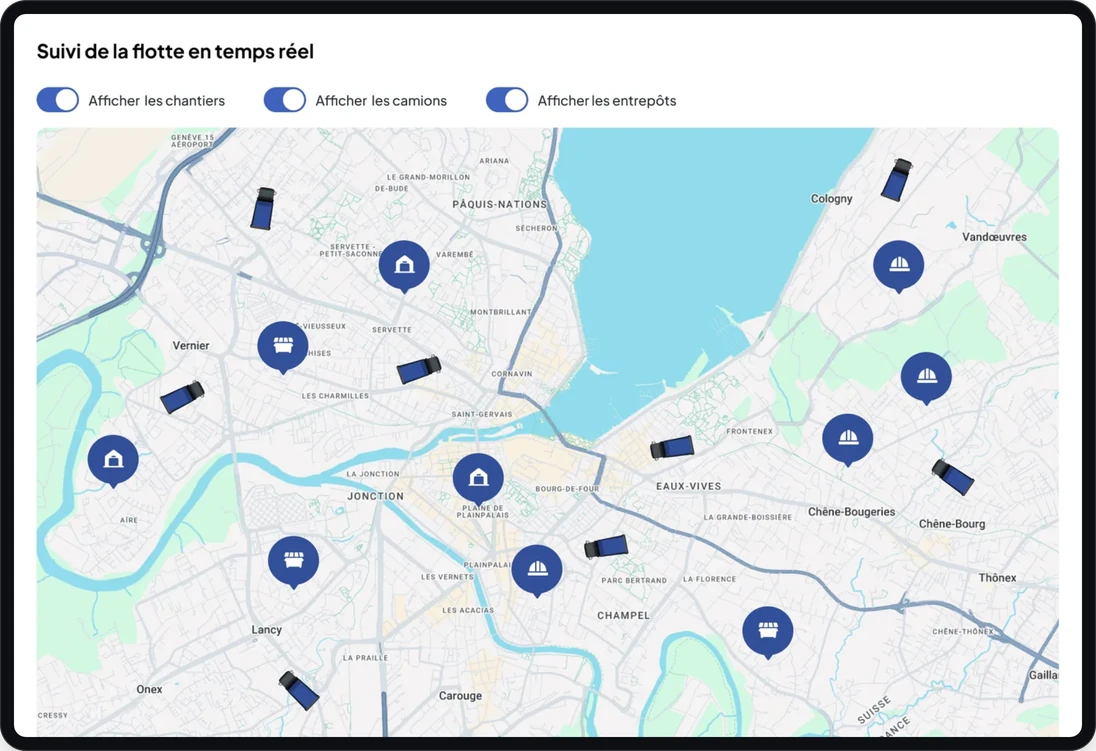
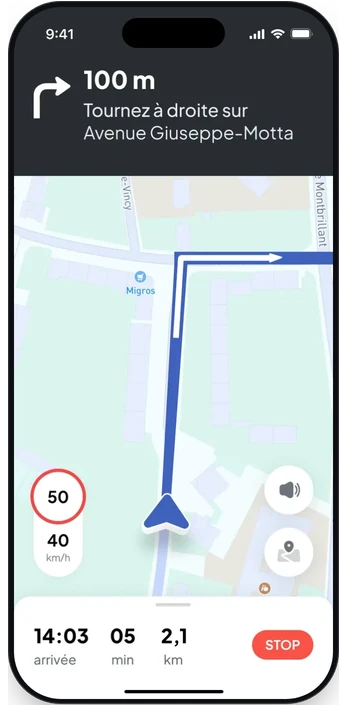
The Transport back office shows the fleet on the map, with sites and depots, while each driver follows the mission in Nereva Transports, guided by truck navigation. What dispatch changes reaches the app; what the driver confirms goes back to the office.
- Fleet tracking on the map: trucks, sites, depots.
- Mission by mission: departure, arrival, drop-off, pick-up, closure, time-stamped by the app.
- Truck navigation from the mission to the place of service.
Nereva Transport · driver
The driver’s day, in order, in the cab.
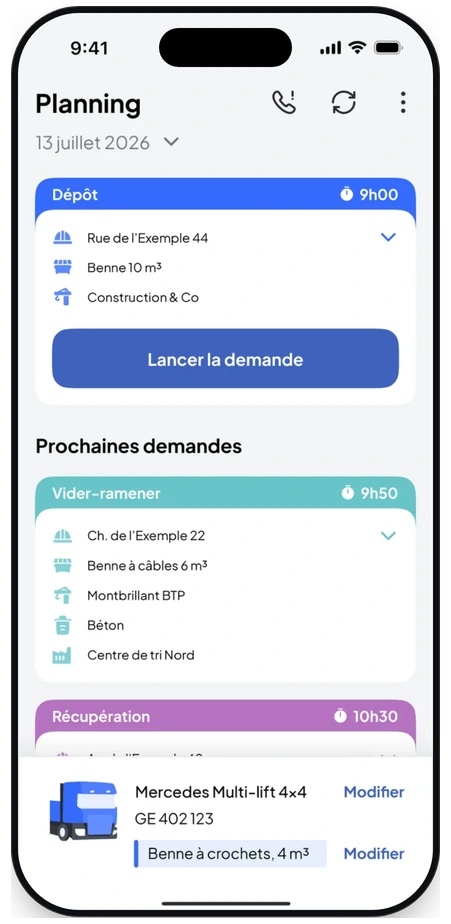
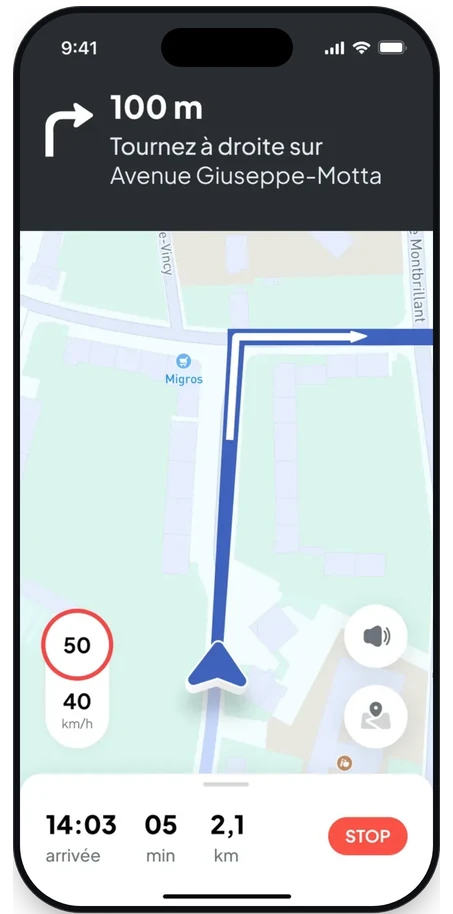
Nereva Transports gives the driver the day: the next mission, the site, the skip type, the time slot, the truck and skip on board, then guidance to the place of the mission. The driver starts the mission, reports the steps and takes the requested photos.
- The day’s planning: drop-off, empty-and-return, collection, with the site and the customer of each mission.
- The selected truck and the skip on board, shown with the mission.
- Truck navigation from the mission, with the arrival time and the remaining distance.
Nereva Transport · statistics
What each truck brings in, what subcontracting costs.
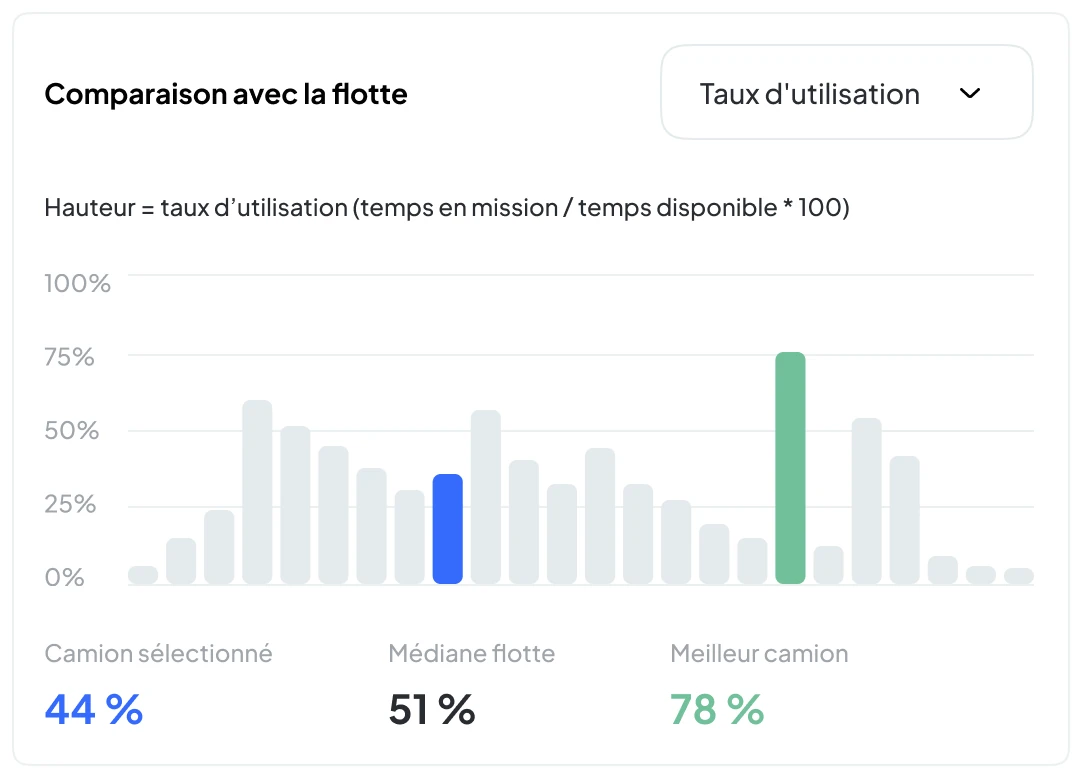
Transport analytics reads the real operation: revenue, estimated cost and estimated margin of a truck from the costs you configure, time on mission, empty time, utilisation rate, comparison with the fleet, use and profitability of subcontractors.
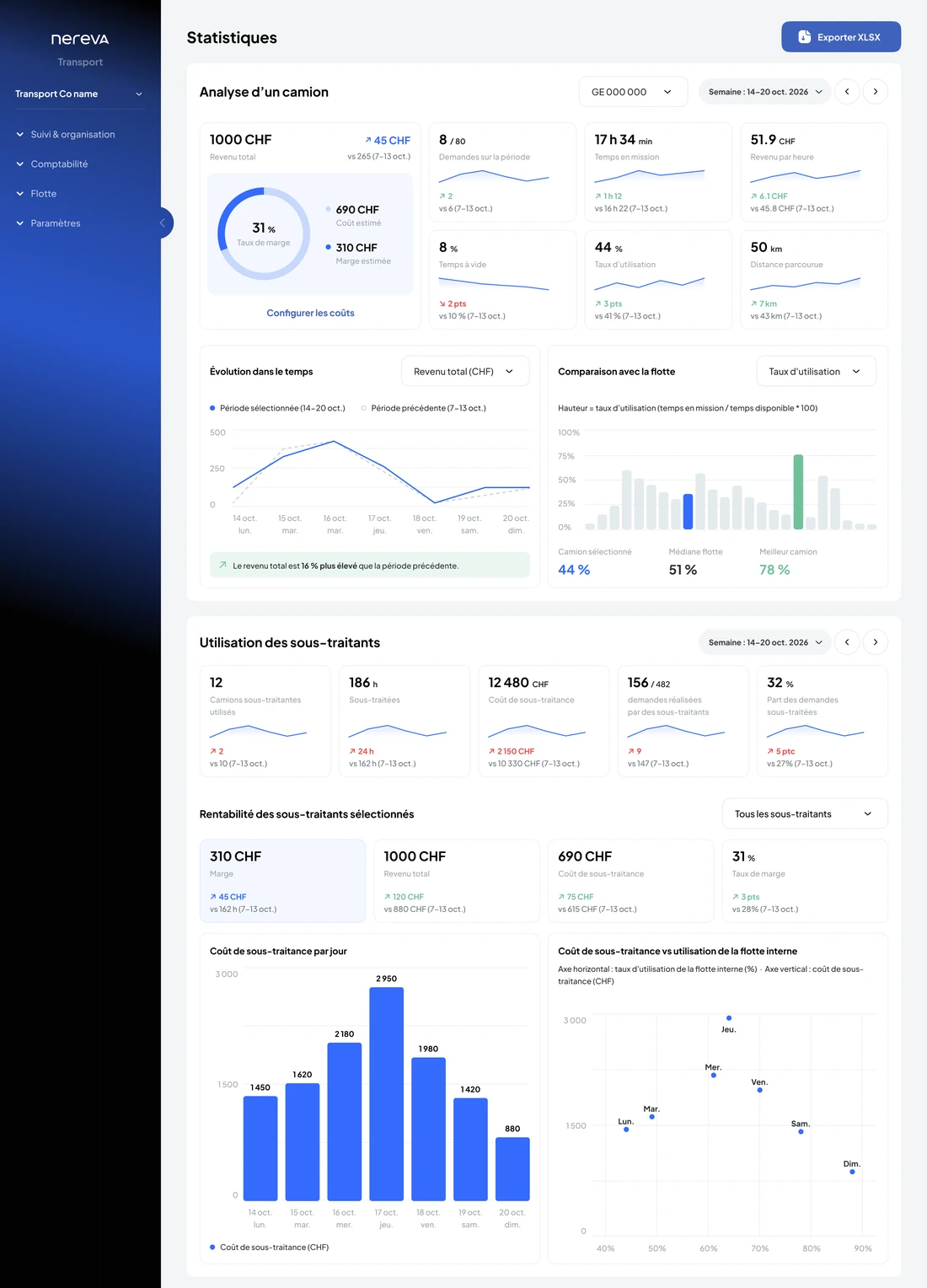
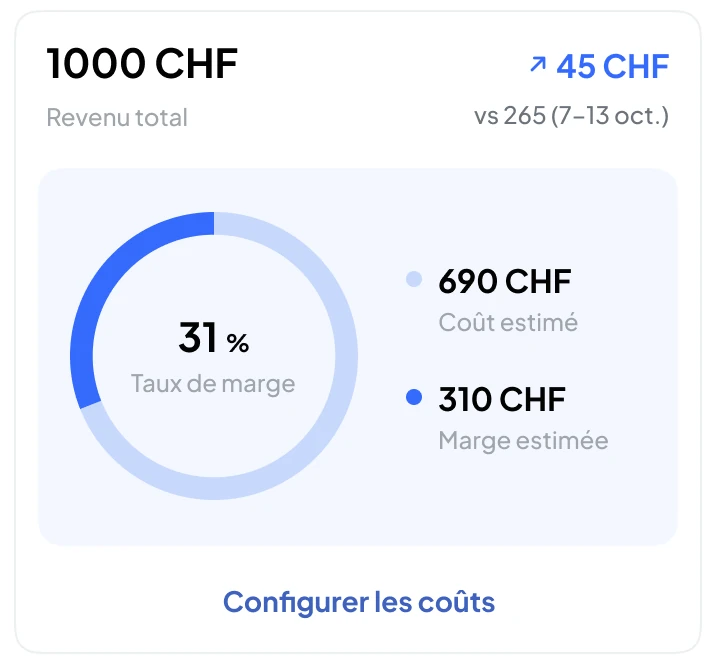
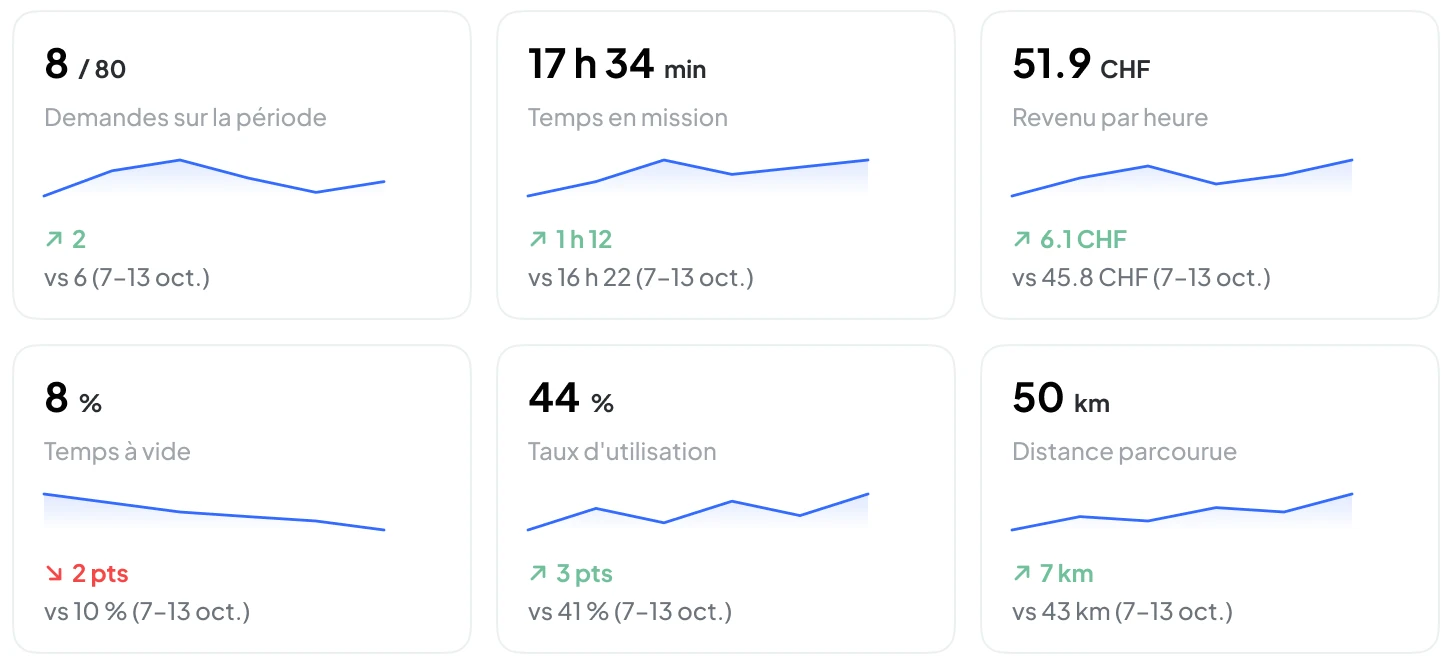
- Analyse a truck, a period, subcontracting.
- Comparison with the fleet: median and best truck.
- XLSX export of the fleet detail.
Illustrative screen: the amounts and percentages shown are not customer results. Costs and margins are estimated from the costs you configure.
See Transport analyticsAlone or connected
The haulier works alone. The site works with its haulier. Connected, they synchronise.
Two situations, one principle: each company keeps its accounts, its customers and its terms.
Situation 1: a transport company, alone on Nereva
Your customers do not need to be on Nereva. You enter their requests in your back office, you plan, your drivers carry them out in Nereva Transports. The TMS is complete, for all your customers, from day one.
Situation 2: a site and its haulier, connected
The request created on the site lands directly in the haulier’s planning, with no re-entry. Status, truck on its way, photos and time-stamped delivery note are visible on both sides, according to roles and permissions.
Do you build and transport?
A Construction account and a Transport back office, created from the same place; the same person switches between them from the account selector.
EVA · in development
EVA, Nereva’s anticipation engine, is in development. It is designed to propose adjustments, anticipate certain situations and assist the teams, based on operational data (requests, rotations, waiting times, cancellations). The decision always remains human.
Understand EVAOperations produce the data. QHSE can then use it. Nereva for QHSE managers
Already synchronising with Nereva







100’000+ transports operated via Nereva · Switzerland: data hosted in Switzerland, Nereva SA is based in Nyon.
Sources: press release of 17 February 2026 · data hosting.
In the field
Nereva, filmed on the construction site
Presentation video made with the teams of M. Ducret SA. French voice-over; subtitles available in French, English, German and Italian.
The model
Nereva takes nothing from anyone.
No commission on your flows, no competitive bidding, no public directory. Your customers, your partners and your business relationships remain yours: Nereva synchronises operations without stepping into the business relationship.
- One licence per assigned role: everyone has their own access, in the back office and on mobile.
- All features, according to roles: no paid add-on modules.
- Zero commission on your transport: you pay for the tool, not for your operations.
The price
69 CHFexcl. VAT / licence / month69 €excl. VAT / licence / month69 USDexcl. taxes / licence / monthRate according to your geographical zoneper licence per month
Switzerland pricing zone. All features included, for every trade.Europe pricing zone (outside Switzerland). All features included, for every trade.United States pricing zone. All features included, for every trade.Excl. taxes. All features included, for every trade.
0% commissionon your transport.
No fixed-term commitment. Free 15-day trial with 2 licences, no payment method.
See pricingFrequently asked questions
In brief
What is Nereva?
A SaaS platform specialised in construction transport flows: a site-transport TMS for hauliers, a request and tracking tool for construction companies, synchronised when both use it.
Who is Nereva for?
Construction-site hauliers, construction and civil-engineering companies, and companies that do both with an in-house fleet.
Can a haulier use Nereva on its own?
Yes. The TMS works autonomously: planning, dispatch, drivers, delivery notes and invoicing, even if your customers are not on Nereva yet.
What does “synchronised” mean?
When the site and the haulier both use Nereva, the request, the planning, the execution and the proof synchronise between the two companies: the information useful to the operation is accessible in the interfaces concerned, according to roles and permissions, with no phone call and no re-entry.
How much does Nereva cost?
69 CHF excl. VAT per licence per month in Switzerland, all features included, with no commission on your transport.69 € excl. VAT per licence per month in Europe outside Switzerland, all features included, with no commission on your transport.69 USD excl. taxes per licence per month in the United States, all features included, with no commission on your transport.One rate per licence per month, according to your geographical zone, all features included, with no commission on your transport. See pricing.
Transport and construction: simplify your operations, from the site to management.
Free 15-day trial with 2 licences. No payment method required. Monthly subscription afterwards, with no fixed-term commitment.