
Roles and profiles
Nereva according to your role
One platform, two environments, one interface per role.
Management, operations, drivers, foremen, accounting: everyone works in the interface of their role, on the same operation. What each person sees depends on the account, the company, the assigned role and its permissions.
15-day free trial · 2 licences included · No payment method required

Transport company
Office, dispatch, driver: three positions, one planning
In the Transport back office, a user receives one of the product’s two roles: Driver or Back-office manager. The manager then receives an access type: Superadmin, Accounting or Logistics.
Management
Superadmin access type: all the features of the company’s back office, including users, roles, partners and settings.
The Transport back officeOperations, dispatch
Back-office manager: planning by truck and by driver, requests, sites, fleet, partners. The dispatcher sees whether each driver is online or offline.
Transport planningDriver
Driver role, in the Nereva Transports app: missions in order, truck navigation, steps, photos and the mission delivery note.
Nereva TransportsAdministration, accounting
Accounting access type: daily and monthly statements, invoices and reports per truck, built from executed and documented missions.
Invoicing and statementsConstruction company
Office and site: the Construction back office and Nereva Commandes
In the Construction back office, the two roles are Foreman and Back-office manager. The manager’s access types are Superadmin (all features), Accounting (Dashboard, Sites and statements) and Logistics (Dashboard, Skips, Orders, Trucks and Users, on one or more selected sites).
Management
Superadmin access type: all the features of the company’s back office, including sites, users, partner carriers and suppliers.
The Construction back officeWorks manager, logistics manager
Back-office manager with the Logistics access type: the requests, skips and users of the sites assigned to them, from a browser.
Following requestsForeman, team leader
Foreman role, in the Nereva Commandes app: the request created from the site, its follow-up, the photos and the history of their sites.
Nereva CommandesAdministration, accounting
Accounting access type: the dashboard, the sites and the statements sent by the carriers.
Statements and invoicesOne operation, different views
From request to archiving, each role acts at its step
The connected cycle links the site and the transport. At each step, the information needed for the operation is available in the relevant interfaces, according to roles and permissions.
Request
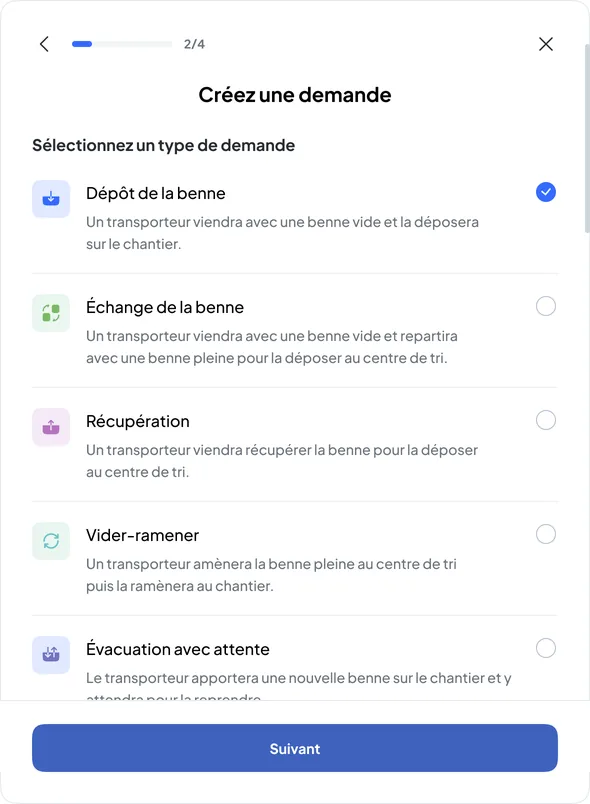
The foreman creates the request from the site, or the office from the Construction back office: request type, skip or materials, time slot, instructions.
Nereva Commandes · Construction back officePlanning
The carrier’s operations team receives the request and assigns it to a truck and a driver in its planning.
Transport back officeExecution
The driver carries out the mission step by step and takes the requested photos.
Nereva TransportsDocumentation
The timestamped steps, photos and delivery note stay attached to the request, available to the relevant roles of both companies.
Back offices · appsArchiving
The history per site and the statements then serve accounting, management and QHSE.
Back offices
Nobody “sees everything”: a user accesses their company’s information, within the limits of their role and permissions.
A role opens an interface, an access type opens sections
The role defines the person’s tool: mobile app or back office. The manager’s access type defines which sections of the back office they can open. A permission is not a role, and no role gives access to other companies’ accounts.
- Transport: Driver, or Back-office manager with the Superadmin, Accounting or Logistics access type.
- Construction: Foreman, or Back-office manager with the Superadmin, Accounting or Logistics access type; the Logistics type applies to the selected sites.
- To assign both roles to the same person, the company creates a second user with the same contact details: each assigned role uses a licence.
- The company’s administrators add, edit, deactivate or delete users from the back office.

In the field, with or without a network
The driver and the foreman keep working when the connection drops
The Nereva Transports and Nereva Commandes field apps have an offline mode. Within the supported scope, work in progress continues without a network and then synchronises when the connection returns, according to how the product works.
- Tunnels and basements
- Underground car parks
- Mountain areas
- Remote sites
- Quarries and gravel pits
- Depots and industrial areas with poor coverage
- Offline mode concerns the field roles: Driver and Foreman. The back offices are used in a browser, with a connection.
- Without a network, nothing is transmitted to other users: the dispatcher sees the driver as “Offline” and receives their updates only when the connection returns.
- The exact scope of actions available offline is that of the app; features that require the network, such as live truck tracking, resume with the connection.
- The driver’s heavy-vehicle GPS navigation keeps working even without a network connection.

1 assigned role = 1 licence used
A licence corresponds to a role assigned to a user. A person who holds two roles, for example Back-office manager and Driver, uses two licences. The price is the same in the office and in the field: CHF 69 excluding tax per licence per month in Switzerland, EUR 69 in Europe outside Switzerland, USD 69 in the United States; 1 to 40 licences at the public price, on quotation beyond.
- 15-day free trial with 2 licences, no payment method required.
- Licences are managed from the Users page of the back office.

Company profiles
Nereva according to your company
- Transport companyYour own site-logistics TMS: planning, drivers, missions, documentation, even if your customers are not yet on Nereva.
- Construction companyYour transport requests, executed by your connected partner carriers, followed from the site and the office.
- Construction and transport in the same companyA Construction environment and a Transport environment, for a company that actually runs its own transport activity.
- Project owners and general contractorsWhat Nereva documents on the sites you manage, and what it does not do.
- Groups and consortiaSeveral companies, each with its own account, users and partners.
- Material suppliersReferenced by your customers, integrated into deliveries, without a portal or marketplace.
- With your usual carrierThe site keeps its carrier, the carrier keeps its customers.
The QHSE manager, as a cross-cutting link
Operations produce the data. QHSE can then use it: requests, missions, delivery notes, photos, timestamps and history, when these elements exist in Nereva.
Nereva for QHSE managersFrequently asked questions
Roles, profiles and access
Which roles exist in Nereva?
On the transport side: Driver and Back-office manager. On the construction side: Foreman and Back-office manager. A manager receives an access type: Superadmin, Accounting or Logistics.
Does a works manager or a team leader have a dedicated role?
No. Job titles are not Nereva roles. A works manager generally works as a Back-office manager, with the Logistics access type on their sites; a team leader who orders from the site receives the Foreman role in Nereva Commandes.
Does management see everything?
The Superadmin access type opens all the features of the back office of its own company. It gives no access to other companies’ accounts, partners included.
Can one person hold two roles?
Yes, by creating a second user with the same contact details. Each assigned role uses a licence.
Can Nereva be used without a network connection?
Yes, for the Nereva Transports and Nereva Commandes field apps, within the supported scope: work in progress continues without a network and synchronises when the connection returns. The back offices are used in a connected browser.
Does the QHSE manager have a role in Nereva?
There is no dedicated data-entry role: the QHSE manager uses the documentation produced by operations, according to the access their company assigns them.
Does Nereva intervene in the commercial relationship?
No. Your partners and your business relationships remain yours. Nereva synchronises operations without stepping into the commercial relationship.
The features of each environment and how the field apps work are described on the product pages.
Go furtherConstruction managers, foremen, operations managers, drivers: each with their own tool.
15-day free trial with 2 licences. No payment method required. Monthly subscription afterwards, no long-term commitment.