Request
The site orders from Nereva Commandes or the back office.

The reference page for features: the TMS and the driver app for transport companies, the back office and the site app for construction companies, and synchronisation when both use Nereva.

Nereva is a single SaaS platform. Each trade works from its own environment: a web back office and a mobile app.
The TMS of construction transport companies: schedule, dispatch, drivers, trucks, skips, notes, photos, invoicing. Usable on its own, as your own TMS, even if your clients are not on Nereva.
The tool for construction companies to create, send and follow their transport requests with their usual carriers: skips, materials, waste, machinery.
When both use Nereva, the site’s request lands directly in the carrier’s schedule and everyone follows the same operation, from request to archiving. Synchronisation is not a condition: a carrier uses its TMS for all its clients, connected or not.
Everything a construction transport company needs to operate, prove and invoice, synchronised with its principals when they are on Nereva.

Every mission in a schedule by truck and by driver, requests to plan at the top; dispatch assigns in one move and the schedule updates for everyone.
The transport TMS→All Transport features→Each mission reaches the driver with its details: movement type, site, address, client, skip or material, time slot, remark. Statuses come back to the office at every step.
The driver app→The fleet on a map, live, during missions, with no telematics box or installation on the vehicles.
Fleet tracking→The fleet tracked by type and by status: at the depot, on site, on a truck or in maintenance; the skips present per client site.
Skip management→Your client sites with their services and prices, by skip type and movement: default price or negotiated price.
Digital, timestamped transport note, photos taken in the app, tonnage entered or weighed, waste type and weight when entered; every request, mission, note and photo stays attached to the truck, the client and the site.
Daily and monthly statements per client and per site, generated from executed missions, PDF and XLSX export.
Guidance launched from the mission, with HERE heavy-vehicle mapping and routing, to the site entrance.
Heavy-vehicle GPS→The site creates its transport requests, sends them to its usual carriers and follows their execution, without a call.

Each site with its current and upcoming requests, its skips present by type, its history and its documents; several active sites in parallel.
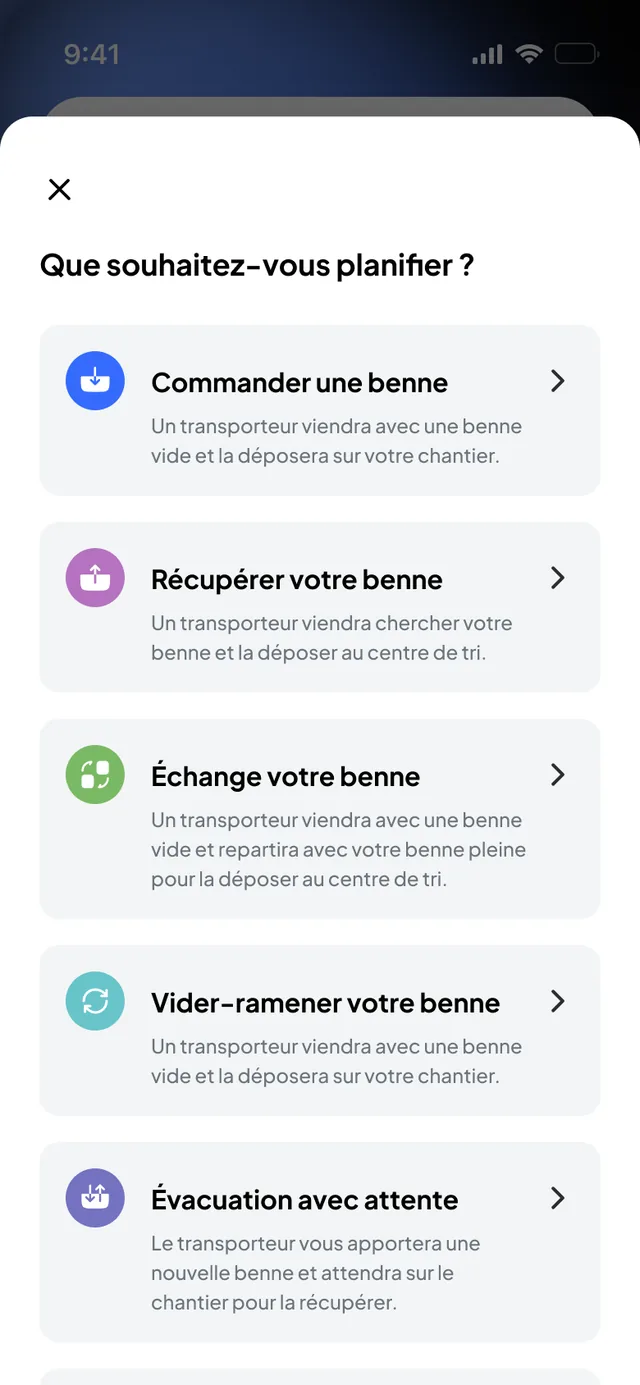
Construction on Nereva→Seven request types: material delivery, drop, collection, exchange, empty-and-return, removal with waiting and custom request, scheduled at the right time slot.
The site app→Ordering an empty skip, exchange, collection or empty-and-return from the site; the skips on site, visible by type.
Material deliveries and machinery transport ordered from the site, with time slot and instructions for the carrier.
Removals with waiting or full skip, waste type and weight when entered, timestamped drop at the sorting centre.
Recycling and waste→The carrier on its way and its estimated arrival time, on the map, with the same status as on the transport side.
At the end of each request, the timestamped note and the photos stay attached to the request, available in the office.
The request history per site, the carriers’ notes and invoices, received in the back office and attached to the services.
All Construction features→The official app names are identical in every language. They are free on the App Store and Google Play; the licence is the user’s.
The driver’s app: the day’s missions in order, every step confirmed in a few taps, photos and the note, heavy-vehicle navigation launched from the mission.
Discover the Driver App→The site’s app: order a skip, a removal, a delivery or the transport of a machine in a few steps, watch the truck arrive, validate the note on the spot.
Discover the Orders App→The two apps side by side and what happens when construction and transport use Nereva together.
See the apps→The site’s request becomes the driver’s mission, then the proof and the invoice line, without being re-entered. Nobody needs to call to check.
The site orders from Nereva Commandes or the back office.
The carrier receives the structured request and assigns it to a truck and a driver.
The driver executes the mission in Nereva Transports; the site watches the truck arrive.
Timestamped note, photos and tonnage stay attached to the request, visible on both sides.
History, notes and invoices can be found per site, per client and per truck.
Synchronisation is not required to use the TMS: a carrier enters itself the requests of clients not yet on Nereva and works with the same schedule, the same missions and the same proof.
Documentation builds itself as the work is done: it is not re-entered. Here is the confirmed data attached to every request and every mission.

The same cross-trade functions, whatever the environment: dashboard, figures, alerts, access and hosting.
All the activity on a map, live during missions, with the figures in view: sites and flows on the construction side, fleet, skips and kilometres on the transport side.
Closed requests, kilometres, skips and costs per site in the dashboard; statements per client and per site and reports per truck, generated from the missions, as PDF or XLSX.
Analytics and reports→A time that moves, a skip that leaves, a delay: everyone receives what concerns them, on the site side and the transport side.
Alerts and notifications→You assign each user their role and permissions; each only accesses what concerns them, and rights can be adjusted at any time.
Security and access→Your data is hosted in Switzerland, encrypted, belongs to you and remains exportable at any time.
Data hosting→In development: EVA analyses your missions and your real constraints to spot tensions before they arrive. It proposes, your teams decide.
EVA and forecasts→Nereva is not QHSE software. The information produced by operations (requests, missions, notes, photos, timestamps, history) nevertheless remains usable by the QHSE manager to find an operation, the available supporting documents and the context of an inspection or an audit.
Several companies involved on the same project? Each keeps its own account, its users, its partners and its prices; requests, missions and their proof keep the context of the operation: requester, company, site, carrier, history. For a group, each entity runs its own operations and management sees the whole.
Timestamped photos, timestamped notes, tonnages, GPS trace of the mission: every rotation is documented in the app, with no paper note.
No. A transport company uses Nereva as its own TMS: it enters the requests received by phone or e-mail, then schedule, missions, notes and history are documented in its back office. Synchronisation is added when the client joins Nereva.
Yes. Nereva covers all construction-site transport flows operated by trucks: skips, materials, raw materials, machinery, equipment, waste and bulk.
Twelve types: tipper, hook-lift, flatbed, low-loader, crane, mixer, concrete pump, mixer-pump, vacuum excavator, jet-vac, tanker and grab truck. Each is defined in the glossary.
Yes: a delay, an unexpected event or a cancellation entered once propagates to the missions concerned, with notifications and alerts to the people concerned, and only to them.
Routes calculated for heavy vehicles, with HERE mapping and heavy-vehicle routing, integrated through the HERE API; traffic and congestion are taken into account, and duration and distance are shown before leaving. Guidance starts from the mission, without entering an address, right to the site entrance.
Every feature on this page is included in each licence, whatever the trade. You start with a 15-day free trial with 2 licences, no payment method required.
See pricing →15-day free trial with 2 licences. No payment method required. Then a monthly subscription, with no fixed term.