Skips on site
Drop, collection and rotation of skips. The trade Nereva was designed for, managed end to end.
See skip management→
Nereva is the TMS software specialised in construction transport: skips, materials, bulk, waste, machinery and other site services. Your clients’ requests arrive in your schedule, your drivers execute them from the app, delivery notes and invoicing follow.
You can use it on your own, even if your clients are not on Nereva yet. No commission, nothing changes in your business relationships.

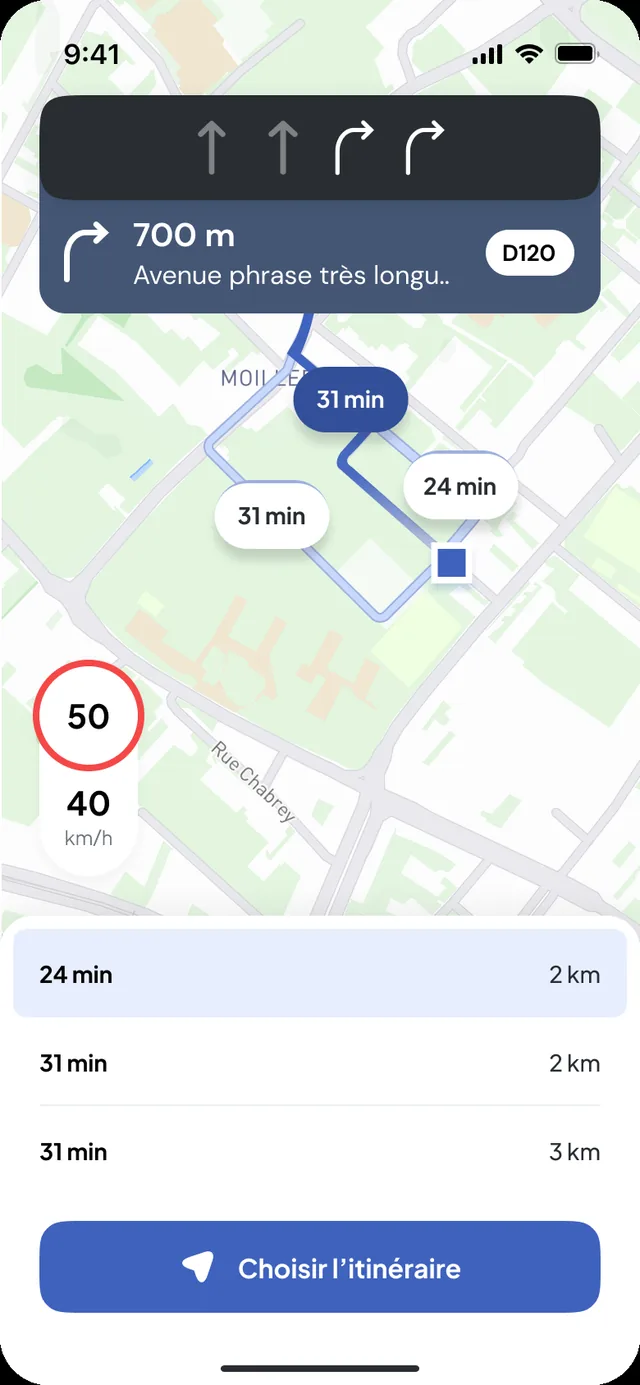
Even if your partner does not use Nereva yet, you keep receiving their orders and you organise your whole operation.


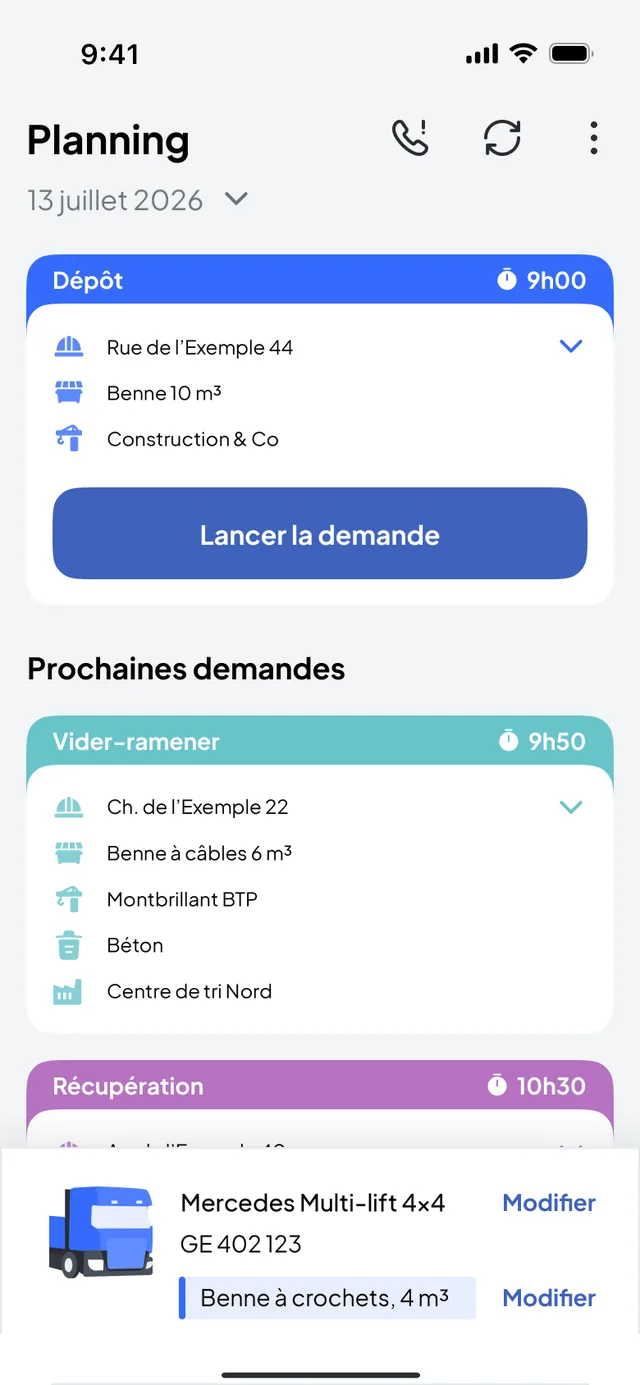
Nereva was first designed to manage end to end the transport of skips dropped on sites by multi-lift trucks, then extended to tipper trucks, flatbed trucks with crane and your entire vehicle fleet. Whatever the type of truck, your vehicles and your constraints are at the heart of the tool.
Drop, collection and rotation of skips. The trade Nereva was designed for, managed end to end.
See skip management→Transport and unloading of bulk, materials and raw materials, with tracking of rotations and quantities.
Loading and delivery of materials, machinery and equipment, with proof of execution at every step.
And your entire fleet, whatever the type of vehicle
A TMS, for Transport Management System, runs a carrier’s operations: schedule, dispatch, drivers, vehicles, missions, delivery notes and invoicing. Nereva does all of that, for construction transport. And it synchronises your operations with construction companies and their sites: the request, the schedule and the execution are shared in real time, on both sides. Whether you are replacing your current software or equipping your company for the first time, you start with the same complete platform, with no commission.
Runs your operations, inside your company
Stops at your perimeter
Coordination with sites still has to be done by hand
Designed for transport in general
Runs your operations, and synchronises you with your sites
Also open to your construction principals, connected to you in real time
Coordination goes through the platform, on both sides: that is what changes everything in the field
Built for construction transport
A single tool to manage all your site flows
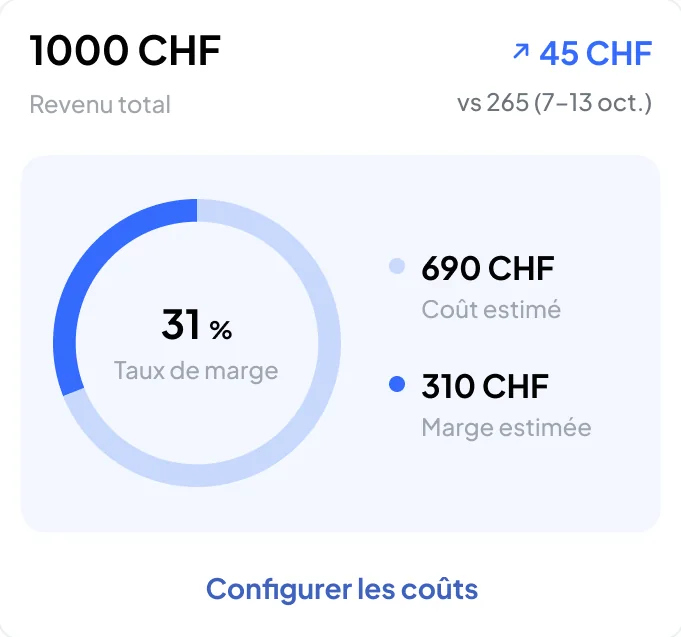
The Statistics module of the Transport back office analyses one truck over the chosen period and compares it with the fleet; the use and profitability of subcontractors are read in the same place. Enough to spot the gaps and better understand the costs, without a spreadsheet.
This simulator shows what Nereva does on top of a TMS’s job: the time and money that coordination with your sites costs you every month for lack of shared information, and that real-time synchronisation saves you. Enter your figures: fewer drivers driving for nothing, less dispatch glued to the phone.
Now see what it gives on your subscription.
Construction and transport, on both sides: that is how synchronisation makes full sense.
“The site orders directly from the mobile application, and our dispatch receives the information immediately. No more phoning to pass on or confirm an order: everyone works on the same information.”
Synchronisation with your principals (construction, general contractors and project owners, suppliers), back office, driver app, heavy-vehicle GPS, tracking, digital notes, invoicing generated from missions…
See everything that is included→ Transport features in detail→The accepted mission does not serve only the truck: the same event feeds the operator, the driver, invoicing and management: a single database, synchronised in real time.
The conductor, finally spending less time on the phone.
Their whole day in the app, no paper route sheet.
Skip dropped, the invoice can go out.
It runs the company on data from the field (Analytics and reports).
Every documented mission provides a history that operations, administration and the QHSE manager can use: the data is produced while the work is done, not re-entered for a report.
Nereva is TMS software specialised in construction-related transport. It lets transport companies manage, from a single environment, their requests, their schedule, their dispatch, their drivers, their vehicles, their missions and the traceability of their operations.
Nereva is designed for the real flows of construction sites: transport of skips, materials, bulk, waste, deliveries, collections, rotations and other transport services related to construction.
Yes. Skip management is one of Nereva’s important trade features. Drop-off, exchange, collection and rotation operations fit into the same environment as the transport schedule, the drivers, the vehicles and the missions.
No. Nereva is a TMS specialised in construction transport. Skip management is an important feature of it, but Nereva also manages materials, bulk, waste and other transport flows related to construction sites.
Yes. A transport company can use Nereva as its own TMS, even if its clients are not yet Nereva users. When both companies use the platform, their operations can then be synchronised.
TMS stands for Transport Management System: the software that runs a carrier’s operations. It receives requests, keeps the schedule, assigns trucks and drivers, tracks missions, produces delivery notes and prepares invoicing. Without a TMS, all of that lives in spreadsheets, text messages and the operator’s head.
Yes, a TMS designed for construction transport. You manage your requests, your schedule per truck, your drivers, your vehicles, your missions, your notes and your invoices in it.
On top of a classic TMS, it manages your skip fleet and can connect to your clients’ sites.
Yes. You enter the requests received by phone or e-mail yourself, then everything else happens in Nereva: schedule, missions, drivers, notes, invoicing.
When a client joins you on the platform, its requests land directly in your schedule and it follows its missions on its side, without a call.
For construction transport, yes: schedule, dispatch, drivers, vehicles, missions, notes and invoicing are covered, and your data remains exportable. What Nereva does not do: vehicle maintenance, driving times, payroll.
The switch is made without importing history: you start with today’s missions.
The schedule shows your missions per truck and per driver, hour by hour. Requests to be scheduled appear in a queue; you place them on a truck and a time slot. A change is transmitted to the driver concerned in their app.
Each request is assigned to a truck and a driver from the schedule. The driver receives it in their app with the address, the time slot, the type of skip or load and the instructions. If something changes, you reassign and they are notified.
Their day in order, in the Nereva Transports app: the next mission, the site, the skip type, the time slot, heavy-vehicle guidance. They start the mission, report the steps and take the photos.
No paper route sheet, no call to the depot to know what comes next.
Yes, within the supported scope. Nereva Transports has an offline mode: in a tunnel, a basement, the mountains, on a remote site, in a quarry or a depot with poor coverage, the driver continues the work in progress, and what is done without a network synchronises when the connection returns, according to how the product works. Heavy-vehicle GPS navigation keeps working even without a network connection. While the device is offline, nothing is transmitted to dispatch, which sees the driver as “Offline”. The details are on the Apps page.
Each truck has its record: plate and type (skip loader, hook-lift, tipper, crane, flatbed). The schedule is organised per vehicle and the mission history stays attached to the truck.
Nereva does not manage maintenance or technical inspections: that is not its job.
The fleet appears on the back-office map during missions, through the driver app: no box to install. You see which truck is where, on a mission or available.
A request that has become work for a driver: drop, exchange, collection, empty-and-return, removal with waiting, materials delivery, machine transport. The mission carries the address, the slot and the skip type, then the actual times and the photos.
The note is digital: each step of the mission is timestamped and the driver takes the requested photos. The note is archived with the mission and attached to the invoice. Your client sees it in their back office if they are on Nereva.
Invoices are built from the executed missions, with daily and monthly statements per site and per client. You check them and send them: into your client’s back office if they are on Nereva, otherwise by e-mail as a PDF.
Nereva takes no commission and does not touch your prices.
A general-purpose TMS is made for parcels or long haul: rounds, packages, pallets. Construction transport means short rotations, skips changing place, sites without a precise address and requests that move during the day.
Nereva is built for that: the site’s request types, the skip fleet, a driver app made for it, and the connection with construction companies.
15-day free trial with 2 licences. No payment method required. Then a monthly subscription, with no fixed term.