
Product · Apps
Two field apps, linked to the same platform
Nereva Transports for the driver. Nereva Commandes for the site.
One Nereva platform, with interfaces specialised by trade: two web environments for the office, two apps for the field. What the dispatcher schedules reaches the driver’s pocket; what the site requests reaches its carrier’s schedule when both companies are on Nereva.
15-day trial with 2 licences. No payment method required.
One platform
One platform, two trade web environments, two field apps
Nereva is not four products. It is a single platform in which each interface serves one trade: the office works in its web environment, the field in its app.
Transport back office + Nereva Transports
Transport back office
Requests, schedule, dispatch, fleet, skip stock, delivery notes, statements and invoicing: the transport company’s TMS, in the browser.
Transport featuresNereva Transports
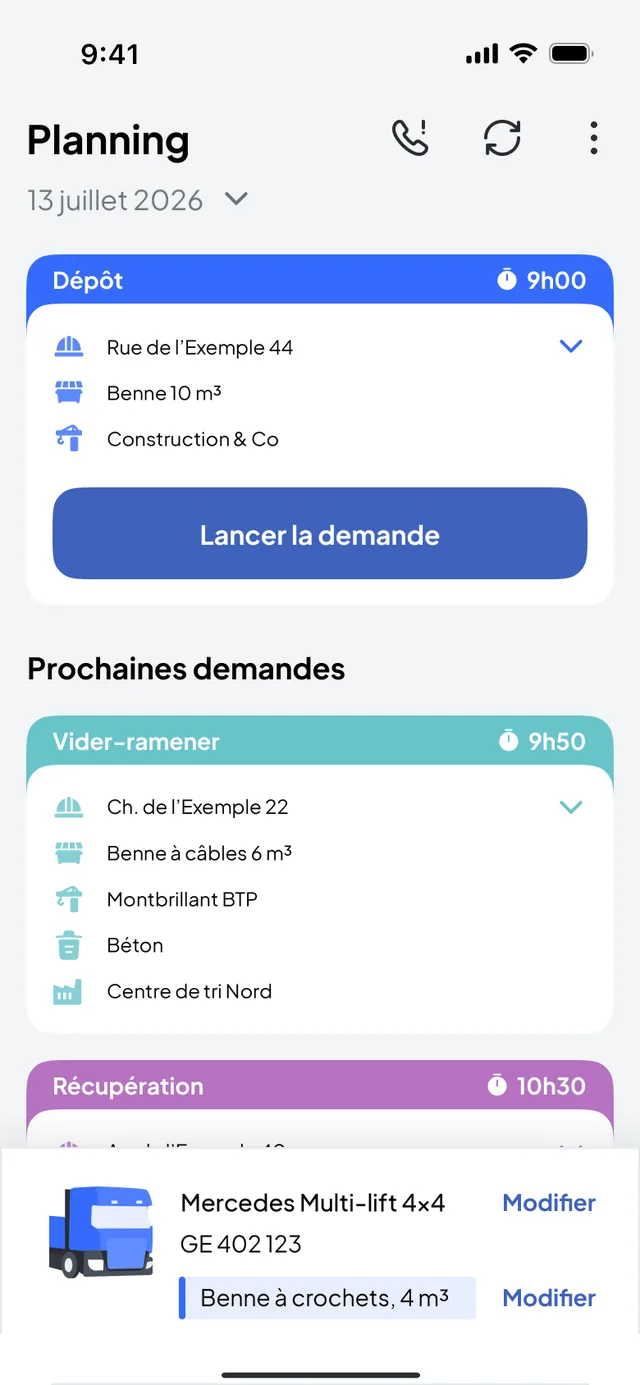
The driver app: the day’s missions, truck navigation, confirmed steps, photos.
Discover Nereva Transports
Construction back office + Nereva Commandes
Construction back office
All the sites, their requests, their history, the carriers’ statements, the users and their roles.
Construction featuresNereva Commandes
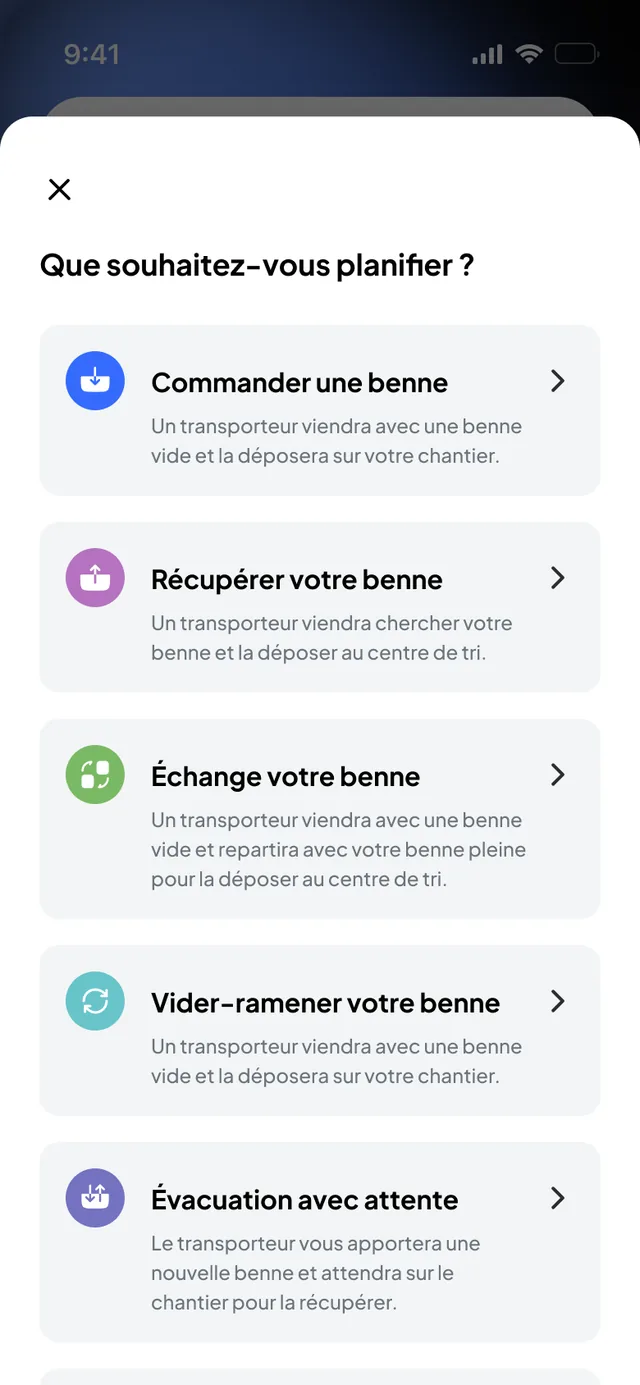
The site app: order a transport, follow the truck linked to the request, find the site’s skips.
Discover Nereva Commandes
Each company keeps its accounts, roles, permissions and environment. The information useful to the operation is synchronised between the interfaces concerned, according to roles and permissions.
Nereva Transports: the driver’s missions, from the schedule to the proof
Linked to the company’s Transport back office, the app shows the driver their day in order. They start the mission, follow the guidance to the site, confirm the steps and take the requested photos. Changes made by the dispatcher reach them in the app.
- The day’s missions: site, address, time slot, mission type, skip or material
- Truck navigation, started from the mission
- Confirmed, timestamped steps and photos attached to the mission
- Works for all your clients, on Nereva or not
Nereva Commandes: your transport requests from the site
Linked to the company’s Construction back office, the app lets the site create a structured request, schedule it, change or cancel it while it is scheduled, and follow the truck linked to an active request. The request goes to your usual carrier, who schedules and carries it out.
- Seven request types: materials delivery, drop-off, collection, exchange, empty and return, removal with waiting, custom request
- Several active sites, the skips present by type, the current and scheduled requests
- The truck linked to your request on the map, with its estimated arrival time, when the carrier is on the way
- Nereva provides neither truck, nor driver, nor skip: your partner carrier carries out the request
Synchronisation
From the request to the archive: the same path in every interface
Three synchronisations, one logic: the Transport back office with Nereva Transports, the Construction back office with Nereva Commandes, and the two companies with each other when they are connected.
Request
The site creates the request in Nereva Commandes or in the Construction back office: type, skip or material, site, time slot, note.
Nereva Commandes · Construction back officeScheduling
The carrier receives the structured request in its schedule if both companies are connected, or enters it itself. The dispatcher assigns it to a truck, a driver and a time slot.
Transport back officeExecution
The driver receives the mission in Nereva Transports, starts navigation and confirms the steps. The site sees the truck linked to its request when tracking is available.
Nereva Transports · Nereva CommandesDocumentation
Timestamped steps, photos, digital delivery note: attached to the operation, visible in the office and on site according to roles and permissions.
Transport back office · Construction back officeArchive
The history stays attached to the site, the client, the mission and the truck, in each party’s own interface.
All interfaces, according to permissions
No universal synchronisation: each company keeps its accounts, its data and its business relationships. Only the information useful to the operation moves between the interfaces concerned.
Alone or connected
Transport is autonomous, Construction works with its carrier
Transport company: a complete TMS, with or without clients on Nereva
Your clients do not need to be on Nereva: you enter their requests in your Transport back office and your drivers carry them out in Nereva Transports. When a client joins you, their request lands directly in your schedule, without re-entry.
Construction company: your requests, carried out by your partner carrier
Nereva Commandes and the Construction back office are for ordering, tracking and documenting. Execution depends on the connected carrier you chose. A construction company that genuinely runs its own transport activity is a hybrid case.
Roles and licences
Who uses what
- Dispatcher, operations, management of the transport companyTransport back office
- DriverNereva Transports
- Site manager, foreman, works manager, logistics managerNereva Commandes
- Management, works managers, secretariat, accounting of the construction companyConstruction back office
The apps are free to download; the service is billed per licence: 1 assigned role = 1 licence used, the Driver role included. Access depends on the roles and permissions configured in each company. All the features of your Nereva environment are included. See pricing
Download
Download the apps
Each user installs the app for their trade and signs in with the credentials created by their company. The download is free; prices are not shown in the stores.
Offline mode
Keep working even without a network connection.
Nereva Transports and Nereva Commandes have an offline mode. Within the supported scope, work in progress continues when the connection drops, then synchronises when the connection returns, according to how the product works.
- Tunnels and basements
- Underground car parks
- Mountain areas
- Remote sites
- Quarries and gravel pits
- Depots with poor coverage
What continues without a network
- The driver continues the work in progress in Nereva Transports, within the supported scope.
- Heavy-vehicle GPS navigation in Nereva Transports keeps working without a network connection.
- The site team continues the work in progress in Nereva Commandes, within the supported scope.
- What is done without a network synchronises when the connection returns, according to how the product works.
What waits for the connection to return
- Nothing is transmitted to other users while the device is offline: the dispatcher sees the driver as “Offline” and receives their updates when the connection returns.
- Live truck tracking and notifications resume with the connection.
- The Transport back office and the Construction back office are used in a connected browser.
Offline mode is not real time: it lets you keep working; synchronisation between the interfaces resumes when the network returns.
Your questions
The apps, in plain words
Is Nereva one platform or four products?
A single platform, with interfaces specialised by trade: the Transport back office and Nereva Transports on the transport side, the Construction back office and Nereva Commandes on the construction side. Each company keeps its accounts, roles and permissions.
Which app for whom?
Nereva Transports is the driver’s app, linked to their company’s Transport back office. Nereva Commandes is the site’s app, linked to the Construction back office: site manager, foreman, works manager or logistics manager, according to the roles configured.
Can a transport company use Nereva Transports if its clients are not on Nereva?
Yes. The Transport back office is a complete TMS: you enter the requests received by phone or e-mail and your drivers carry them out in the app. When a client is on Nereva, their request lands directly in your schedule.
Can a construction company carry out its transports alone with Nereva Commandes?
No. Nereva Commandes is for ordering, tracking and documenting; execution depends on the connected partner carrier. Nereva provides neither truck, nor driver, nor skip, nor carrier. Only a construction company that genuinely runs its own transport activity, the hybrid case, also uses the transport side.
What is synchronised between the interfaces?
The information useful to the operation, according to roles and permissions: the request, its scheduling, the mission steps, the photos and the delivery note, then the history. The site sees the truck linked to its active request, not the carrier’s fleet nor its other clients.
Are the apps free?
The download is free on the App Store and Google Play. The Nereva service is billed per licence, 1 assigned role = 1 licence used, at the rate on the Pricing page, after a 15-day trial with 2 licences.
Do the apps work without a network?
Yes, within the supported scope: Nereva Transports and Nereva Commandes have an offline mode to keep working in a tunnel, a basement, the mountains, on a remote site, in a quarry or a depot with poor coverage. What is done without a network synchronises when the connection returns, according to how the product works. Without a network, nothing is transmitted to other users, and the back offices are used in a connected browser.
Does the site see the position of each skip?
No. GPS follows the truck on a mission, through the driver’s app. The site sees the truck linked to an active request when tracking is available; skips are managed by type and state, without individual location.
Each feature is described in detail on the Transport features and Construction features pages.
Going furtherFrom the foreman to the driver, the right information in the field.
15-day free trial with 2 licences. No payment method required. Monthly subscription afterwards, with no fixed term.