
Alerts and notifications
Alerts and notifications: knowing what changes, without phoning
The notifications that exist today, role by role.
A request accepted, scheduled, modified or cancelled, a carrier on the way, a skip dropped at the sorting centre: each event notifies the people concerned, in their interface, according to roles and permissions. This page describes what actually exists; predictive alerts, for their part, fall under EVA, under development.
15-day free trial · 2 licences included · No payment method required
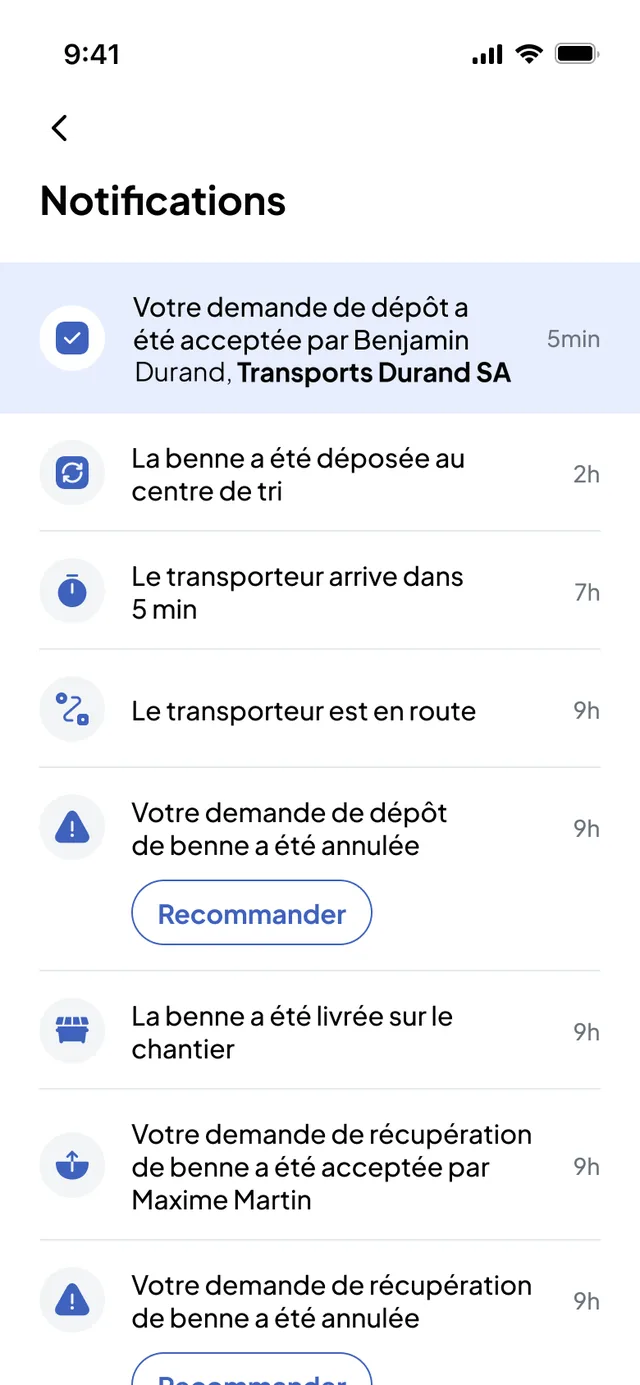

Notifications available today
What everyone receives, as the product does it
Three interfaces, three lists. Each notification belongs to a request: it is timestamped and attached to the operation concerned.
The site
Nereva Commandes and Construction back office.
- Request accepted by the carrier, with the person’s name
- Request scheduled for a date and time (the time may vary slightly), modified or unscheduled by the carrier
- Carrier on the way, carrier arriving in five minutes
- Skip delivered on site, skip dropped at the sorting centre
- Request cancelled by the carrier, postponed by the driver, slot expired: to be reordered
- Full skip passing through the carrier’s depot, delivery to the sorting centre rescheduled
Operations
Transport back office.
- The client modified the request: type, skip, volume, site or slot
- The client cancelled the request: adjust the driver’s schedule
- The driver is waiting for a schedule update
- The driver cannot complete the request: it moves to postponed requests
- Slot modified by the client: the request goes back to “To be scheduled”
The driver
Nereva Transports.
- New request received
- Current request modified or moved by the administrator
- Request cancelled by the client or by the administrator
- Skip ready for collection on site
- Request closed; prolonged inactivity
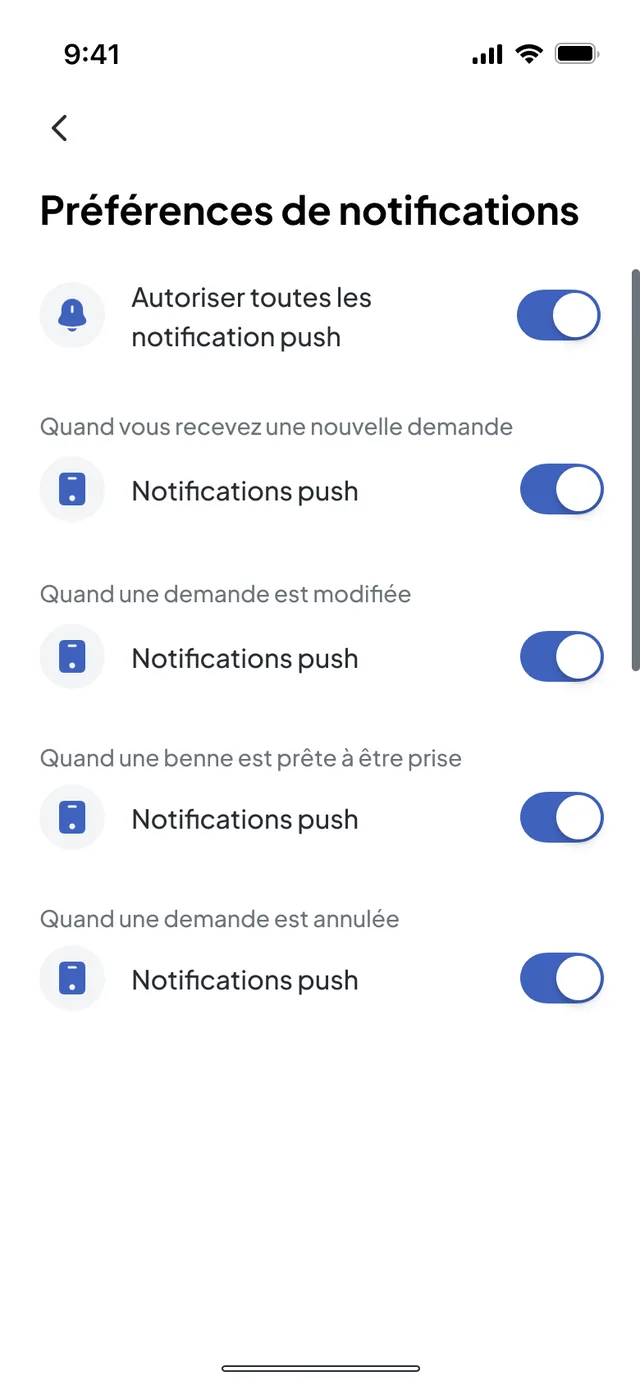
- Push notification preferences, type by type
A notification follows roles and permissions, not curiosity
The site receives what concerns its requests; operations, what affects its schedule; the driver, what changes in their day. Nobody “sees everything”: each user accesses their company’s information, within the limits of their role. On the driver side, push notifications are set type by type.
- Site: Foreman in Nereva Commandes, Construction back office managers according to their access type
- Operations: Transport back office managers
- Driver: Driver role in Nereva Transports, with their notification preferences
- A carrier does not see another carrier’s flows; a site only sees its own requests
Site side, in the Construction back office
The site manager receives in their back office the same events as the app: request awaiting acceptance, scheduled, modified, unscheduled or cancelled by the carrier, slot expired. They cancel or recreate the request from the notification.
- Request awaiting acceptance by the carrier
- Request scheduled for the stated day and time, with the mention “the time may vary slightly”
- Request modified or unscheduled by the carrier
- Request cancelled by the carrier: please place your request again

Operations side, in the Transport back office
When a client modifies or cancels a request, or when a driver cannot complete it, operations are notified in their back office and adjust the driver’s schedule from the notification.
- Request cancelled by the client: adjust the schedule of the driver concerned
- Request the driver cannot complete: postponed, to be rescheduled
- Materials delivery cancelled en route: bring the material back to the gravel pit or reschedule

Offline
Without a network, no notification: work in progress continues, transmission waits
The Nereva Transports and Nereva Commandes field apps have an offline mode. Within the supported scope, work in progress continues without a network, then synchronises when the connection returns, according to how the product works. Notifications, for their part, require a connection.
- Tunnels and basements
- Remote sites
- Quarries and gravel pits
- Mountain areas
- Nothing is transmitted to other users before the network returns
- No live notification offline
- Offline mode is not real time: synchronisation resumes when the network returns
- The dispatcher sees the driver as “Offline” in the schedule

Future alerts
Predictive alerts are not notifications: they fall under EVA
Everything above exists. What follows is under development or not planned, and the text says so.
Event notifications
- Request accepted, scheduled, modified, cancelled, postponed
- Carrier on the way, arriving in five minutes
- Skip delivered, skip dropped at the sorting centre
- Driver waiting for a schedule update
Anticipation alerts (EVA)
- The day’s tensions spotted in advance
- Adjustment proposals submitted to the dispatcher
- No date announced
What we do not invent
- “Smart” delay alert, anomaly alert
- Cost alert, CO2 alert
- Safety alert, compliance alert
- Vehicle maintenance alert, accident risk alert
A delay does not trigger an automatic alert today: what the site receives is “carrier on the way”, “arriving in five minutes” and the slot changes announced by the carrier.
Go further
The pages related to notifications
- Mobile appsNereva Transports and Nereva Commandes, offline mode included
- Transport featuresSchedule, dispatch, missions, drivers
- Construction featuresRequests, tracking, documents
- Forecasts and tensionsThe status of each anticipation capability
- EVAThe anticipation engine, under development
Your questions
Alerts and notifications, plainly
Does the schedule update for everyone?
A modification or a cancellation entered once is reflected on the request concerned and notifies the people concerned, according to roles and permissions: the site, operations and the driver, each in their interface.
Am I warned when the carrier arrives?
Yes: the site receives “the carrier is on the way” then “the carrier arrives in 5 min” in Nereva Commandes, from the driver’s mission.
Am I warned automatically in the event of a delay?
There is no automatic delay alert. What exists: the “on the way” and “arriving in 5 min” notifications, and the slot or scheduling changes announced by the carrier. The estimated arrival time is displayed on the map during the mission.
Can the driver choose their notifications?
Yes. In Nereva Transports, push notifications are set type by type: new request, request modified, skip ready to be collected, request cancelled, request closed, inactivity.
Do notifications work offline?
No. Notifications require a connection. Without a network, work in progress continues within the supported scope and synchronises when the connection returns; nothing is transmitted to other users before that.
Does Nereva send alerts on costs, safety or compliance?
No. No cost, CO2, safety, compliance, maintenance or accident risk alert exists. Anticipation alerts (tensions spotted in advance) fall under EVA, under development, without a date.
Does Nereva step into the commercial relationship?
No. Your partners and your business relationships remain yours. Nereva synchronises operations without stepping into the commercial relationship. It takes no commission on flows.
Other questions? The general FAQ and the Apps pages complete these answers.
Go furtherRequest accepted, truck on the way, skip dropped: everyone is notified, without a call.
15-day free trial with 2 licences. No payment method required. Monthly subscription afterwards, no long-term commitment.