
Environmental monitoring
Environmental monitoring: your site flows, documented
Waste, skips, removals, materials: what operations have documented.
Nereva documents the transport flows of your sites as they happen: the request, the timestamped steps, the waste type and quantity when entered, the sorting centre receipt, the photos. It is this base, site by site, that your environmental and QHSE teams use in their own processes.
15-day free trial · 2 licences included · No payment method required
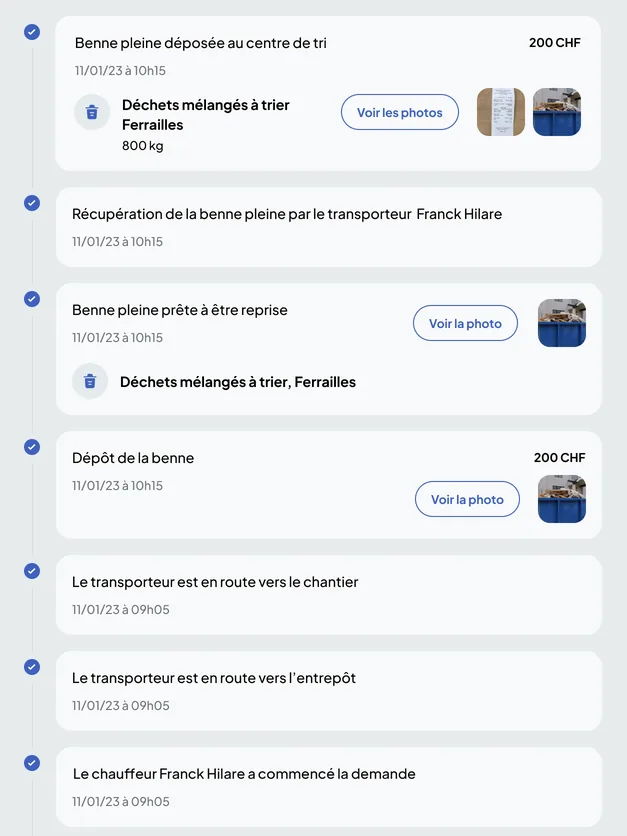
From request to history
Each flow leaves a trace at the moment it happens
Environmental monitoring requires no additional entry: it relies on requests and missions as they are created, carried out and documented in Nereva.
Request
The site requests a skip, a removal, an exchange, a materials delivery: skip or material type, time slot, address.
Nereva Commandes · Construction back officeExecution
The driver reports the steps: on the way, skip dropped or collected, drop at the sorting centre. Each step is timestamped.
Nereva TransportsDocumentation
Entered waste type and quantity, attached sorting centre receipt, photos requested from the driver, digital note.
Transport back office · request threadHistory
Per site, per client, per truck: the executed requests, their documents and the statements, available afterwards.
Back offices · Analytics
These elements are the faithful reflection of the entries made by users, timestamped and attached to the operation (Terms of Use, art. 16 bis).
Knowing what left each site, and where it was dropped
A removal in Nereva carries its site, its skip, its carrier and its timestamped steps up to the drop at the sorting centre. The waste type and quantity are entered in the request, and the sorting centre receipt can be attached to it.
- Drop-off, collection, exchange, empty-and-return, removal with waiting: five skip operations, in the same schedule as the rest of the transport
- Waste type, unit and quantity entered in the request
- Time of the drop at the sorting centre, timestamped by the driver’s app
- Sorting centre receipt and skip photos attached to the request

Materials deliveries follow the same path
A materials delivery is a request like any other: material, requested quantity, time slot, site, carrier. It is carried out and documented by the driver, then retrievable in the site history.
- Material type and requested quantity, entered in the request
- Timestamped delivery steps, digital note and photos
- Site history and statements sent by the carrier

Entered quantities and sorting centre receipts: supporting documents attached to each removal
The weight or quantity of a removal is entered by users, with its unit, and the sorting centre receipt can be attached to the request. Nereva keeps these elements as operational data of the operation, without any weighing or weight certification on its part.
- Quantity and unit entered in the request, editable by authorised users
- Sorting centre receipt attached as a file, photos of the full skip and of the dropped skip
- These elements serve as available supporting documents; their value depends on the framework applicable to your activity

QHSE and environment
The same history serves the environmental engineer, the QHSE manager and the project owner
The environmental engineer follows the waste flows; the QHSE manager prepares inspections; the project owner asks for supporting documents. All start from the same documented requests, according to the access their company has given them.
Find a removal
Per site and per date: the request, the carrier, the truck, the timestamped steps, the drop at the sorting centre.
Open the supporting documents
Entered waste type and quantity, sorting centre receipt, photos, digital note.
Pass on
Daily and monthly statements and per-truck reports in PDF or XLSX; at the end of the contract, data returned on request.
Documenting and meeting your obligations
Nereva documents the flows; your teams keep control of their obligations
Teams keep control of their regulatory obligations and validations, waste management included (Terms of Use, art. 14), while Nereva centralises traceability and the operational follow-up elements.
What Nereva documents
- Requests for skips, removals, exchanges and deliveries
- The timestamped steps, up to the drop at the sorting centre
- The waste type and quantity, when entered
- The receipts, photos and notes attached to the request
- The history per site, per client and per truck
What remains in your tools and processes
- CO2 calculation, carbon footprint and site footprint, prepared by you from the kilometres and flows recorded
- The regulatory register, declarations and consignment notes, which you prepare with the supporting documents retrieved
- Recycling and recovery rates and treatment certificates, established in your own processes
- Legal weighing and weight certification
- ADR management and complete regulatory traceability
Nereva organises and documents transport; the sorting line, weighing and the industrial operation of the centre remain in the sorting centre’s own tools.
Go further
The pages that complement environmental monitoring
- QHSE managerFinding operations and their supporting documents
- Sorting centres and recyclingTransport, fleet and skips of sorting centres
- Skip managementSkip fleet, rotations, drop-offs, exchanges
- Construction companiesRequests, tracking and documents, site by site
- Transport companiesThe TMS: schedule, missions, notes, statements
- Analytics and reportsDashboard, statements, history
- EcologyFewer empty kilometres, documented flows
Your questions
Environmental monitoring, plainly
Does Nereva calculate CO2 emissions?
Nereva records the kilometres driven per mission and the executed flows; the CO2 calculation and the carbon footprint are done in your own processes, from this data.
Is the tonnage recorded?
The quantity and its unit are entered in the request by users, and the sorting centre receipt can be attached to it. This is operational data, kept together with the receipt when it is attached.
Does Nereva keep the waste register?
Nereva makes documented requests retrievable, with their supporting documents, so that you can meet your own obligations; the regulatory register, declarations and consignment notes remain prepared by you.
What is waste tracking in Nereva?
For each documented removal: the site, the skip, the carrier, the timestamped steps up to the drop at the sorting centre, the entered waste type and quantity, the receipt and the photos. All of it is found per site and per client.
Can the project owner obtain supporting documents?
You find the operation concerned and its available elements, and you pass on the statements or documents you consider useful. The project owner’s requirements depend on the project and the applicable regulations.
Does Nereva manage the sorting centre?
No. Nereva organises and documents transport; the sorting line, weighing, material stock and the industrial operation of the centre remain managed by the centre’s own tools.
Does Nereva step into the commercial relationship?
No. Your partners and your business relationships remain yours. Nereva synchronises operations without stepping into the commercial relationship. It takes no commission on flows.
Other questions? The general FAQ and the QHSE manager page complete these answers.
Go furtherWaste removals, materials, supporting documents: documented site by site.
15-day free trial with 2 licences. No payment method required. Monthly subscription afterwards, no long-term commitment.