



On site
The foreman
All the site’s transport logistics, from their phone.
- Orders transport, materials and skips directly from the site
- Follows deliveries and sees trucks arrive
- Anticipates delays, limits idle teams
Reducedcalls to the depot

Nereva lets construction companies create, send and follow their construction transport requests with their usual carriers. The request leaves the site, the carrier receives it in its schedule, and everyone follows the execution in real time.
Nereva is a software platform, not a transport company: your carriers and your terms remain yours.

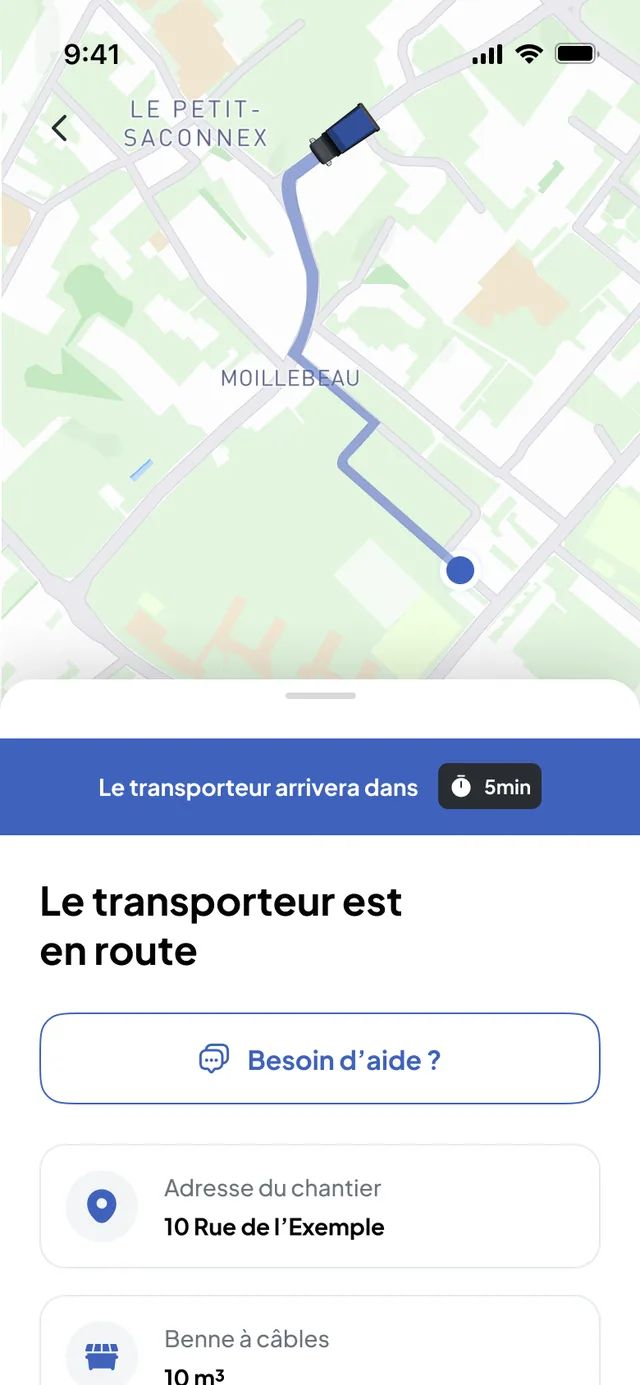
A real site, a real truck, a real skip exchange. The manager orders from their phone: the carrier receives the request, the driver and the site follow it in their app.


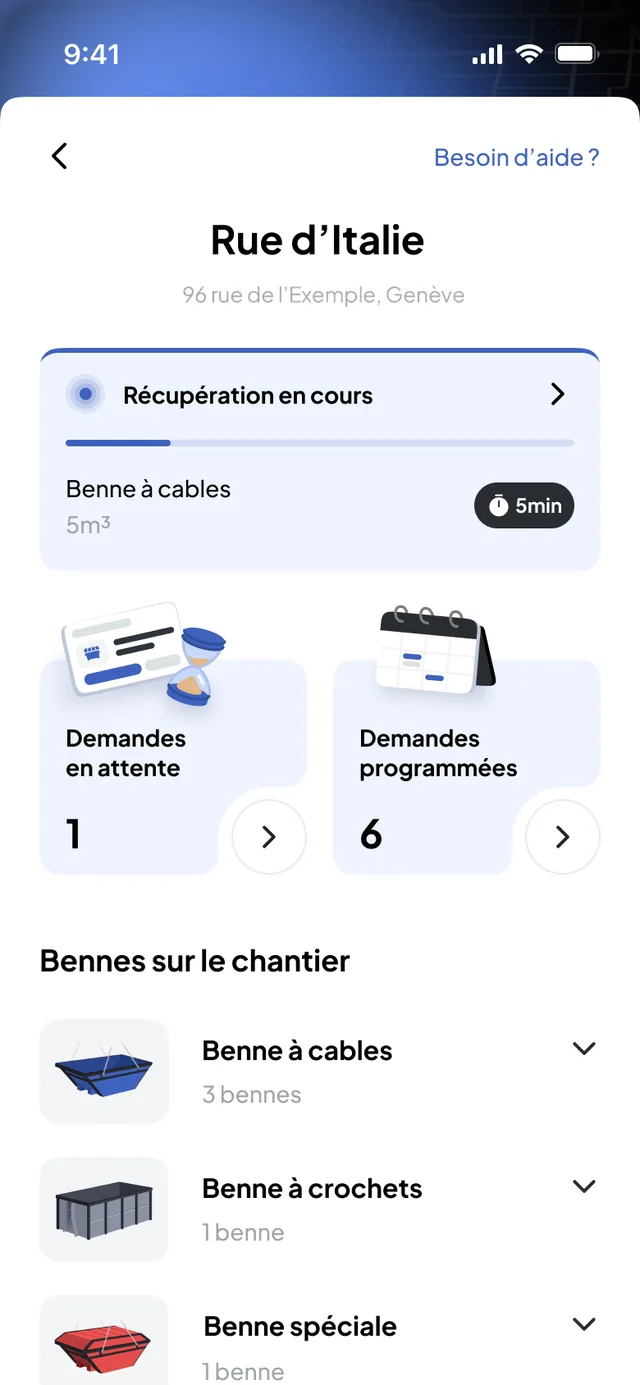
The site needs to see its transport: what is ordered, what is arriving, what is done. Today this information travels by phone, by e-mail or across separate tools, and everyone re-enters it on their side.
Pick-up, times, delivery, contingencies: the information exists, but it is spread between the site, the office and the carriers, and passed on piece by piece. Everyone rebuilds their own version and checks it.
Your requests go from the platform to your usual carriers, without changing provider or terms. The carrier plans and executes in its own tool; you follow the same mission in real time, with the delivery notes and photos, whichever carrier it is.
Two trades working together, on a single piece of information : the site sees its truck arriving, the carrier receives clear requests, and nobody needs to call back to find out where things stand.
Your foreman orders transport from their phone, follows the delivery live and has no one to call back. Result: fewer teams and machines waiting around.
Fewer teams and machines waiting for the truckThe carrier’s invoices are built from each request. Fewer errors, less time spent rechecking everything.
Fewer delays and corrections due to poor coordinationYou place your orders and modify them whenever you want, without picking up the phone. Site managers and carriers are notified automatically.
Fewer calls with carriers, who are notified automatically“With Nereva, our requests go straight from the site and the carrier receives the information without us having to multiply calls. We see what is planned, what changes and what is done, in the same place.”
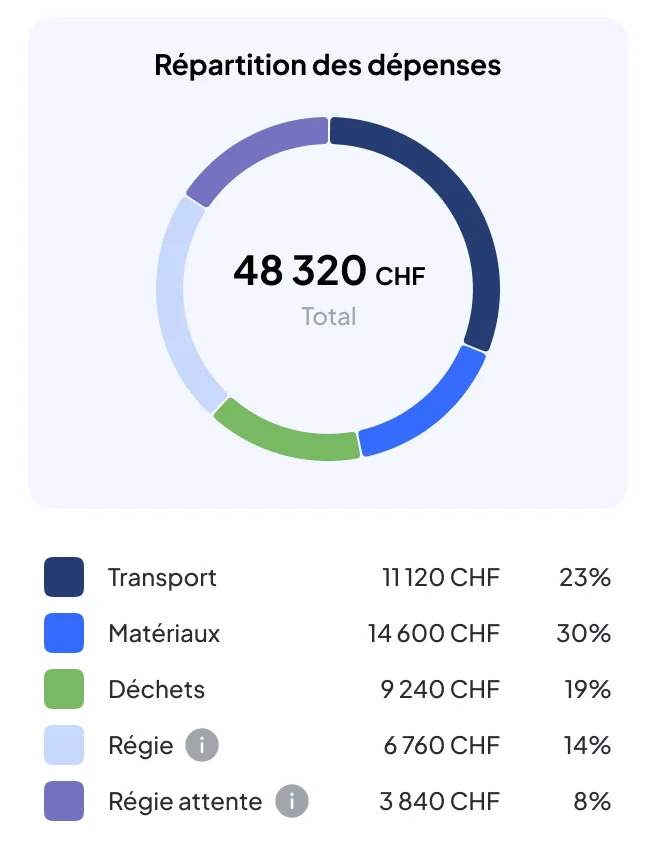
The Statistics module of the Construction back office shows what your requests cost over the period: by item, by request type and by site, each indicator compared with the previous period. Enough to identify gaps between sites more easily and steer the activity better.
Managing your sites, your orders and your schedules: good software can do that, and so can Nereva. This simulator shows what Nereva does on top: the time and money that coordination with your carriers costs you every month for lack of shared information, and that real-time synchronisation saves you. Enough to understand what we do, and what you gain with us. Enter your figures.
Site manager, works manager.
What a team with its machines waiting costs.
Ordering transport, following up, finding out where the delivery is.
Per site. Often the most expensive item: team and machines immobilised.
Checking notes, ticking off invoices, handling discrepancies.
Conservative assumption. Raise or lower according to your reality.
The foreman orders and follows the delivery without calling anyone back.
The arrival time is visible live: teams are positioned at the right moment.
Every delivery is traced, notes and invoices cross-check on the same request.
One licence per assigned role, office and field combined.
Now see what it gives on your subscription.
Construction and transport, on both sides: that is how synchronisation makes full sense.
Site back office, Nereva Commandes app, multi-site, shared schedule, tracking of skip and bulk requests, checking of notes and invoices, cost control…
See everything that is included→ Construction features in detail→The foreman’s order does not stop at the site: the same event serves four trades, on a single database synchronised in real time. No one re-enters anything, no one chases information.
All the site’s transport logistics, from their phone.
An overall, real-time view of all their sites.
Documents file themselves.
It pays on complete documents, already reconciled.
Skips, waste, materials, machines: each request placed from the site keeps its requester, its site, its timestamps, its notes and its photos. The QHSE manager finds the context of an operation there without depending on e-mails, messages or the teams’ memory.
From the site app or the back office: you choose the movement (drop, exchange, collection, empty-and-return, removal with waiting), the skip type, the time slot and the site. The request lands in your usual carrier’s schedule.
You follow the skip until collection, with the photos. On their side, your carrier manages their skip fleet and rotations in the same software: skip management.
Every request leaves the same way: the type of transport, the place, the time slot, the details useful to the driver (access, contact on site). It is sent to the carrier of your choice among your partners, who schedules it. No call to launch or confirm.
You create a removal request with the waste type, the container and the time slot. The carrier carries it out; the time of drop at the sorting centre, the weight when entered and the photos stay attached to the request.
You find them again for your supporting documents and for the project owner.
A materials delivery is requested with the nature, quantity, place and time slot; it goes to the carrier or the supplier you work with. A machine transport is requested the same way.
For a need outside the usual boxes, the custom request leaves structured, with its details.
In the back office and the app: received, scheduled, under way, completed. During the mission, the map shows the truck and the estimated time of arrival. At the end, the photos and the note are attached to the request.
The same status is visible at your carrier’s.
Yes, within the supported scope. Nereva Commandes has an offline mode: in a basement, a tunnel, the mountains, on a remote site or in a quarry with poor coverage, the site team continues the work in progress, and what is done without a network synchronises when the connection returns, according to how the product works. While the device is offline, nothing is transmitted to the carrier. The details are on the Apps page.
You invite your usual carriers from your back office; each keeps its terms and prices. Several carriers can serve the same site. If you also transport with your own fleet, that is the hybrid use case: construction and transport in the same account.
As long as a carrier has not joined Nereva, you carry on with them as today.
No. Nereva is a software platform: it transports nothing, hires out no skips and sells no service. Your carriers remain your providers and invoice you directly.
Nereva takes no commission and does not touch your prices.
Those you authorise: foreman, site manager, works manager. Roles and permissions determine who orders, who validates, who consults. Each request keeps the name of the person who placed it.
For each request, the photos and the timestamped note. For each period, your carrier’s invoices, built from the executed requests: in your back office if they are on Nereva, by e-mail otherwise.
Enough to check an invoice on facts, not from memory.
In construction, no one has time to decipher an endless price grid or wait for a ten-page quote. Nereva is a simple price: a single licence, the same for everyone, all inclusive. You look, you understand, you get started. And the price per licence stays the same, however many licences you have.
15-day free trial with 2 licences. No payment method required. Then a monthly subscription, with no fixed term.