
Sorting and recycling centres
Sorting centres: your transport, fleet and skips in one TMS
Site requests, truck schedule, drivers, skip stock, delivery notes and statements: one environment, from the office to the cab.
For sorting and recycling centres that run their own trucks and their own skip stock. The Transport back office receives site requests, keeps the schedule and the dispatch, follows the fleet and the skip stock, produces delivery notes and statements. Nereva Transports gives each driver their day, truck navigation and the photos to take, on site and on arrival at the centre.
15-day trial with 2 licences. No payment method required.

A transport operation in its own right
A sorting centre is also a transport operation
As soon as your trucks drop off, swap and collect skips on construction sites, you run a transport operation: requests to receive, a schedule to keep, drivers to guide, proof to keep. Nereva’s Transport side is built for that, and your skip stock is managed in the same place.
Your trucks
Transport back officeEach truck has its record: plate, make and model, lifting system, gross vehicle weight, status. The schedule is organised per truck and per driver, and during missions the trucks appear on the map thanks to the driver app.
See fleet trackingYour skips
Skip stockThe stock is managed by type, volume and status: at the depot, on site, on a truck or in maintenance. Each site shows the skips present. Truck = GPS, skip = management: no individual geolocation of skips.
See skip managementYour requests
Site requestsSkip drop-off, skip exchange, collection, empty and return, removal with waiting, materials delivery, custom request: requests land in your queue, created by your clients on Nereva or entered by you when they call.
See the Transport features
Operational flow
From the site to the sorting centre, every round follows the same path

- 1
The request
The site orders a skip or its removal: type of operation, container, time slot, instructions. It creates it on Nereva, or you enter it when it comes by phone or e-mail.
- 2
Scheduling and dispatch
The request waits in the queue, then is placed on a truck, a driver and a time slot. The driver sees it at once in the app; whatever changes is visible in the office and in the cab.
- 3
Execution
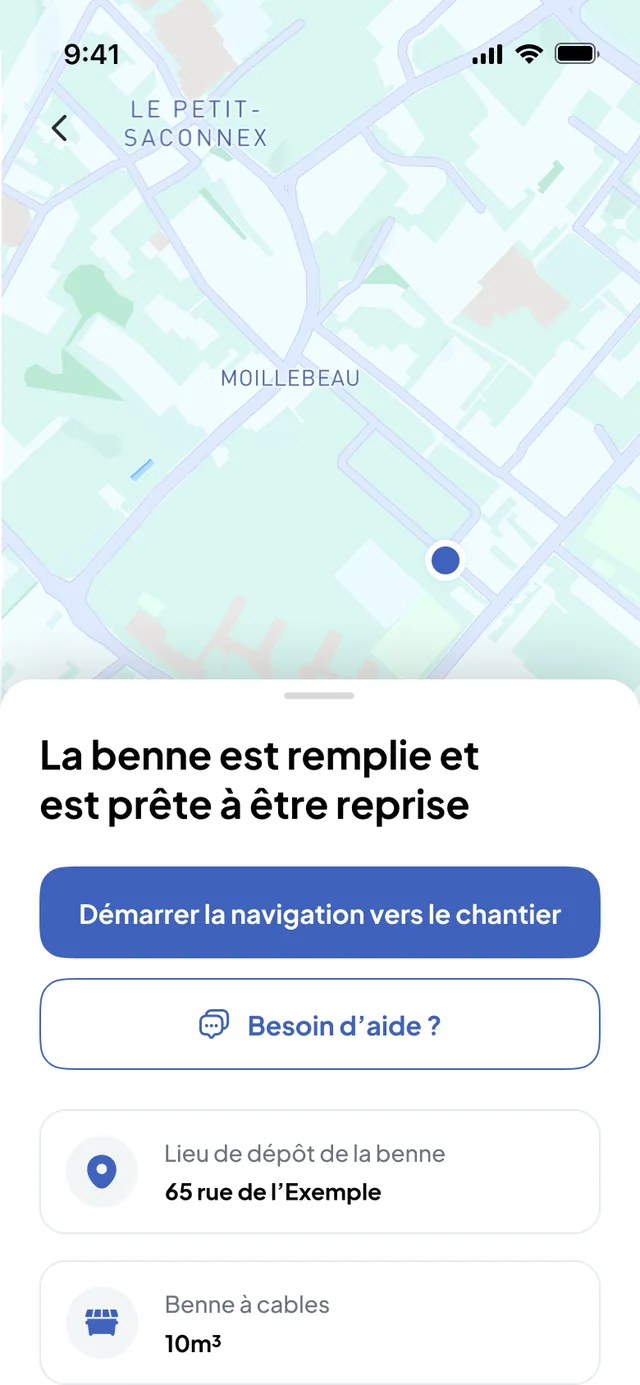
The driver starts the mission, navigates to the site, drops off or collects the skip and takes the requested photos. Each step is timestamped by the app.
- 4
Back at the centre
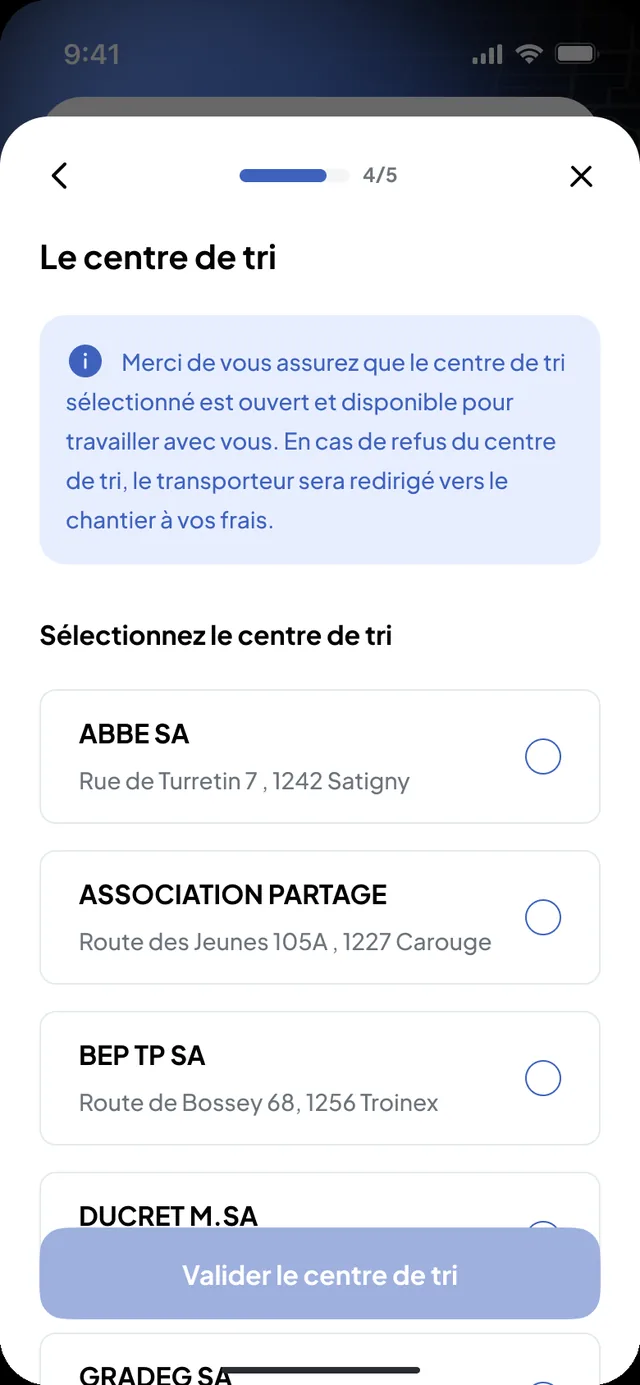
On arrival, the driver validates the drop-off: skip photo, receipt photo, weight and weighing number if they fill them in. The digital delivery note is archived with the mission and attached to the statements and the invoice.
An operations history, not a regulatory register. Nereva records what was done, when and by whom. It does not handle weighing, waste registers or invoicing by weight. See proof and documentation
Your skip stock, by type and by status, in the same software
Chain skip, hook-lift skip, trailer: each skip has a type, a volume and dimensions. The stock is followed by status, at the depot, on site, on a truck or in maintenance, and each site shows the skips present.
- The stock by type and by status, on one screen: how many skips are out, how many are left at the depot.
- The skips present on each site, with the movements requested.
- Truck = GPS, skip = management: a skip is followed by its status and its movement history, not by a tracker.
- Individual identification of each skip (number, photo, history) is in development.

Schedule · Fleet · Drivers
The schedule per truck, the fleet on the map, the drivers in the app
The dispatcher decides; Nereva makes the decision visible to everyone: in the office, in the cab and, if the site is on Nereva, on the client side.

- The schedule, hour by hourDaily view per truck and per driver, weekly view of the load, queue of requests to schedule, immediate requests at the top, blocked time slots with a comment. No automatic optimisation: Nereva does not reassign your trucks for you.
- The fleet, during missionsEach truck has its record. During missions, trucks appear on the Transport back office map, with the sites and the depots, thanks to the driver app: no box to install.
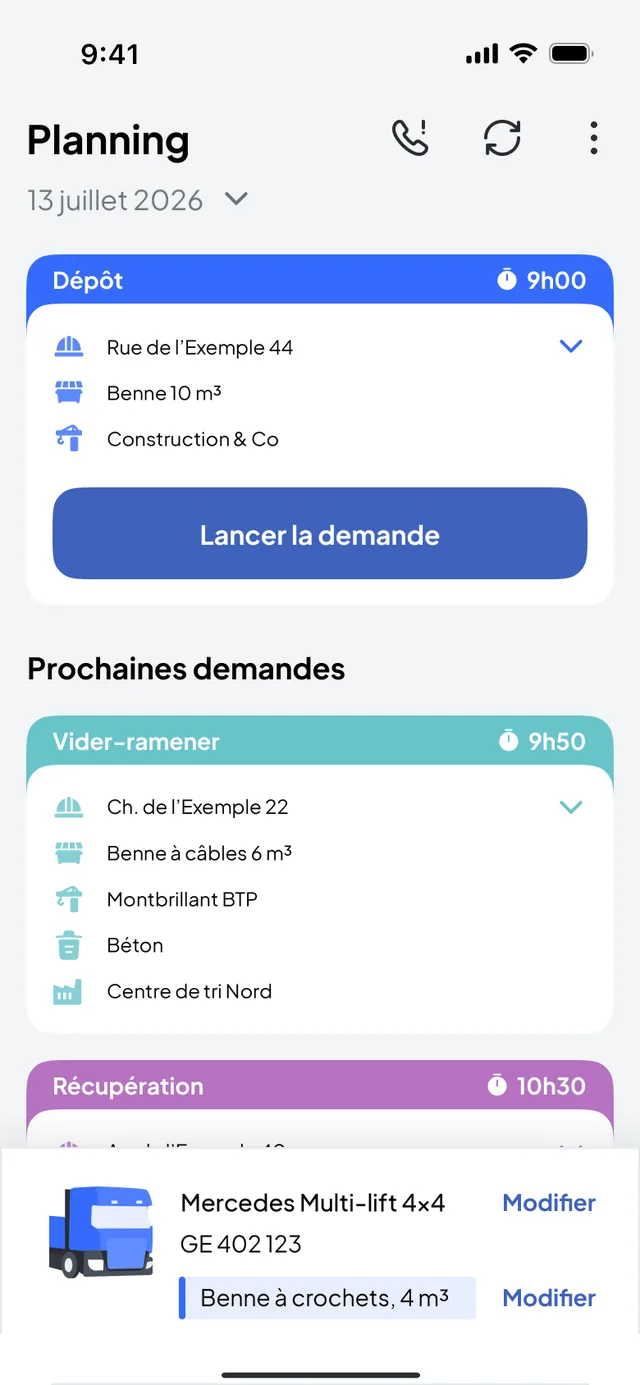
- The drivers, without calling the depotEach driver receives their day in Nereva Transports: missions in order, addresses, time slots, instructions, truck navigation. A change of address or time slot is visible live.
In the cab, the day in order and the proof taken on the spot
The driver opens their day: the next mission, the site, the skip type, the time slot, the instructions. They start truck navigation, report the steps and take the requested photos: the skip dropped off, the full skip, the skip at the sorting centre, the receipt.
- Missions in order, with the truck and the skip on board.
- Steps timestamped by the app: departure, arrival, drop-off, collection, completion.
- Photos and receipts taken on the spot, attached to the mission.
- A request the driver cannot carry out is postponed and returns to the schedule, to be rescheduled.
Sites and clients
Your site clients remain your clients

Without waiting for your clients
You enter the requests received by phone or e-mail yourself, then everything else happens in Nereva: scheduling, dispatch, missions, drivers, delivery notes, statements and invoicing. Your clients have nothing to install.
When a client is on Nereva
Their request lands directly in your schedule. They then see their request scheduled, the truck linked to their request approaching, the mission completed and the delivery note. They see neither your fleet nor your other clients.
Your partners and your business relationships remain yours. Nereva synchronises operations without stepping into the business relationship. 0% commission on your transports.
Scope
What Nereva centralises, and what it does not replace
What Nereva centralises
- Site requests and the schedule per truck and per driver.
- Dispatch, missions and their status.
- Drivers, truck navigation and timestamped steps.
- Truck records and the fleet on the map during missions.
- The skip stock by type and by status.
- The photos, receipts and digital delivery note of each mission.
- Daily and monthly statements per client and per site, PDF and XLSX export, invoices.
What Nereva does not do
- Managing the sorting centre itself: sorting line, materials, stocks.
- Weighing and the weighbridge.
- Regulatory registers and declarations.
- Invoicing by weight.
- Vehicle maintenance, driving times, payroll.
The weight and the waste type appear in the mission when the driver fills them in. They document the operation; they do not make Nereva sorting centre management software.
Your questions
Nereva for a sorting centre, in plain terms
Does Nereva manage my sorting centre?
No. Nereva manages your transport activity and your skip stock: requests, scheduling, dispatch, drivers, fleet, skips, delivery notes and statements. The sorting line, weighing, regulatory registers and invoicing by weight stay in your own tools.
Can I use Nereva if my site clients do not use it?
Yes. You enter the requests received by phone or e-mail, then everything else happens in Nereva: scheduling, dispatch, missions, drivers, delivery notes, statements and invoicing. When a client joins you on the platform, their requests land directly in your schedule.
Is each skip geolocated?
No. The GPS follows the truck on a mission, thanks to the driver app. Skips are managed by type and by status, at the depot, on site, on a truck or in maintenance, with their movement history. Individual identification of each skip is in development.
What happens when the truck arrives at the centre?
The driver validates the drop-off in Nereva Transports: skip photo, receipt photo, weight and weighing number if they fill them in. This information is attached to the mission and to the digital delivery note, which is attached to the statements and the invoice.
How much does Nereva cost?
69 CHF excluding VAT per licence per month in Switzerland, 69 EUR excluding VAT in Europe, with no fixed term and no commission on your transports. 15-day free trial with 2 licences, no payment method required.
All the questions from carriers are in the FAQ.
Going furtherSorting centres: your trucks, your skips and your requests in one software system.
15-day free trial with 2 licences. No payment method required. Then a monthly subscription, with no fixed term.