
Product · Nereva Commandes
Nereva Commandes: your transport requests from the site
The site app, linked to your company’s Construction back office.
The site manager, the foreman or the works manager creates the request directly from the site: request type, skip or material, time slot, note. The request goes to your usual carrier, who schedules and carries it out; the site follows the truck linked to its request and finds its delivery notes and photos.
15-day trial with 2 licences. No payment method required.
Nereva Commandes, free on the App Store and Google Play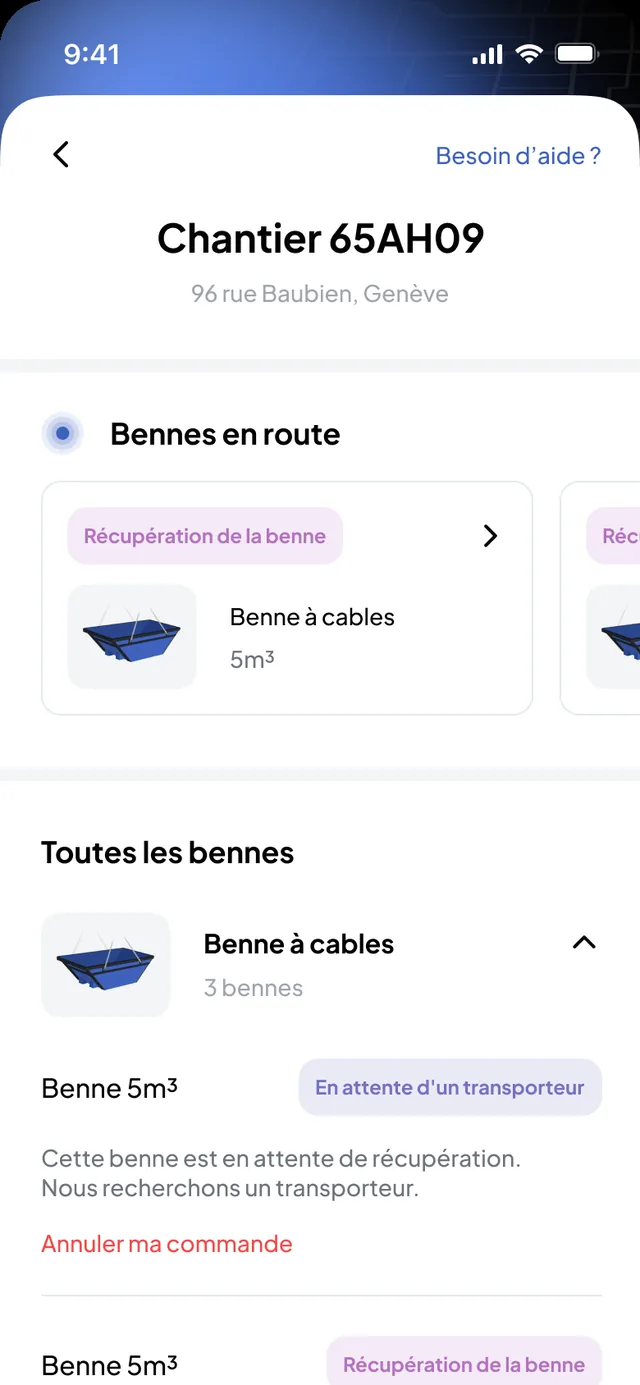
Your active sites, in your pocket
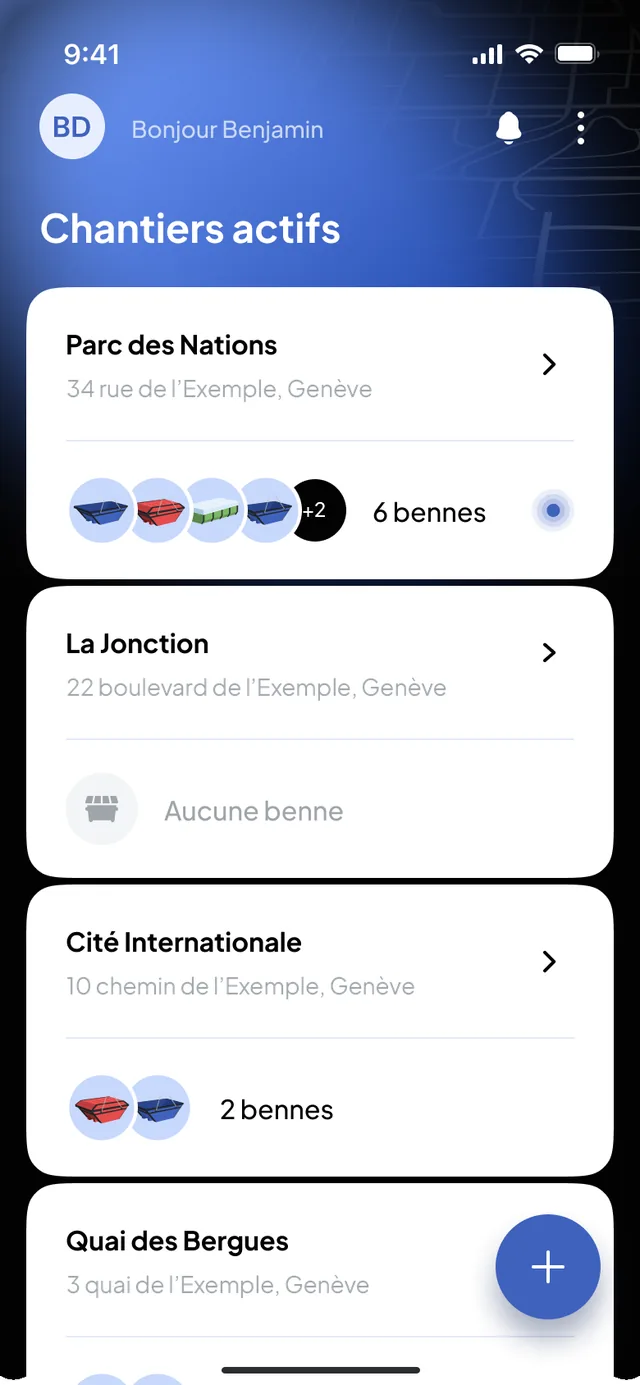
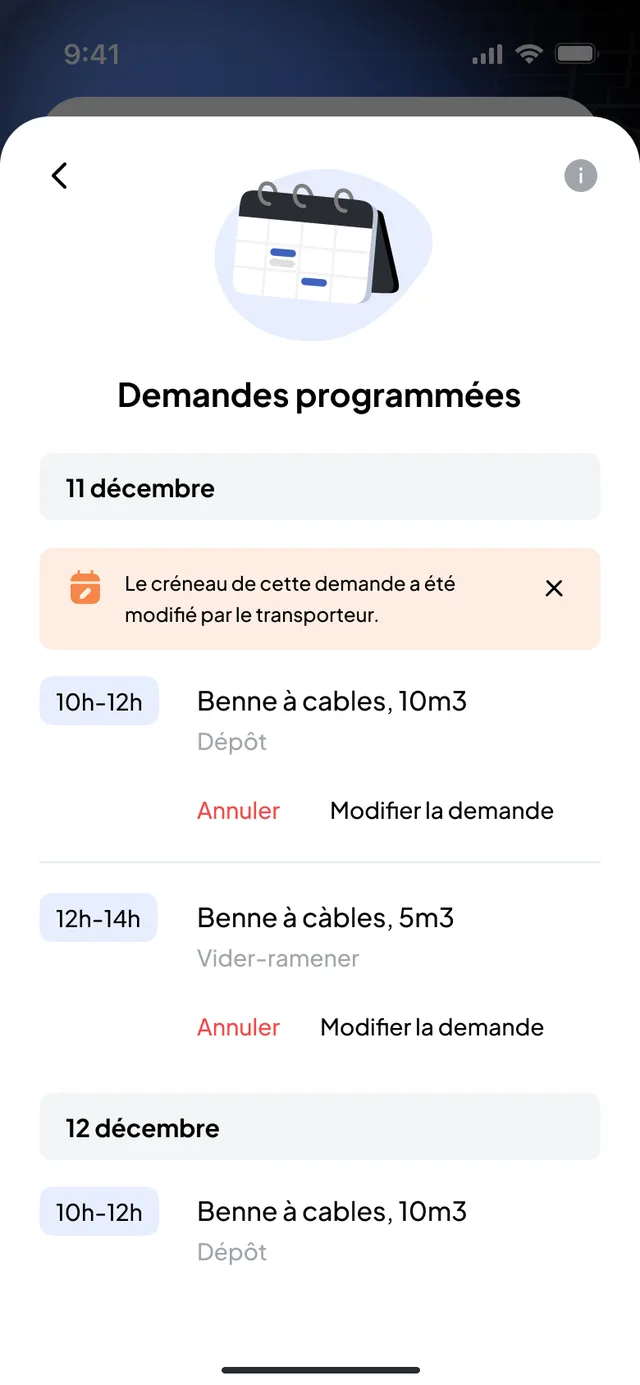
Each user finds the sites assigned to them. For each one: the current request, the pending and scheduled requests, the skips present by type, and the site’s request history.
- Several active sites in the same app
- The current request, the pending requests and the scheduled requests
- The skips present on the site, by type, with their state
- The site’s request history, with the photos and the delivery notes
Create a request in a few steps
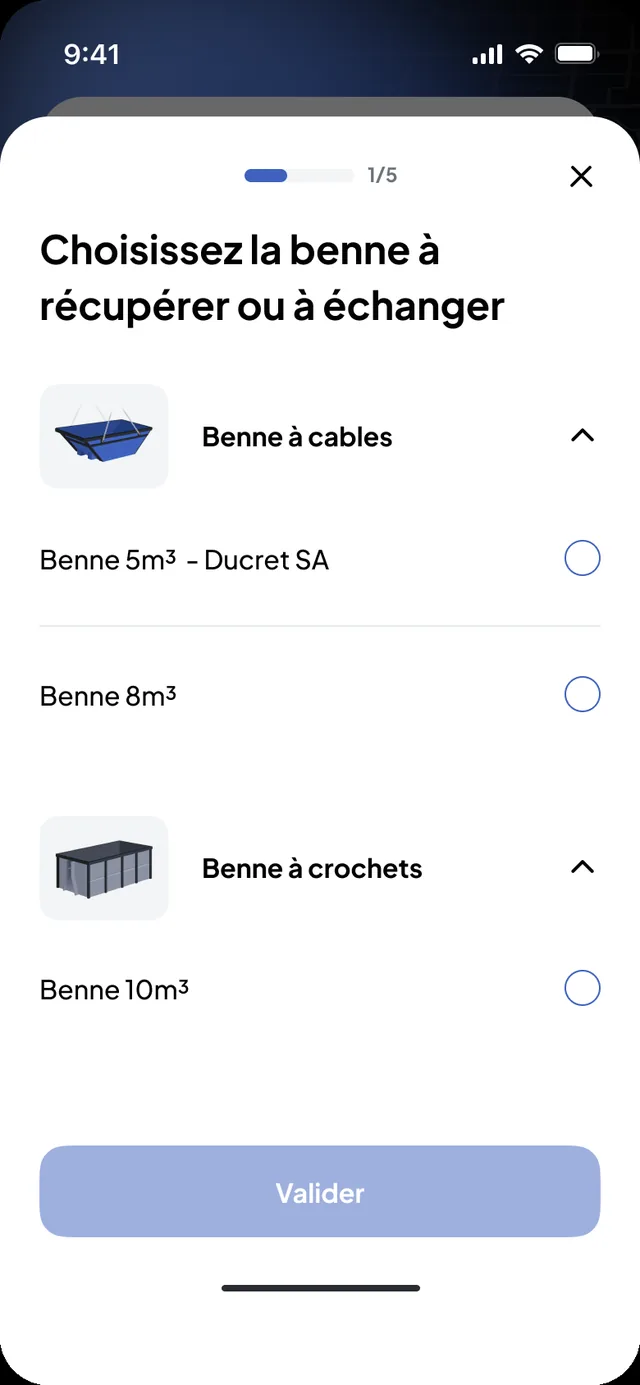
The site chooses the request type, the skip (type and volume) or the material, the preferred time slot, adds a note for the logistics officer or the driver, checks the summary and sends. The request goes structured to the chosen carrier: nothing to dictate again by phone.
Requests, construction side- The site’s access constraints (width, height, length, truck weight, photo of the spot) can be described when ordering
- A past request can be redone from the site’s history
- The same request can also be created from the Construction back office
Seven types
Seven request types, the same fields
Each request carries the site, the request type, the skip or the material, the time slot and your notes.
- Materials delivery
- materials are collected where they are and delivered to the site.
- Skip drop-off
- an empty skip is placed on the site.
- Collection
- the full skip is picked up and taken to the sorting centre.
- Skip exchange
- an empty skip replaces the full one, which goes to the sorting centre.
- Empty and return
- the full skip is emptied at the sorting centre and brought back to the site.
- Removal with waiting
- the truck brings a skip, waits while it is loaded on site and leaves to dispose of it.
- Custom request
- anything outside the catalogue, moving a machine for instance, described in plain words for the carrier; the service is billed by the hour.
The truck linked to your request, when the carrier is on the way
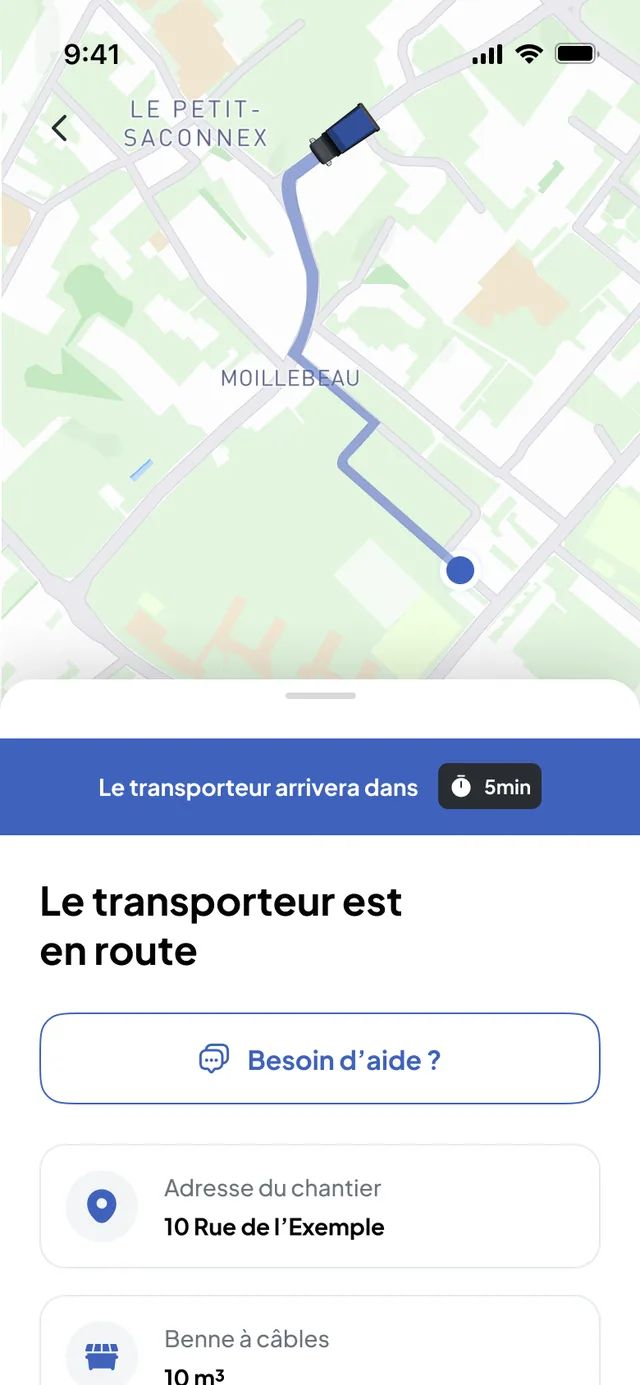
While the request waits for its time slot, the app shows that it is being scheduled. As soon as the carrier is on the way, the map shows the truck assigned to your request and its estimated arrival time. You see that truck, not the carrier’s fleet nor its other clients.
- Request status: received, scheduled, in progress, completed
- Site notifications: request accepted, carrier on the way, arriving in a few minutes, skip dropped at the sorting centre, time slot changed
- At the end, the photos and the timestamped delivery note stay attached to the request
Skips and materials
Skips, materials, waste, machines: what the site requests
Skips
A skip is requested by movement, type, volume, site and time slot. On each site, the app shows the skips present by type and the state of each one; the next rotation is ordered from the same page. The GPS is the truck’s, never the skip’s.
Materials
A materials delivery is requested with the nature, the quantity, the site and the time slot; the carrier collects the materials where they are and delivers them to the site.
Waste
For a removal, the waste type is stated in the request; the skip goes to the sorting centre, and the weight stays attached to the request when it is entered by the carrier.
Machines and others
The custom request covers anything outside the catalogue, moving a machine for instance, described in plain words for the carrier.
Change or cancel a scheduled request
While the request is scheduled, the site can change it (new time slot) or cancel it from the app; the carrier sees the change in its schedule. Cancelling requires a reason; if the carrier has already started the service, the app says so before confirmation.
- New time slot from the scheduled request
- Cancellation with a reason
- The carrier sees the change in its schedule
Construction synchronisation
Nereva Commandes and the Construction back office: the same request, on site and in the office
What the site creates in the app appears in the Construction back office, without re-entry: the schedule by site, the list of requests with their status, the photos and the delivery notes. The office finds all the sites, the history, the partner carriers and their statements, the users and their roles.

On site
- Create and schedule a request
- Follow the current request, the pending and scheduled requests
- See the skips present by type and their state
- Receive the carrier’s notifications
In the office
- All the sites, with their current and upcoming requests
- The history by site, with the photos and the delivery notes
- The partner carriers, the suppliers and their statements
- The users and their roles
Your carriers
Your requests go to your usual carrier
Nereva Commandes does not replace your carrier: it passes your requests on to them. Execution depends on the connected partner carrier you chose.
Your carrier is on Nereva
Your requests land directly in their schedule. You follow the truck linked to your request and find the photos and the delivery note; their statements arrive in your back office.
Your carrier is not yet on Nereva
You invite them from your back office; they receive an e-mail invitation and start with a free 15-day trial. They remain free to accept the partnership or not. Until then, you keep working with them as you do today.
Your partners and your commercial terms remain yours. Nereva synchronises operations without stepping into the business relationship.
Download
Nereva Commandes, free on the App Store and Google Play
Nereva Commandes
Site teams install the app and sign in with the credentials created by their company. The download is free; the service is billed per licence: 1 assigned role = 1 licence used.
Driver side: Nereva Transports
The app with which your carriers’ drivers receive and carry out your requests.
Offline mode
Keep working even without a network connection.
Nereva Commandes has an offline mode. In a basement, a tunnel, the mountains, on a remote site or in a quarry with poor coverage, the site team continues the work in progress, within the supported scope; the app synchronises when the connection returns, according to how the product works.
- Tunnels and basements
- Underground car parks
- Mountain areas
- Remote sites
- Quarries and gravel pits
- Depots with poor coverage
What continues without a network
- The foreman continues the work in progress in the app without waiting for the network to return, within the supported scope.
- What is done without a network synchronises when the connection returns, according to how the product works.
What waits for the connection to return
- While the device is offline, nothing is transmitted to the carrier or to the Construction back office: synchronisation resumes when the connection returns.
- Tracking of the truck linked to an active request and the carrier’s notifications resume with the connection.
Offline mode is not real time: it lets you keep working; synchronisation between the interfaces resumes when the network returns.
Your questions
Nereva Commandes, in plain words
Who uses Nereva Commandes on site?
The site users authorised by your company: site manager, foreman, works manager, logistics manager. Each one signs in with their credentials and finds their active sites; access depends on the roles and permissions configured.
Does my carrier have to be on Nereva?
Yes, for a request placed in Nereva Commandes to be carried out in Nereva: it goes to a connected partner carrier, who schedules and carries it out. A carrier not yet on Nereva receives an invitation from your back office and starts with a free 15-day trial. Until then, you keep working with them as you do today.
Can Nereva Commandes carry out my transports without a carrier?
No. Nereva provides neither truck, nor driver, nor skip, nor carrier, and is not a marketplace. The app is for ordering, tracking and documenting; execution is your carrier’s. A construction company that genuinely runs its own transport activity is a hybrid case.
What does the site see during the mission?
The request status (received, scheduled, in progress, completed) and, when the carrier is on the way, the truck linked to your request on the map with its estimated arrival time. At the end, the photos and the timestamped delivery note stay attached to the request. You see neither the carrier’s fleet nor its other clients.
Can a request be changed or cancelled?
Yes, from the app, while the request is scheduled: new time slot or cancellation, with a reason. The carrier sees the change in its schedule. If their service has already started, the app says so before confirmation.
Does Nereva Commandes work without a network?
Yes, within the supported scope: the app has an offline mode to keep working in a basement, a tunnel, the mountains, on a remote site or in a quarry with poor coverage. What is done without a network synchronises when the connection returns, according to how the product works. While the device is offline, nothing is transmitted to the carrier.
Does the site see where its skips are?
It sees the skips present on each site, by type, with their state: waiting for a carrier, being loaded, collection or empty-and-return scheduled. The GPS is the truck’s during a mission; no skip is located individually.
On which phones is the app available?
Nereva Commandes is free on the App Store (iPhone) and on Google Play (Android). The download is free; the service is billed per licence, 1 assigned role = 1 licence used.
What is the difference with the Construction back office?
The back office is the office view: all the sites, the schedule, the history, the carriers’ statements, the users and their roles. The app is the site view: create, schedule, follow and find the site’s skips. The information useful to the operation is synchronised between the two, according to roles and permissions.
Each feature of the Construction back office is described in detail on the Construction features page.
Going furtherPlace your orders from the site, directly on your phone.
15-day free trial with 2 licences. No payment method required. Monthly subscription afterwards, with no fixed term.