
QHSE manager
QHSE: using the data that operations already produce
Operations produce the data. QHSE can then use it.
Nereva is the platform where site and transport teams work every day: requests, schedule, missions, notes, photos, timestamps. The QHSE manager finds there, when needed, what operations have documented, per site, per client and per truck.
15-day free trial · 2 licences included · No payment method required

What operations produce
An operation leaves its trace as it happens, not afterwards
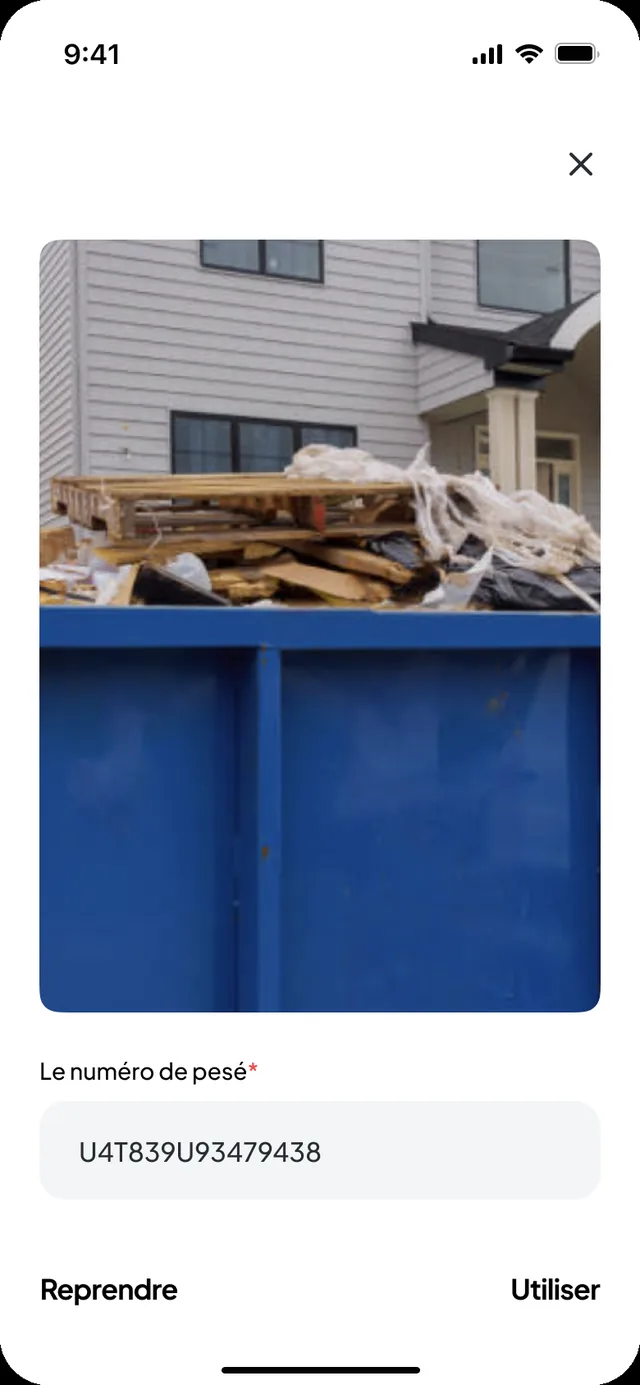
A request placed from the site, a mission carried out by a driver, a digital note, a photo, an entered quantity: each step is recorded during the work. Nobody enters data for QHSE.
The request
- Site, requester, date and status: received, scheduled, in progress, completed
- Seven request types: drop-off, collection, exchange, empty-and-return, removal with waiting, materials delivery, custom request
- Skip or material type, time slot, address, remark
The mission
- Assigned carrier, truck and driver
- Steps timestamped by the driver’s app
- Truck position during the mission, from acceptance to closure
The documents
- Digital note and photos requested from the driver
- Waste type and quantity, when entered
- Sorting centre receipt attached to the request
The history
- Per site, per client and per truck
- Daily and monthly statements, per-truck reports in PDF or XLSX
- Change log and technical traces kept by the platform
Operations document while they work
Requests received, schedule, missions, notes, photos: the Transport back office and the Nereva Transports app record execution while dispatch and drivers get through their day. The QHSE manager then finds the elements useful for internal or external checks.
- Requests received and schedule per truck and per driver
- Truck and driver assigned to each mission
- Steps timestamped by the app: on the way to the site, request started, skip dropped or collected, drop at the sorting centre, closure
- Digital note, photos, waste type and entered quantity, sorting centre receipt
- History per site, per client and per truck; statements and reports in PDF or XLSX
- Not all your clients are on Nereva? You enter their requests yourself and execution is documented in your TMS.

Finding operations, not reconstructing them
What site teams order and follow in Nereva remains available, site by site. The QHSE manager depends less on e-mails, messages, scattered photos, paper notes and colleagues’ memories.
- Transport requests: skips, removals, materials deliveries, machine transports
- Site, requester, date and status of each request
- Carrier, truck, driver and timestamped steps, visible according to roles and permissions
- Digital notes and photos attached to the request
- Statements received from carriers, attached to the services

Finding the context of an operation
An inspection, an audit, a claim: you start from the operation, not from a mailbox
The day a supporting document is requested, the question is always the same: which request, which site, which truck, what time, which document. In Nereva, these elements are attached to the operation that produced them.
Find the operation
Site, date, request type, carrier: the site or client history can be filtered from the back office.
Construction back office · Transport back officeRead what happened
Timestamped steps, assigned truck and driver, final status: the request thread, as it was recorded.
Request threadOpen the available supporting documents
Digital note, photos, sorting centre receipt, entered quantity and waste type.
Request documentsPass on
Statements and reports in PDF or XLSX from the Invoices module; at the end of the contract, data returned on request, in a structured format.
Invoices module · Terms of Use, art. 10.9 and 30
What Nereva keeps is the faithful reflection of the entries made by users, timestamped and attached to the operation (Terms of Use, art. 16 bis).
Supporting documents and evidential value
Dated supporting documents, whose value depends on your contractual framework
Proof of execution, note, photo, timestamp, history: these are elements produced by the operation itself and kept attached to the request and the mission. Their value depends on the framework applicable to your contract and your activity.
What Nereva keeps
- Digital notes and photos attached to the mission
- Steps timestamped by the app
- Entered waste type and quantity, attached sorting centre receipt
- History per site, per client and per truck
- Change log, login traces and technical logs
What remains the company’s responsibility
- The accuracy of entries: the information recorded is what your users entered
- Qualified timestamps or qualified signatures within the meaning of a given regulation, if your activity requires them
- Evidential value in a given jurisdiction, according to your contractual framework
- Arbitration between companies: Nereva provides the trace, arbitration remains between the parties
Source: Terms of Use, art. 16 bis (evidential value of elements from the platform). For elements with reinforced evidential value, additional arrangements remain to be put in place by the company.
Compliance and responsibilities
Your teams keep control of compliance. Nereva makes your operations retrievable.
Teams keep control of their regulatory obligations and validations (road transport, waste management, materials traceability, occupational safety; Terms of Use, art. 14), while Nereva centralises traceability and the operational follow-up elements. Authorisations, approvals and permits remain verified by the company and its partners.
Occupational safety
Accident register, incident management, PPE, work permits, prevention plans and safety training remain managed in your dedicated systems; Nereva provides the trace of transport operations.
Regulated transport
ADR, tachograph and driving times remain tracked in your regulatory tools; Nereva organises and documents the missions.
Management systems
ISO 9001, 14001 or 45001 system, audits, non-conformities and risk analyses remain carried by your management system; Nereva provides the dated facts of the operations.
Environmental regulation
Regulatory CO2 calculation, carbon footprint, waste compliance and regulatory declarations remain prepared by you; Nereva provides the useful activity data.
The figures and the documents come from the same operations
Dashboard, daily and monthly statements per client and per site, per-truck reports, history: the back office produces them from executed requests. The Analytics page describes what exists.
- Statements generated from missions: reference, date, request, truck, skip, destination, distance, price, linked photos and receipts
- Per-truck reports for the month, with or without prices
- Statistics exportable to Excel from the dashboard

Less time searching. More dated facts.
For operations documented in Nereva, the history and the available elements can be found more easily during an inspection or an audit. The applicable requirements depend on the context and the regulations concerned.
Roles and profilesGo further
The pages that complement QHSE
- Transport companiesThe TMS: schedule, missions, drivers, notes, statements
- Construction companiesRequests, tracking and documents, site by site
- Analytics and reportsDashboard, statements, history: what operations produce
- Environmental monitoringWaste, skips, removals, materials: the recorded flows
- SecurityAccess, traceability, service security, availability
- Data hostingWhere your data goes, who accesses it, for how long
- Roles and profilesWho does what in Nereva, role by role
Your questions
QHSE and Nereva, plainly
Is Nereva QHSE software?
No. Nereva is not QHSE management software: it is the operational platform of site and transport teams. The information produced by operations can be used by QHSE managers to find the history and the available supporting documents of an operation.
Can Nereva help during an inspection or an audit?
For operations documented in Nereva, the history and the available elements can be found more easily during an inspection or an audit. The applicable requirements depend on the context and the regulations concerned.
What information does the QHSE manager find?
What operations have produced: the request (site, requester, type, slot, status), the mission (carrier, truck, driver, timestamped steps), the digital note, the photos, the waste type and quantity when entered, the attached sorting centre receipt, the history per site, per client and per truck.
Does the QHSE manager have to create requests?
No. Requests are created by site teams and carried out by carriers. The QHSE manager accesses the back office with the role and access type assigned by their company; there is no dedicated “QHSE” role.
Is a digital note or a photo legal proof?
They are supporting documents: the faithful reflection of the entries made by users, timestamped and attached to the mission. Their evidential value depends on the framework applicable to your contract and your activity (Terms of Use, art. 16 bis); they do not take the place of an attestation or a certification.
Is the weight of a skip certified?
No. The quantity and unit entered in a request are operational data, entered by users. The sorting centre receipt can be attached to the request and kept with the operation; Nereva keeps these elements without performing any weighing or certifying any weight.
Can the data be exported?
Daily and monthly statements and per-truck reports download in PDF or XLSX; the dashboard statistics export to Excel. At the end of the contract, data return is requested in writing within 90 days, in an open, structured format (Terms of Use, art. 10.9 and 30).
Does Nereva step into the commercial relationship?
No. Your partners and your business relationships remain yours. Nereva synchronises operations without stepping into the commercial relationship. It takes no commission on flows.
Other questions? The general FAQ and the Transport and Construction pages detail the functions.
Go furtherHistory, traceability, supporting documents: make tracking your operations easier.
15-day free trial with 2 licences. No payment method required. Monthly subscription afterwards, no long-term commitment.